


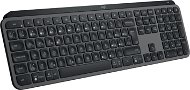
Recenze Logitech MX Keys S Graphite - CZ/SK
Zajímají Vás názory a recenze na Logitech MX Keys S Graphite - CZ/SK? U nás má zatím hodnocení 4,7 z 5 hvězdiček od 473 uživatelů. Níže na této stránce naleznete od ostatních zákazníků také jejich konkrétní zkušenosti s Logitech MX Keys S Graphite - CZ/SK. Určitě budeme ale rádi, když nám po koupi napíšete hodnocení na Logitech MX Keys S Graphite - CZ/SK i vy.
Uživatelské recenze

Šimon, Praha
Hodnoceno 03.01.2024, varianta Logitech MX Keys S Graphite - CZ/SK
Ověřený nákup
Krásně svítí
Dobře se na ní píše
Působí celkem prémiově (taková střední vyšší třída)
Inteligentně integrované přepínání mezi počítači
Praktické funkční klávesy, včetně UI na monitoru
Integrovaná baterie napájená USB-C
Použitelné pro Win i Mac
Bluetooth i USB reciever
Těžká
Materiál plast
Nelze nastavovat výška
Není odolná proti polití, zato se hezky mačká (žádný z tuha)
0 ×Nahlásit

Radek, Sezimovo Ústí
Hodnoceno 31.12.2023, varianta Logitech MX Keys S Graphite - CZ/SK
Ověřený nákup
Povedené zpracování, v kanceláři i doma udělá paráda.
Opravdu pěkné provedení
Použitelná přes Bluetooth i logi přijímač
3různá zařízení(jede mi i s jablečným pro tabletem4gen.)
Podsvícená a regulovatelné podsvícení
Kombinaci s myší MX Master3S vřele doporučuji.
Zdvih kláves
USBC
Některé znaky tam nenajdete. Jako na jiných US/CZ klávesnicích.
Nedá se polohovat/ úplně položit do roviny. Díky baterce je zvedlá. Mně náklon vyhovuje
Nikde jsem před nákupem neviděl skutečnou fotku CZ verze ani u výrobce.

0 ×Nahlásit

Zákazník, Buštěhrad
Hodnoceno 30.12.2023, varianta Logitech MX Keys S Graphite - CZ/SK
Ověřený nákup
Vůbec nefunguje nastavení backlighting :-(
0 ×Nahlásit

Jiří, Praha
Hodnoceno 05.12.2023, varianta Logitech MX Keys S Graphite - CZ/SK
Ověřený nákup
Nestandardní popis kláves, takový hybrid mezi MAC a PC navíc pouze CZ/SK pro někoho kdo používá jak angličtinu tak češtinu docela nepříjemné. Dost dlouiho byl standrd layout CZ/US.
Nestandardní popis kláves, takový hybrid mezi MAC a PC navíc pouze CZ/SK pro někoho kdo používá jak angličtinu tak češtinu docela nepříjemné. Dost dlouiho byl standrd layout CZ/US.
Nestandardní popis kláves, takový hybrid mezi MAC a PC navíc pouze CZ/SK pro někoho kdo používá jak angličtinu tak češtinu docela nepříjemné. Dost dlouiho byl standrd layout CZ/US.
0 ×Nahlásit

Petr, Zliv
Hodnoceno 03.12.2023, varianta Logitech MX Keys S Graphite - CZ/SK
Ověřený nákup
Spokojenost
Tlačítka na hraní jsou blízko. CENA
0 ×Nahlásit

Vojtěch, Praha 4 - Hodkovičky
Hodnoceno 20.11.2023, varianta Logitech MX Keys S Graphite - CZ/SK
Ověřený nákup - recenze ze srovnávače
Výborná klávesnice, nedělá hluk při psaní. Velikost akorát i na velké ruce, dobré podsvícení, možnost připojit k více zařízením.
0 ×Nahlásit

Pavel, Miroslav
Hodnoceno 18.11.2023, varianta Logitech MX Keys S Graphite - CZ/SK
Ověřený nákup - recenze ze srovnávače
Často není sparovana
Asi cena
0 ×Nahlásit

Martin, Odolena Voda
Hodnoceno 14.11.2023, varianta Logitech MX Keys S Graphite - CZ/SK
Ověřený nákup - recenze ze srovnávače
Vynikající kancelářská klávesnice, na které se výborně píše. Bohužel aktuální verze má jen striktně české popisky kláves. Anglické již zde nenajdete. Předchozí verze bez "S" v názvu měla obojí, díky tomu, že CZ znaky byly na EN klávesnice gravírovány dovozcem dodatečně.
Bezdrátová
Vynikající nastavitelné podsvícení
Těžká
Výdrž na baterii až 10 dnů
Klávesy s nízkým zdvihem
Připojení až ke 3 zařízením.
V modernizované verzi S nemá na klávesách popisky pro EN klávesnici, jen CZ znaky.
Trochu rozlitého piva rozleptalo průhledný kryt podsvícení uvnitř. Takže bacha na tekutiny, čistá voda tomu asi neublíží. Překvapilo mne, že pivo ano. Pak dojde k výraznému dopadu na rovnoměrnost podsvícení.
Není odolná proti polití
Velmi špatně se rozebírá a čistí.
0 ×Nahlásit

Petr, Měcholupy
Hodnoceno 10.11.2023, varianta Logitech MX Keys S Graphite - CZ/SK
Ověřený nákup
Klávesnice splňuje vše, co od klávesnice Logitech pro práci očekávám. Vše je intuitivní, tlačitka pohodlná, klávesnice je kvalitně zpracovná a těžká, takže skvěle drží na místě. V kombinaci s podložkou Logitech Desk Mat Studio Series paráda. Myši jiné než Logitech nekupuji, takže to opět krásně sedí k sobě. Vyměnoval jsem za původní LOGITECH Illuminated Keyboard K740, která se už bohužel nevyrábí.
Kvalitní zpracování a materiály
Žádné prodlevy nebo zpoždění
Běží už přes týden intenzivní práce a baterie na 65%, což je oproti deklarované výdrži lepší
0 ×Nahlásit

Pavel, Boskovice
Hodnoceno 11.10.2023, varianta Logitech MX Keys S Graphite - CZ/SK
Ověřený nákup
klávesnice je skvělá, krásně se na ní píše, píšu rychleji než na obyčejné. Ale má jedno zásadní mínus. Levý shift. Je strašně malý a dělám spoustu chyb při psaní velkých písmen. Pravý je přitom obří, vůbec nechápu, proč Logitech ten pravý nezmenší a ušetřený prostor nepoužije pro zvětšení toho levého. Evidentně investuje hodně peněz a času do designu celé klávesnice a toto jim unikne. Nechápu.
skvěle se na ní píše
podsvícení
váha
LEVÝ SHIFT
0 ×Nahlásit
