Office Monitors

While most monitors can be used for multiple purposes, they differ in terms of the quality and characteristics of the image.

 

Continue

What to look for when choosing an office monitor

How often will you use the monitor?

  • For occasional usage, a monitor with a diagonal of at least 19" will suffice.
  • For regular use, we recommend a monitor with a diagonal of at least 22". For convenience, select a model with an adjustable height and technologies to minimize eye fatigue (Flicker-free, Flicker-safe, etc.).

If you are buying two monitors for one computer, we recommend selecting the same models to avoid differences in colour reproduction.

Resolution

The larger the monitor you choose, the higher the resolution should be. With a higher resolution, you get a more detailed picture and a larger workspace.

Screen Size (1" = 2.54cm)20"21-32"33" and larger
Resolution needed to ensure adequate image qualityXGA (1024 x 768 pixels) or higherFull HD (1920 × 1080 pixels) or higherUHD or 4K (3840 × 2160 pixels) or higher

Panel Type

  • IPS/S-IPS monitors - excel in natural colours, low power consumption and wide viewing angles. The disadvantage is a higher purchase price.
  • TN monitors - often characterised by low response times. Compared with IPS monitors they are cheaper, offer lower-quality colour reproduction and narrower viewing angles. While cheaper TN monitors are sufficient for less demanding users, models with 4ms response times are popular with gamers.
  • MVA/PVA monitors - in terms of price and picture quality, these are somewhere between IPS/S-IPS and TN monitors. They provide more realistic colour reproduction and wider viewing angles than TN monitors and are cheaper than IPS monitors.

Screen Surface

  • Matte - reflects light from surroundings; provides less-saturated colour reproduction.
  • Glossy - provides vibrant and realistic colours but more ambient light is reflected, so the display can be hard to see in bright sunlight.
  • Anti-glare - a compromise between glossy and matte screens; they are easier to view in direct sunlight than glossy screens but offer lower quality colour reproduction.

Connectors

Before buying, make sure the monitor has at the least one compatible port with your computer. If not, you won't be able to connect the monitor to it.

basic connectors 23 "or 24" monitor - VGA, DVI, HDMI, DisplayPort

Useful Functions and Features

  • Eyestrain-minimising technology - Flicker-free, Flicker-safe, etc.
  • Adjustable height - allows you to adjust the monitor to a comfortable position.
  • TV tuner - for watching television broadcasts.
  • VESA mount - allows you to mount the monitor on a bracket.
  • Web camera - useful if you plan to make calls over the Internet.
  • USB Hub - play data from portable drives; connect a keyboard or mouse.
  • Pivot - allows the screen to rotate horizontally; suitable for office work and reading texts from your computer.
Hide description
Was this information useful?
This form is used only for evaluating the information in the description above.
If you have any question about our products, services, transport or any other request, please contact our customer support.
What should be improved? Is anything missing here? Is anything wrong? Share it with us.
801 Results
Add to PC configurator
Watch Price/Availability
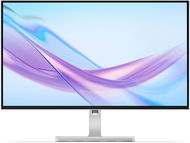
18,5" Acer PD193QE
Monitor - IPS,, 1920 × 1080 Full HD 1920 × 1080 Full HD (16:9), 100 Hz, matte display,, 4 ms, pivot, speakers, HDMI, VESA
  6,990,-
Buy
In stock > 5 pcs at the supplier's
Order Code: WO024k3v
4.8 25×
Watch Price/Availability
27" Lenovo L27q-4A
Monitor - IPS, Quad HD / QHD 2560 × 1440 Quad HD (16:9), 100 Hz, Anti-Glare display, 8 bit, 1 ms, adjustable height, pivot, HDR, speakers, HDMI and DisplayPort, VESA
  4,290,-
Currently Unavailable
Order Code: WM232k7h2
5.0 2×
Watch Price/Availability
23.8" MSI PRO MP241W E14V
Monitor - VA, 1920 × 1080 Full HD 1920 × 1080 Full HD (16:9), 144Hz / 144Hz, Anti-Glare display, 8 bit, 1 ms, FreeSync, HDMI and DisplayPort, VESA
  1,890,-
Currently Unavailable
Order Code: WQ27o5o5s3n
4.6 15×
Watch Price/Availability
31.5" Lenovo L32p-30
Monitor - IPS, 4K / UHD 3840 × 2160 4K (16:9), 60 Hz, Anti-Glare display, 10 bit, 4 ms, FreeSync, Power Delivery max. 75 W, HDMI, USB-C and DisplayPort, VESA
  7,990,-
Currently Unavailable
Order Code: WM232k5g
5.0 1×
Watch Price/Availability
27" Lenovo ThinkVision T27QD-40 with MC60 webcam
Monitor - IPS, Quad HD / QHD 2560 × 1440 Quad HD (16:9), 120Hz/ , Anti-Glare display, 8 bit, 4 ms, adjustable height, pivot, Power Delivery max. 100 W, HDR, HDMI, USB-C and DisplayPort, USB and USB-C data interface, VESA
Discounted -1 % 9,279,- 9,429,-
Currently Unavailable
Order Code: WM232e7z28
4.8 23×
Watch Price/Availability
27" Lenovo L27m-30
Monitor - IPS, 1920 × 1080 Full HD 1920 × 1080 Full HD (16:9), 75 Hz, Anti-Glare display, 8 bit, 4 ms, FreeSync, adjustable height, pivot, Power Delivery, speakers, HDMI, USB-C and VGA, VESA
  4,690,-
Currently Unavailable
Order Code: WM232k7f3
5.0 4×
Watch Price/Availability
23.8" Lenovo L24m-4A
Monitor - IPS, 1920 × 1080 Full HD 1920 × 1080 Full HD (16:9), 100 Hz, Anti-Glare display, 8 bit, 1 ms, adjustable height, pivot, Power Delivery max. 75 W, HDMI and USB-C, USB data interface, VESA
  3,519,-
Currently Unavailable
Order Code: WM232k7f5c
5.0 3×
Watch Price/Availability
13“ ASUS ZenScreen OLED MQ13AH
Monitor OLED - OLED,, 1920 × 1080 Full HD 1920 × 1080 Full HD (16:9), 60 Hz, glossy display,, 10 bit, 1 ms, USB-C and mini HDMI, USB-C data interface
  11,190,-
Currently Unavailable
Order Code: WA004
Watch Price/Availability
31.5" ASUS TUF Gaming VG32VQM5B
Monitor - VA, curved, 1920 × 1080 Full HD 1920 × 1080 Full HD (16:9), 240Hz / 240Hz, matte display, 8 bit, 0,5 ms, FreeSync Premium and Adaptive-Sync, HDR, speakers, HDMI and DisplayPort, VESA
Discounted -9 % 4,990,- 5,490,-
Currently Unavailable
Order Code: WA049nda3
In the category Office Monitors on Alza.cz, we currently have a total of 1910 products, which you can easily buy online and get quickly delivered. See all of your purchases and make orders on our easy-to-use app.
Check out products sorted by price starting with the lowest price in the category cheap office Monitors Check out products sorted by price starting with the highest price in the category best sellers, best office Monitors You’ll find products sorted by reviews starting from the highest ranked in office Monitors reviews