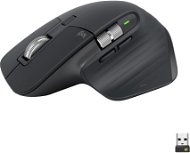
Reviews Logitech MX Master 3S Universal Graphite
Interested in reviews of Logitech MX Master 3S Universal Graphite? It got 4.7 out of 5 stars from our customers. Find specific customer reviews of Logitech MX Master 3S Universal Graphite below. We will appreciate if you also share your experiences with Logitech MX Master 3S Universal Graphite after purchasing.
User Reviews

Lukáš, Smiřice
Rated 04/01/2025, variant Logitech MX Master 3S Universal Graphite
Verified purchase
The best I've ever used
Fits perfectly in the hand
0 ×Report
Automatic translation
Anonymous customer
Rated 04/01/2025, variant Logitech MX Master 3S Universal Graphite
Verified purchase
Quality
0 ×Report
Automatic translation

Jan, Humpolec
Rated 31/12/2024, variant Logitech MX Master 3S Universal Graphite
Verified purchase - review from a price comparison website
A proper mouse for the IT guys: -)
0 ×Report
Automatic translation
Anonymous customer
Rated 28/12/2024, variant Logitech MX Master 3S Universal Graphite
Verified purchase
ingenious
0 ×Report
Automatic translation

Petr, Plzeň
Rated 27/12/2024, variant Logitech MX Master 3S Universal Graphite
Verified purchase
I used to use ergonomic mice (because of my wrist), but when playing occasionally, the tilt of my hand alone was more of a hindrance (accuracy). That's why I chose this mouse and it's an excellent compromise, between a healthy grip and precise hold/movement. I can't get enough. The ability to pair to 2+1 devices is also great (easy portability between multiple PC/tablet).
Great ergonomics
Low weight
Choice of connection (dongle or 2 BT profiles)
Multiple buttons and two wheels
Great accuracy and low response time (about 7-8ms via USB dongle)
Sophisticated control software
Plug'n'Play
At least a USB-C charging cable could be included
0 ×Report
Automatic translation
Anonymous customer
Rated 24/12/2024, variant Logitech MX Master 3S Universal Graphite
Verified purchase
USB C, Bluetooth and Logitech dongle
Scrolling in all directions
Long lasting
It holds well
The material doesn't last very long, after about a year it started to pimple. Quite disappointing
0 ×Report
Automatic translation

Miroslav, Líbeznice
Rated 16/12/2024, variant Logitech MX Master 3S Universal Graphite
Verified purchase
The mouse itself is excellent, but the new Bolt USB dongle, which runs over the bluetooth protocol, is extremely sensitive to interference. When I had the Bolt plugged into the dock behind the monitor, about 1m from the mouse, the mouse would very often stutter and was basically unusable. At the same time, the old mouse with the unifying receiver worked perfectly well in the same place. When I placed the Bolt a few cm below the table top via an extension cable, the jitter improved significantly, but still didn't completely disappear (besides the MX keyboard, there was a tablet and phone nearby, which probably contributed to the interference as well). The behavior was the same on the macbook, as well as on the Dell laptop with linux. Finally I connected the mouse directly to the macbook via BT, which works absolutely without problems.
6 buttons (one is hidden in the bottom surface where the thumb rests)
comfortable grip (but more for larger hands)
USB dongle (Logitech Bolt) is very susceptible to interference
buttons are not as quiet as the previous M590
0 ×Report
Automatic translation

Jaroslav, Oslavany
Rated 12/12/2024, variant Logitech MX Master 3S Universal Graphite
Verified purchase - review from a price comparison website
A mouse can be a good working tool, but it comes at a cost.
It fits well in the hand.
It is pleasant to handle.
Useful features and settings.
Silent buttons.
Higher price.
0 ×Report
Automatic translation

Jan, Brno
Rated 08/12/2024, variant Logitech MX Master 3S Universal Graphite
Verified purchase
There is no better mouse on the market: -)
0 ×Report
Automatic translation
Jiří, Praha 4 - Kunratice
Rated 08/12/2024, variant Logitech MX Master 3S Universal Graphite
Verified purchase
I was looking for a wireless mouse for my big hand. This one can bluetooh and that's a big advantage, it saves the USB port in the laptop, I don't have to use a dongle. I don't use the horizontal roller much, but I'm very happy with this mouse
bluetooth connection
mouse for big hand
I didn't use any setup; I turned it on and it works right away
I don't need to use any batteries, charging via USB-C
price
0 ×Report
Automatic translation