


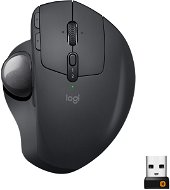
Reviews Logitech Wireless MX Ergo
Interested in reviews of Logitech Wireless MX Ergo? It got 4.6 out of 5 stars from our customers. Find specific customer reviews of Logitech Wireless MX Ergo below. We will appreciate if you also share your experiences with Logitech Wireless MX Ergo after purchasing.
User Reviews

Dávid, Bratislava 
Rated 13/02/2022, variant Logitech Wireless MX Ergo
Verified purchase
I have had this mouse, trackball, for the second year in a row and I can' t praise it. It has excellent ergonomics, button personalization options and sensitivity. Features of software that provides file transfer across connected devices (win to win, but also win to mac and vice versa), the ability to personalize buttons for individual applications, etc. they are sensational. Due to its shape and positionability, my hand no longer hurts and I do not feel the onset of a carpal tunnel, even though I work with it for 8-12 (sometimes more) hours a day. There are only two things I would like to tell her.1 Since I often carry it across workplaces, I have no choice but to carry a USB receiver in my wallet or cam. 2 The sensor is located at the bottom under the trackball and often needs to be cleaned of dirt. It might help to move the sensor to a higher position.
Ergonomics
personalization of buttons in the application
quality workmanship
connectivity to two devices and easy switching between them even without application
USB storage
0 ×Report
Automatic translation

Ľubomír, Bratislava
Rated 02/01/2022, variant Logitech Wireless MX Ergo
Verified purchase
Excellent innovation
Ergonomics
Variety of materials
Size
connectivity
High price but matches the quality
0 ×Report
Automatic translation

Pavel, Bratislava
Rated 21/06/2021, variant Logitech Wireless MX Ergo
Verified purchase
trackball
Ergonomic. even if it's only 20%
battery life
I miss another extra button on the edges, one or two
not backlit: )
0 ×Report
Automatic translation

Katarína, Miloslavov
Rated 27/11/2019, variant Logitech Wireless MX Ergo
Verified purchase
mouse angle adjustment works by tilting over the edge and has 2 positions - normal and tilted, while the whole mouse is magnetically attached to the metal plate
holds well
the bottom of the mouse/metal plate is rubberized
contains a magnet
the wheel and the buttons can be felt - it's not a complete disaster, but there are quieter mice
the hole from the bottom to squeeze the ball is smaller and it can not be done with a finger, but it is only necessary when cleaning
in daily office use, my Logitech mice have always lasted just until the end of the warranty - the button always goes away, similar to cheaper mice, so the price/performance ratio.
0 ×Report
Automatic translation

Peter, Bratislava - Petržalka
Rated 02/07/2019, variant Logitech Wireless MX Ergo
Verified purchase
You don't have to move your hand at all
It's a terrible habit to have your hand in place and do everything with your thumb, with your thumb you then make an unusual movement, it's a habit, but with a classic mouse it's much easier.
0 ×Report
Automatic translation

Vladimír, Bratislava
Rated 05/07/2018, variant Logitech Wireless MX Ergo
Verified purchase
Quality of workmanship
Wheelbarrow
Possible button settings
Tilt
USB dongle/Bluetooth
The thumb is more loaded than the mouse
Long hours of work cause "rigidity"
0 ×Report
Automatic translation
