

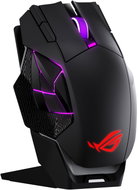
Reviews ASUS ROG SPATHA X 65K
Interested in reviews of ASUS ROG SPATHA X 65K? It got 2.5 out of 5 stars from our customers. Find specific customer reviews of ASUS ROG SPATHA X 65K below. We will appreciate if you also share your experiences with ASUS ROG SPATHA X 65K after purchasing.
User Reviews

Václav, Jámy
Rated 27/10/2026, variant ASUS ROG SPATHA X 65K
Verified purchase
65,000 DPI
No need to lift the mouse off the mat even in 4K resolution
Comfortable to hold for someone who has large hands and long fingers
Option to swap the left and right buttons. The mouse is relatively quiet after changing the switches. It requires a bit of skill.
option for 2x10g extra weight.
very lightweight to start with :)
Very robust charging station. High-quality build, shame the same can't be said about the mouse. Apart from the aluminium bottom section, it feels quite cheap to me. It's a bit like buying an Asus ROG Zephyrus Duo where they boast about quality, and then you buy the most plasticky laptop, the Strix Scar 17, which seems to be made of the worst possible plastic – it's as if they just cared about having quality innards and completely forgot that the previous generation was the absolute top of the market.
for this kind of money, I would recommend MAD CATZ, which is on a completely different level in terms of quality.
if I were to recommend it to anyone, it would probably only be because you don't need to lift the mouse off the pad, and at 65k DPI on 4K, the speed and smoothness are very pleasant
not much of a setup
outdated software
setup via the internet, you need to have both a mouse and a USB-C charger, as they only supply one with the product. and the internet setup is not great. up until now I haven't figured out how to configure the side buttons, and Alza just refers you to the manufacturer. so not great either.
Once I updated everything, I hoped it would work. Yes, it works, but only partly – it's still not possible to configure the side buttons. For gamers who would like to bind the side buttons to, for example, spells in WoW, only two side buttons (the top ones) work by default. The middle buttons are disabled by the software, and I can't get them to work. The bottom buttons are also programmable, but I can't get them to bind either. By default, out of the bottom buttons, the left one slows down movement (lowers the DPI in action games for more precise aiming) and the right one controls MUTE for the sound. The top buttons – both the two on the left side and the one between the right and left click – are for DPI. So, nothing special.
when lifting the mouse off the mat, you almost always press the bottom side button!
£4,699 is not a reasonable price considering how well-made the product is.
without the charger plugged in, the mouse won't work on 2.4GHz
for pairing, the mouse needs to be connected to the cable.
initial connection - worse than a Christmas tree, it flashes and lights up, I suppose it's modern nowadays.
0 ×Report
Automatic translation

Oční centrum MUDr. Bártíkové s.r.o., Jihlava
Rated 25/10/2026, variant ASUS ROG SPATHA X 65K
Verified purchase
I am not addressing the build quality, ergonomics, or anything else here. The frustration starts right after plugging it in. You already have Armoury Crate bloatware on your computer, but you cannot configure this mouse with it. It only redirects you to a webpage where you can configure the mouse. But it doesn't end there; you have to install two more things directly onto your PC just to access the settings. Of course, it is dependent on an internet connection. Without it, you cannot access the mouse settings at all. And the setup itself is not exactly user-friendly either. When you click over to macros, you cannot go back to the mouse settings. You have to close and reopen the page. You cannot set just one DPI, and the lack of logic goes on and on. At this point, after about 30 minutes of fighting with it, I lost my patience. I have no idea what led Asus to choose configuration via a browser when they already have their own software.
it sort of works?
charging stand
software
you can't adjust the mouse without the internet
configuring the mouse via a browser
0 ×Report
Automatic translation
