Try our cookiesAlza.cz a. s., Company identification number 27082440, use cookies and other data to ensure the proper functioning of the website and, with your consent, also, among other things, to personalize advertising and the content of our websites. By clicking on the “I understand“ button, you agree to the use of cookies and the transfer of data regarding the behavior on the website for displaying targeted advertising on social networks and advertising networks on other websites.
We use 8 categories of cookies on our website:
Technical cookies
These are strictly necessary for the functioning of the website and the features you choose to use. Without them, our website would not work; you wouldn't be able to log in to your user account, for example.
Functionality cookies
These cookies allow us to remember your basic choices and improve the user experience. These include remembering your preferred language or allowing you to stay logged in permanently.
Social media cookies
These cookies allow us to easily link you to your social media profile and, for example, allow you to share products and services with your friends and family.
Content personalisation
These cookies allow us to show you content and ads according to the information we have about you to best meet your needs. This includes what content you have viewed, or on what device you are accessing our website.
Non-personalised advertising
These cookies allow us to show you general ads for products and services.
Personalised advertising
Thanks to these cookies, we and our partners can offer you relevant products and services based on your purchases, your shopping behaviour and your preferences.
Audience metrics
These cookies allow us to optimise our site for your convenience based on how you use it. The aim is to remember or anticipate your choices. This includes, for example, the use of features, their location, or the behaviour on the page.
By giving your consent to the processing of cookies, functionality and analytical cookies will be installed on the device you use to browse the website (click on the "I understand" button for both categories, or you can select only one of the categories by clicking on the "Settings" button). We always install technical cookies on your device, even without your explicit consent, because without them our website would simply not work.
You can revoke your consent to the processing of cookies. In connection with our company's cookie processing, you also have the following rights: the right to access cookies, delete, modify, supplement and correct them, restrict processing and the right to lodge a complaint with the Office for Personal Data Protection. Read more about your rights.
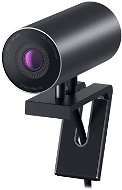
Interested in reviews of DELL UltraSharp Webcam WB7022? It got 4.2 out of 5 stars from our customers. Find specific customer reviews of DELL UltraSharp Webcam WB7022 below. We will appreciate if you also share your experiences with DELL UltraSharp Webcam WB7022 after purchasing.
Finally, a webcam where you can actually see the difference during a call. I mainly use the camera for daily video calls and meetings, and the main point is immediately clear: The 4K image from the Sony STARVIS sensor is in a league of its own compared to typical laptop or cheap USB cameras. The detail, colours and handling of light (even in a less-than-ideal room facing a window) hold up well, and you can really see the difference on the other end of the line. On Arch Linux, it’s recognised as a standard UVC device — the 4K video feed comes up without any fuss, no drivers needed; it simply appears as a camera and works in anything (Teams, Meet, web browser). What’s more, I use its IR function for facial recognition login — on Linux via howdy, so instead of a password, all I need to do is look at the camera. It’s great that a single device can handle both video calls and unlocking. Mechanically, it’s spot on: The magnetic monitor mount holds firmly in place and can be removed in a single movement; the built-in lens cover (privacy shutter) is exactly the kind of feature I appreciate, and there’s also a tripod socket. On the downside, to be fair: Full configuration (AI auto-framing, HDR, 65/78/90° field of view selection, digital zoom) is carried out via Dell Peripheral Manager, which is Windows-only. I can’t access these software features on Linux — but I still get an excellent 4K picture, so it’s not a deal-breaker for me; it’s just good to know. And bear in mind that the camera doesn't have a built-in microphone. In my opinion, it’s definitely a good choice if you want high-quality video on the go — and it runs smoothly on Linux.
Excellent 4K image quality (Sony STARVIS), significantly better than standard USB cameras
On Arch Linux, it works straight away as a UVC device, without any drivers
IR for facial recognition login (on Linux via howdy)
Magnetic mount — secure and quick to remove
Integrated lens cover (privacy shutter)
Good handling of light, tripod thread
Full settings (auto-framing, HDR, FOV) are only available via the Windows app
I don't understand the other positive reviews. I would not buy again, and do not recommend buying to others. Better look at products from other companies - I tried 2 cameras from DELL and both had similar experiences. This is a complete tragedy, if not a fraud.
4k
Aesthetic
image "blurs" (almost like TAA) at 60fps
significant loss of brightness at 60fps
pronounced graining - especially in darker environments
the colours in darker environments are terrible
not much brightness autocorrection - unusable in low light
settings in dell software are inconsistent - for example, when you turn on the "camera" application in windows after setting the camera parameters, everything is reset
overheating
extremely incompatible for some reason - I had massive problems getting it to work at all - only the "high-power" USB ports work - has a huge power draw
90 degree angle of view is overkill
the price/performance ratio is atrocious (you can probably find a better quality camera for 1500 CZK)