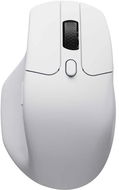
Reviews Keychron M6 Wireless Mouse - White
Interested in reviews of Keychron M6 Wireless Mouse - White? It got 3.4 out of 5 stars from our customers. Find specific customer reviews of Keychron M6 Wireless Mouse - White below. We will appreciate if you also share your experiences with Keychron M6 Wireless Mouse - White after purchasing.
User Reviews

Jan, Brno
Rated 16/08/2025, variant Keychron M6 Wireless Mouse - White
Verified purchase
They accidentally mounted an Easter cakewalk instead of a wheelbarrow. Useless for me. Not comparable to the scroll wheel on the real MX Master, which this mouse is copying and which is not that much more expensive. If you want a cheap MX Master knockoff, take the one from Eternico instead.
USB-A and USB-C sensor, BT and wired operation
light
incredibly jerky wheel, scrolling is like starting a tractor
Lies on the packaging, the max DPI is 5000, nowhere in the instructions does it say how it should be increased (but like who needs such a high DPI. )
0 ×Report
Automatic translation

Martin, Praha
Rated 13/08/2025, variant Keychron M6 Wireless Mouse - White
Verified purchase
ergonomic
second scroll wheel by the thumb, great for working on large Excel
matt finish, excellent workmanship
weight (relative to processing and features)
glides great, good skytes
three connection options - wired, dongle, BT
great price
the middle wheel has buttons on both sides and the possibility of smooth operation in steps
setup via VIA
0 ×Report
Automatic translation