



Dobrý deň, nedávno som zakúpil 8.10.2018 graficku kartu geforce gtx 1060 6gb a mohol by som niekde ziskat ten kod? Dakujem
Installation Procedure
REDEEM YOUR BUNDLE USING GEFORCE EXPERIENCE
1. Install an action graphics card.
2. Update or install the latest version of GeForce Experience (version 3.16 or later).
3. Open GeForce Experience and sign up.
4. Go to the Account drop-down menu in the upper-right corner and select "Redeem".
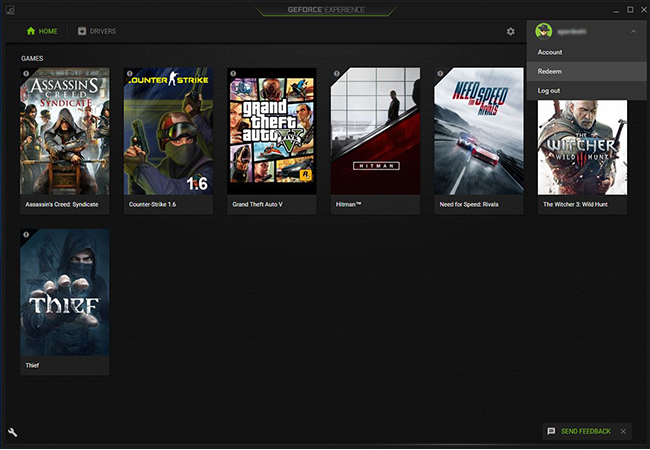
5. Enter the bundle code you received when purchasing the action bundle.
6. Follow the remaining instructions on the screen. Your code will be displayed on screen and sent to your e-mail.
7. Download and register on the Epic Games Store, or log in if you already have an account.
8. In the Epic Games Store, click on your account and select "Redeem code."
9. Enter the code from the site or that you received in your e-mail and click "Redeem."
10. Your game has been added to your library.
If you need help with troubleshooting, visit our frequently asked questions page here. If you're still having problems with the code, contact a customer support team .