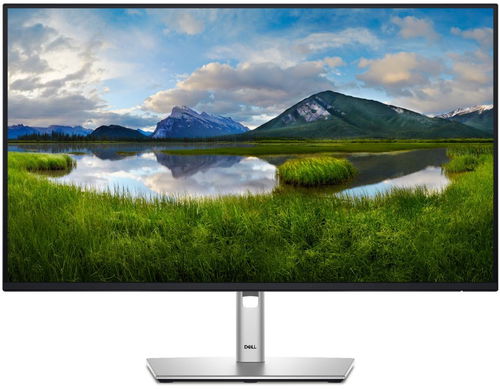
The Dell P2725H professional monitor brings a 27" screen size display with a proven Full HD resolution of 1920 × 1080 pixels to your desk. This IPS monitor offers efficient and comfortable work, which is reflected not only in the image quality but also in the overall design. At the heart of the monitor is an IPS panel that ensures consistent and accurate colour reproduction with 99% sRGB coverage, no matter what angle you're viewing the screen from. Compared to standard office displays, this 100Hz monitor offers noticeably smoother motion when scrolling through documents or browsing the web. ComfortView Plus technology reduces eye strainby reducing blue light at the hardware level without distorting colours. This ergonomic monitor is complemented by a fully adjustable stand and extensive connectivity, which includes modern and legacy ports, including a handy USB-C with 15W of power for connected devices.
27"
Screen Size
1920 × 1080 (Full HD)
Resolution (Type)
IPS Panel
Display Type
100Hz
Refresh Rate
8ms (GTG)
Response Time
Key Features of the 27" Dell P2725H Professional Monitor
The monitor offers 99% sRGB coverage for faithful colour reproduction
An integrated USB-C port allows for data transfer and provides 15W of power
The monitor stand is fully adjustable, allowing for height adjustment and pivot function
ComfortView Plus technology with TÜV Eye Comfort certification protects your eyesight
The monitor supports wall or arm mounting using the VESA standard
True-to-life Colours and a Smooth Picture
The display is based on a 27" IPS panel with a resolution of 1920 × 1080 pixels. The 100Hz refresh rate contributes to smoother motion rendering and less screen tearing during fast scenes or scrolling, which increases comfort during everyday use. The panel achieves a brightness of 300 cd/m² and a contrast ratio of 1,500:1, which ensures deeper blacks. The colour reproduction covers 99% of the sRGB space, which you will appreciate when working with graphics and presentations where colour accuracy is important. The monitor displays 16.7 million colour shades using 6-bit + FRC technology.
Ergonomics for All-day Work
The monitor stand offers complete positioning options to find the optimal working position. The screen height can be adjusted by 150mm, tilted from -5° to +21° or swivelled from -45° to +45°. The pivot rotates the screen 90 degreesto a portrait orientation, which is practical when working with long text documents, spreadsheets or when programming. The monitor can be mounted on a wall or an adjustable VESA 100 × 100mm standard arm. The Dell Display Manager software then makes it easy to organise your work with the Easy Arrange feature for screen splitting.
Thoughtful Design
The monitor integrates ComfortView Plus technology, which reduces harmful blue light emissions at the hardware level without an undesirable yellow tint to the image. Together with Flicker-Free technology, which prevents screen flicker, it contributes to less eye strain. The monitor meets the 4-star TÜV Eye Comfort certification. The product belongs to energy class D with a consumption of 16W in SDR mode. Sustainable materials, including recycled plastics, steel and aluminium, were used in its production, and the packaging is from 100% renewable sources.
Connectivity Options
The monitor offers a wide range of computer connectivity options. HDMI 1.4, DisplayPort 1.2 and VGA ports are available. The monitor also functions as a handy hub for peripherals. By connecting it to your computer with a USB-B cable, you gain access to three USB-A ports for connecting a keyboard, mouse or external drive. The integrated USB-C portis used for data transfer and also delivers 15W of power, allowing you to charge your phone, for example. The package includes a power cable, a DisplayPort cable and a USB cable for connecting to your computer.
1× HDMI 1.4
1× DisplayPort 1.2
1× VGA
1× USB 3.2 Gen 1 Type-B
3× USB 3.2 Gen 1 Type-A
1× USB 3.2 Gen 1 Type-C
Monitor Technical Specifications
Screen Size: 27"
Display Type: IPS
Backlight: LCD
Aspect Ratio: 16:9
Maximum Brightness: 300 nits
Contrast Ratio: 1,500:1
Viewing Angles: 178°/178°
Response Time: 8ms (GtG)
Refresh Rate: 100Hz
Package Contents
1× monitor
1× stand with base
1× quick installation guide
1× safety, environmental and regulatory information
1× power cable
1× DisplayPort cable (DisplayPort → DisplayPort)
1× USB 3.2 Gen 1 cable (USB-A → USB-B)
Colour Gamut
Determines how accurately the monitor can display colours. sRGB is ideal for the web, movies or games. DCI-P3/Adobe RGB is appreciated by graphic designers or professionals. The higher the stated value, the better the monitor displays colours.
Maximum Brightness
The value given in nits or cd/m² determines the brightness of the monitor. A brightness of over 400 nits is key for HDR content and readability in sunlight, while standard office monitors are fine with values over 250.
Refresh Rate and Response Time
The refresh rate (Hz) determines the number of frames displayed per second, so the higher the value, the smoother the image and the less eye strain. A lower response time (ms) eliminates motion blur. 144Hz+ is ideal for gaming, while values around 75Hz are suitable for office monitors.
Denotes the distance between the lower left and upper right corner of the screen. It is quoted in inches,while 1 "= 2.54 cm. How big a diagonal measurement to choose with which device and what are the benefitsand the disadvantages?
The monitor resolution type refers to the number of pixels that can be displayed on the monitor screen. Choosing the right resolution type can have a significant impact on the overall experience of using your monitor, whether it's for work, gaming or watching movies.
Monitor resolution refers to the number of pixels on the monitor screen, expressed as width × height. Higher resolutions provide a more detailed and clearer image, while lower resolutions may be suitable for smaller monitors or to save power.
Denotes the distance between the lower left and upper right corner of the screen. It is quoted in inches,while 1 "= 2.54 cm. How big a diagonal measurement to choose with which device and what are the benefitsand the disadvantages?
The monitor resolution type refers to the number of pixels that can be displayed on the monitor screen. Choosing the right resolution type can have a significant impact on the overall experience of using your monitor, whether it's for work, gaming or watching movies.
Monitor resolution refers to the number of pixels on the monitor screen, expressed as width × height. Higher resolutions provide a more detailed and clearer image, while lower resolutions may be suitable for smaller monitors or to save power.
The monitor connection type refers to the interface that is used to transmit the video signal from the source (e.g. computer) to the monitor. Different connection types support different resolutions and refresh rates and can affect the quality and performance of the display on the monitor.
The sRGB colour coverage of a monitor is a measure of how much of the range of colours defined in the sRGB (Standard Red Green Blue) standard the monitor is able to display. A higher percentage of sRGB coverage means that the monitor can display a wider and richer range of colors.
Dell Products, Raheen Business Park, Limerick, Ireland, [email protected], www.dell.com
This American multinational corporation based in Round Rock (Texas, USA) is a leading player in the field of information technology. The Dell brand carries the hallmark of quality and is known throughout the world. In 2010, it ranked fifth in the poll of most admired computer companies.
Dell's operations are incredibly broad - the company can be found not only in personal computers, servers, storage devices, switches, software and peripherals, but also HDTV, cameras, printers and MP3 players. The company, whose history began in 1984, now ranks among the giants in the field.
Note:
Specifications can be changed without notice. Images are for illustrative purposes only.
Jaká je prosím nejnižší nastavitelná výška tohoto monitoru? Potřebuji se vejít pod poličku, tedy nejvýše 40,7 cm. Děkuji.
Jaká je prosím nejnižší nastavitelná výška tohoto monitoru? Potřebuji se vejít pod poličku, tedy nejvýše 40,7 cm. Děkuji.
Try our cookiesAlza.cz a. s., Company identification number 27082440, use cookies and other data to ensure the proper functioning of the website and, with your consent, also, among other things, to personalize advertising and the content of our websites. By clicking on the “I understand“ button, you agree to the use of cookies and the transfer of data regarding the behavior on the website for displaying targeted advertising on social networks and advertising networks on other websites.
We use 8 categories of cookies on our website:
Technical cookies
These are strictly necessary for the functioning of the website and the features you choose to use. Without them, our website would not work; you wouldn't be able to log in to your user account, for example.
Functionality cookies
These cookies allow us to remember your basic choices and improve the user experience. These include remembering your preferred language or allowing you to stay logged in permanently.
Social media cookies
These cookies allow us to easily link you to your social media profile and, for example, allow you to share products and services with your friends and family.
Content personalisation
These cookies allow us to show you content and ads according to the information we have about you to best meet your needs. This includes what content you have viewed, or on what device you are accessing our website.
Non-personalised advertising
These cookies allow us to show you general ads for products and services.
Personalised advertising
Thanks to these cookies, we and our partners can offer you relevant products and services based on your purchases, your shopping behaviour and your preferences.
Audience metrics
These cookies allow us to optimise our site for your convenience based on how you use it. The aim is to remember or anticipate your choices. This includes, for example, the use of features, their location, or the behaviour on the page.
By giving your consent to the processing of cookies, functionality and analytical cookies will be installed on the device you use to browse the website (click on the "I understand" button for both categories, or you can select only one of the categories by clicking on the "Settings" button). We always install technical cookies on your device, even without your explicit consent, because without them our website would simply not work.
You can revoke your consent to the processing of cookies. In connection with our company's cookie processing, you also have the following rights: the right to access cookies, delete, modify, supplement and correct them, restrict processing and the right to lodge a complaint with the Office for Personal Data Protection. Read more about your rights.