

Try our cookiesAlza.cz a. s., Company identification number 27082440, uses cookies to ensure the functionality of the website and with your consent also to personalisage the content of our website. By clicking on the “I understand“ button, you agree to the use of cookies and the transfer of data regarding the behavior on the website for displaying targeted advertising on social networks and advertising networks on other websites.
We use 8 categories of cookies on our website:
Technical cookies
These are strictly necessary for the functioning of the website and the features you choose to use. Without them, our website would not work; you wouldn't be able to log in to your user account, for example.
Functionality cookies
These cookies allow us to remember your basic choices and improve the user experience. These include remembering your preferred language or allowing you to stay logged in permanently.
Social media cookies
These cookies allow us to easily link you to your social media profile and, for example, allow you to share products and services with your friends and family.
Content personalisation
These cookies allow us to show you content and ads according to the information we have about you to best meet your needs. This includes what content you have viewed, or on what device you are accessing our website.
Non-personalised advertising
These cookies allow us to show you general ads for products and services.
Personalised advertising
Thanks to these cookies, we and our partners can offer you relevant products and services based on your purchases, your shopping behaviour and your preferences.
Audience metrics
These cookies allow us to optimise our site for your convenience based on how you use it. The aim is to remember or anticipate your choices. This includes, for example, the use of features, their location, or the behaviour on the page.
Third party cookies
These are third party cookies, and you can find out more about them and our partners here.
By giving your consent to the processing of cookies, functionality and analytical cookies will be installed on the device you use to browse the website (click on the "I understand" button for both categories, or you can select only one of the categories by clicking on the "Settings" button). We always install technical cookies on your device, even without your explicit consent, because without them our website would simply not work.
You can revoke your consent to the processing of cookies. In connection with our company's cookie processing, you also have the following rights: the right to access cookies, delete, modify, supplement and correct them, restrict processing and the right to lodge a complaint with the Office for Personal Data Protection. Read more about your rights.
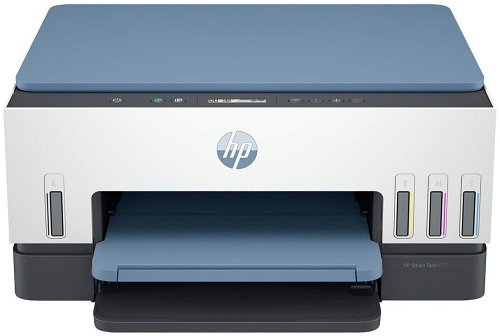
Inkjet Printer - multifunctional, colour, A4, copier and scanner, black-and-white print speed of 12 PPM, colour print speed of 7 PPM, print resolution: 4800 x 1200 DPI, duplex, tank system, display, AirPrint, USB and Wi-Fi
Show full description
Price with CashbackCashback presents the option to get back money from your purchase online, usually requires a registration
Akce platí do 30. 4. 2026
HP Smart Tank Wireless 675 All-in-One 4,999,- In stock > 5 pcs
Buy
HP Smart Tank Wireless 675 All-in-One
Printers are usually supplied with a starter toner and/or cartridges with an approximate 60% capacity of regular cartridges which are available to purchase separately.
Printing technology determines how data is transferred to paper, affecting quality, speed and cost, and varies by type of application - from home to professional.
The resolution of a flatbed scanner is a parameter that determines the quality of the scan, measured in DPI (dots per inch) and the higher the resolution, the more detailed the scan.
The print resolution determines how detailed and sharp the output from the printer will be, measured in DPI, the higher the value the better the print quality, ideal for high quality photos and documents.
The number of printer colours determines the amount of ink used, with more than four colours ensuring higher print quality, especially for professional graphics and photos.
Zobrazovací jednotka tiskárny sloužící k informaci o stavu či nastavení tiskárny. V případě dotykového displeje slouží i k přímému nastavení a ovládání tiskárny.
GO Europe GmbH, Zum Kraftwerk 1, Hattingen 45527, Germany, +49232468010, [email protected]
Hewlett-Packard was founded in the difficult times of the Great Depression. The founders were a pair of friends whose name the company still proudly bears. They started their business in an unobtrusive garage near the city of Palo Alto. It is now a national monument. HP’s success lay not in copying existing products, but in the ability and courage to come up with something new.
The first commercial triumph was an oscillator that surpassed all competition in quality, yet sold at a quarter of the price. In 1968, HP released their first desktop computer - a desktop calculator. The company currently manufactures products primarily related to computer technology - computers and laptops, printers, scanners, digital cameras, servers, and last but not least, calculators.
Note:
If there is no "package contains" box in the product parameters and the data or USB cable is not specifically mentioned in there, the package does not contain it and must be purchased separately.
Specifications can be changed without notice. Images are for illustrative purposes only.
dobry den, tlacim kazdy den ale ked chcem zacat tak HP smart aplikacia hlasi offline i ked tlaciaren je pripojena aj do elektriky aj do wifi ( podla displeja na tlaciarni). aby som mohla nieco vytlacit musim odpojit tlaciaren z elektriky ( ani vypnut neide tlacitkom on/off) toto musim urobit niekedy aj 2x za den. uz ma to nebavi a to ju mam len necely mesiac . Za tie peniaze som ockavala teda uplne nieco ine. Viete mi poradit kde moze byt chyba? je to na reklamaciu?
Dobrý den, tiskárna docela často nereaguje na zadanou tiskovou úlohu, ikdyž je připojení zcela v pořádku. Někdy vytiskne pouze jednou a když zadám do tisku další soubor, už nereaguje a musím ji vypnout a znovu zapnout, někdy nepomůže ani tohle.
Dobrý den,
co vše se musí na této tiskárně nahrazovat jako běžné spotřební zboži? Aktuálně jsem se dočetl, že je třeba každý rok měnit tiskové hlavy, ale v příslušenství na Alze jsem je nenalezl. Je ještě něco jiného co se musí měnit ? Má to automatický duplex ? Z recenzí jsem se dočetl že to není automatické cituji : Tiskárna není zrovna levná, přesto neumí automatický oboustranný tisk, musíte dát papír znovu do tiskárny.
Dobrý den,
co vše se musí na této tiskárně nahrazovat jako běžné spotřební zboži? Aktuálně jsem se dočetl, že je třeba každý rok měnit tiskové hlavy, ale v příslušenství na Alze jsem je nenalezl. Je ještě něco jiného co se musí měnit ? Má to automatický duplex ? Z recenzí jsem se dočetl že to není automatické cituji : Tiskárna není zrovna levná, přesto neumí automatický oboustranný tisk, musíte dát papír znovu do tiskárny.
Dobrý den,
tiskárna nonstop kolísavě píská. Pískání je synchronizováno s blikáním diod na panelu, je to tedy pískání způsobené nějakou vadou zdroje. Má to řešení? Mám tiskárnu reklamovat?
Dobrý den,
tiskárna nonstop kolísavě píská. Pískání je synchronizováno s blikáním diod na panelu, je to tedy pískání způsobené nějakou vadou zdroje. Má to řešení? Mám tiskárnu reklamovat?
DD, tiskárna nám nejde připojit v kancláři na wifi, protože HP software nepracuje s možností, kdy si na wifi musíte zvolit uživatele a napsat heslo. Chce jen heslo.
Takže chceme zkusit připojit přes ethernet. Poradíte mi prosím, co všechno je třeba mít/koupit, od zástrčky ethernetu u nás ve zdi, až po USB-B v tiskárně? (kabel ethernet-ethernet a dock (Port Replicator Vention Type-C (USB-C) to HDMI / 3x USB3.0 / RJ45 / SD / TF / 3.5mm / PD 0.15M) s dírkou pro ethernet tu máme, ale nevím, jestli si to spolu bude všechno povídat, když dokoupíme AlzaPower LinkCore USB-A to USB-B)
Díky.
DD, tiskárna nám nejde připojit v kancláři na wifi, protože HP software nepracuje s možností, kdy si na wifi musíte zvolit uživatele a napsat heslo. Chce jen heslo.
Takže chceme zkusit připojit přes ethernet. Poradíte mi prosím, co všechno je třeba mít/koupit, od zástrčky ethernetu u nás ve zdi, až po USB-B v tiskárně? (kabel ethernet-ethernet a dock (Port Replicator Vention Type-C (USB-C) to HDMI / 3x USB3.0 / RJ45 / SD / TF / 3.5mm / PD 0.15M) s dírkou pro ethernet tu máme, ale nevím, jestli si to spolu bude všechno povídat, když dokoupíme AlzaPower LinkCore USB-A to USB-B)
Díky.
Mám tuto tiskárnu a fotky, které tiskne, jsou hodně tmavé. Kontroloval jsem nastavení a vse je v poradku. Take fotopapir si vzdy vezme krive, bily ramecek neni uplne rovny. A do fotky se "zakousne" podavac 2 zuby.
