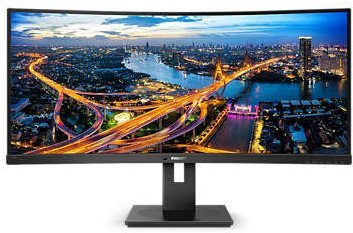
This Philips monitor captivates with its futuristic design and image quality. Modern VA display technology ensures superb sharpness and true-to-life colour reproduction. The Philips 346B1C display features an exceptionally fine, ultra-wide image in a 21:9 format. Its outstanding colour depth delivers more than a billion shades, covering 119% of the sRGB colour space and 90% of Adobe RGB. This makes it the ideal monitor for architects or financial experts working with extensive spreadsheets.
34"
Screen Size
3440 × 1440 (Ultra Wide QHD)
Resolution (Resolution Type)
VA
Display Type
100Hz
Refresh Rate
4ms (GtG)
Response Time
Key Features of the 34" Philips 346B1C Monitor
Rich colours with wide viewing angles thanks to the VA panel
Covers 119% of the sRGB and 90% of the Adobe RGB colour space
QHD resolution for a sufficiently fine image
USB-C support including a built-in docking station and notebook charging up to 90W
Less eye strain thanks to LowBlue technology
Anti-reflective screen surface
The Philips 346B1C has a Built-in Docking Station with USB-C
A key advantage of the Philips 346B1C monitor is its built-in docking station. You can connect a keyboard, mouse and an RJ-45 Ethernet cable to the monitor. Then all you need to do is connect your notebook to the monitor with a single USB-C cable, and you're all set—it will even charge your notebook. Do you need a large workspace for your job? Then use the Philips 346B1C instead of two monitors. A wide-screen display with a Quad HD resolution of 3,440 × 1,440 pixels will definitely increase your productivity.
Saves up to 70% on energy costs
Thanks to its built-in sensor, the Philips 346B1C monitor knows whether someone is sitting in front of it or not. If the user moves away from the desk, the Philips monitor automatically reduces its brightness. The Philips 346B1C monitor features an integrated KVM switch. This makes it easy to control two different computers with a single keyboard and mouse. The Philips 346B1C is also ready for playing the latest games. Get smooth, artefact-free images at any frame rate.
Monitor Technical Specifications
Screen Size: 34"
Display Type: VA
Backlight: LED
Aspect Ratio: 21:9
Maximum Brightness: 300cd/m²
Contrast Ratio: 3,000:1
Viewing Angles: 178°
Response Time: 4ms (GtG)
Refresh Rate: 100Hz
Package Contents
1× Stand
1× HDMI cable
1× DisplayPort cable
1× USB-C cable
Colour Gamut
Determines how accurately the monitor can display colours. sRGB is ideal for web, movies or games. DCI-P3/Adobe RGB is appreciated by graphic designers or professionals. The higher the stated value, the better the monitor displays colours.
Maximum Brightness
Given in nits or cd/m², this value determines the monitor's brightness level. Brightness above 400 nits is key for HDR content and readability in sunlight, while standard office monitors are sufficient with values above 250.
Refresh Rate and Response Time
The refresh rate (Hz) determines the number of frames displayed per second, so the higher the value, the smoother the picture and the less eye strain. A lower response time value (ms) eliminates motion blur. 144Hz+ is ideal for gaming, while values around 75Hz are suitable for office monitors.
Denotes the distance between the lower left and upper right corner of the screen. It is quoted in inches,while 1 "= 2.54 cm. How big a diagonal measurement to choose with which device and what are the benefitsand the disadvantages?
The monitor resolution type refers to the number of pixels that can be displayed on the monitor screen. Choosing the right resolution type can have a significant impact on the overall experience of using your monitor, whether it's for work, gaming or watching movies.
Monitor resolution refers to the number of pixels on the monitor screen, expressed as width × height. Higher resolutions provide a more detailed and clearer image, while lower resolutions may be suitable for smaller monitors or to save power.
Denotes the distance between the lower left and upper right corner of the screen. It is quoted in inches,while 1 "= 2.54 cm. How big a diagonal measurement to choose with which device and what are the benefitsand the disadvantages?
The monitor resolution type refers to the number of pixels that can be displayed on the monitor screen. Choosing the right resolution type can have a significant impact on the overall experience of using your monitor, whether it's for work, gaming or watching movies.
Monitor resolution refers to the number of pixels on the monitor screen, expressed as width × height. Higher resolutions provide a more detailed and clearer image, while lower resolutions may be suitable for smaller monitors or to save power.
The monitor connection type refers to the interface that is used to transmit the video signal from the source (e.g. computer) to the monitor. Different connection types support different resolutions and refresh rates and can affect the quality and performance of the display on the monitor.
Specifications can be changed without notice. Images are for illustrative purposes only.

Dobrý den. Stále zápasím s KVM přepínáním a USB porty na monitoru. Mám pracovní NTB připojený přes USB-C a stolní PC připojené přes DP/USB UP. V monitoru mám klávesnici a myš. Bohužel neustále dochází k tomu, že po vypnutí jedné strany (např. stolního PC), není schopen monitor přepnout USB porty následně do USB-C či naopak. Když vypnu NTB a následně zapnu PC, obraz naběhne, ale USB nefungují. Je možné tomuto předejít nějakým nastavením USB, BIOSU atd.? Předpokládal jsem, že po přepnutí KVM zdroje se USB připojí k danému zařízení, ale bohužel z nějakého důvodu toto nefunguje jak má.
Dobrý deň, mám grafickú kartu MSI GTX 1080 GAMING X 8G,aký Displeyport by ste mi k tomuto monitoru odporučili a ak je možné mi potvrdiť či nrbude problém ak bude monitor prepojený cez displeyport a tv bude zároveň prepojený cez hdmi.
Dobry den, mam nastaveny jas na 30, Low Blue Mode 3 a zapnuty Power Sensor. Kdyz odejdu, tak se spusti rezim setreni energie, coz je v poradku. Jakmile se ale vratim, rezim setreni energie se vypne, ale jas se nastavi na vyssi hodnotu, nez byl pred tim rezimem. Nevim jakou hodnotu jasu to nastavi, ale puvodnich 30 to neni. Je to vada, nebo je to spravne chovani, nebo se to da nejak prenastavit?
Dobrý den,
chtěl bych se zeptat zda je DisplayPort součástí balení nebo ne? V popisu produktu je uvedeno že ano, ale když mám monitor v košíku tak mi ho to nabízí ke koupi s upozorněním že DispayPort není součástí balení.
Dobrý den,
chtěl bych se zeptat zda je DisplayPort součástí balení nebo ne? V popisu produktu je uvedeno že ano, ale když mám monitor v košíku tak mi ho to nabízí ke koupi s upozorněním že DispayPort není součástí balení.
Ahoj, nemuzu najit jednoznacnou odpoved, jestli to ma Freesync funkci nebo ne. Dokonce jsem se dival i na stranky vyrobce a tam ne neco jako - Adaptive-Sync, což nevím, co znamená. Grafiku mám AMD Radeion RX 560 (což asi není žádná dělo). Děkuji za odpověď.
Magyarországra történő kiszállításért tekintse meg ezt a termékoldalt: 34" Philips 346B1C
Try our cookiesAlza.cz a. s., Company identification number 27082440, use cookies and other data to ensure the proper functioning of the website and, with your consent, also, among other things, to personalize advertising and the content of our websites. By clicking on the “I understand“ button, you agree to the use of cookies and the transfer of data regarding the behavior on the website for displaying targeted advertising on social networks and advertising networks on other websites.
We use 8 categories of cookies on our website:
Technical cookies
These are strictly necessary for the functioning of the website and the features you choose to use. Without them, our website would not work; you wouldn't be able to log in to your user account, for example.
Functionality cookies
These cookies allow us to remember your basic choices and improve the user experience. These include remembering your preferred language or allowing you to stay logged in permanently.
Social media cookies
These cookies allow us to easily link you to your social media profile and, for example, allow you to share products and services with your friends and family.
Content personalisation
These cookies allow us to show you content and ads according to the information we have about you to best meet your needs. This includes what content you have viewed, or on what device you are accessing our website.
Non-personalised advertising
These cookies allow us to show you general ads for products and services.
Personalised advertising
Thanks to these cookies, we and our partners can offer you relevant products and services based on your purchases, your shopping behaviour and your preferences.
Audience metrics
These cookies allow us to optimise our site for your convenience based on how you use it. The aim is to remember or anticipate your choices. This includes, for example, the use of features, their location, or the behaviour on the page.
By giving your consent to the processing of cookies, functionality and analytical cookies will be installed on the device you use to browse the website (click on the "I understand" button for both categories, or you can select only one of the categories by clicking on the "Settings" button). We always install technical cookies on your device, even without your explicit consent, because without them our website would simply not work.
You can revoke your consent to the processing of cookies. In connection with our company's cookie processing, you also have the following rights: the right to access cookies, delete, modify, supplement and correct them, restrict processing and the right to lodge a complaint with the Office for Personal Data Protection. Read more about your rights.