Try our cookies Alza.cz a. s., Company identification number 27082440, uses cookies to ensure the functionality of the website and with your consent also to personalisage the content of our website. By clicking on the “I understand“ button, you agree to the use of cookies and the transfer of data regarding the behavior on the website for displaying targeted advertising on social networks and advertising networks on other websites.
Alzak icon
Catalogue
Price
-
Availability
Order status
Brands
(2)

Routers & Firewalls

Routers and firewalls are highly specialized pieces of equipment that you need to run and protect your corporate network. They can, however, also be used in a home setup, if necessary.

Continue

What is the Difference between Switches, Routers and Firewalls?

Switches

Switches or network switches are hubs that coordinate network traffic so that the data on the input gets to the correct output. It does this by analysing the headers to determine the position of the recipient. Switches work in layer 2 of the ISO/OSI model - in the node. It connects network elements or parts of the network, most often end devices, such as computers or printers, directly to the switch.

Routers

Routers also have the task of forwarding data to the destination, but unlike switches, they do not create networks but connect them. It is crucial to set up the router correctly for it to work well, which is usually done by the network administrator. Routers in this category are not home WiFi routers.

Firewalls

A firewall is a network traffic security element that stands between networks and determines communication rules. In corporate or home networks, firewalls are plugged into the network's input, protecting all devices connected to it.

Types of Switches, Routers and Firewalls

Desktop - Desktop network elements such as switches, routers or firewalls are great for all applications. Their cabinet is adapted to be placed on a desktop, or the casing can have holes in it for hanging on a wall.

Rack - Rack-mounted switches, routers and firewalls are designed primarily for larger corporate networks because they fit into standardised switchboards. Therefore, their acquisition is worthwhile if you are serious about organising your network elements.

Functions of Switches, Routers and Firewalls

PoE (Power over Ethernet) - PoE makes it possible to simultaneously conduct data and power end devices with a single cable. Such power supplies usually support IP cameras, VoIP phones and WiFi Access Points. The switch plays the role of a power supply.

QoS (Quality of Service) - QoS is a technology that prevents switch congestion by distributing bandwidth among connected clients fairly. It considers the type of data being transferred and the priorities set.

Managed or Unmanaged Switches (smart switch, web manageable) - Managed switches give you complete control over the traffic on your network. Still, they need to be configured correctly by a skilled administrator.

Stackable - some network switches can be stacked. The stack then acts as a single switch with several ports that have all the sub-elements together.

VLAN (virtual local area network) - VLAN is a logically separated network that can be created on the switch. When a switch is split into several VLANs, each of them pretends to be a separate switch. This means that we can have multiple networks connected on one switch, but they are not connected to each other.

L2 - the link layer of the ISO/OSI reference model in which all switches operate.

L3- L3 routers work primarily in the network layer of the ISO/OSI model, but special L3 switches with routing functions can also do this.

Speed of Switches

  • Switching capacity - defines the switching capability of the network switch. This is de facto one of the parameters defining the switch's performance, but its relationship to performance also depends on the number of ports.
  • LAN port transfer rate - tells how much data can be transferred per second using the port. It is also essential to think about using the correct cable to achieve maximum speed.
  • Packet Capacity - Packet capacity is the amount of 64B packets that the switch can forward in one second.

Switches and Router Ports

  • RJ-45 - This is the standard Ethernet connector found in most switches, routers, firewalls and end devices, such as computers, IP cameras or VoIP phones.
  • SFP - SFP is a transceiver that connects through an electronic interface but uses optical fibres for transmission. Thanks to this, it can achieve very high speeds and is therefore particularly suitable for business applications.
  • 10/100Base-T - also referred to as Fast Ethernet. This is a standard port with an RJ-45 connector and achieves transfer speeds of 100 Mbps.
  • 10/100/1000Base-T - it is the successor of Fast Ethernet and is also called Gigabit Ethernet. Its maximum transfer rate is 1000Mbps.
  • Dual Personality - these ports have two connectors, one RJ-45 and one SFP. Both connectors cannot be used simultaneously. You can only use one connector at a time.
Hide description
Was this information useful?
This form is used only for evaluating the information in the description above.
If you have any question about our products, services, transport or any other request, please contact our customer support.
What should be improved? Is anything missing here? Is anything wrong? Share it with us.
2 items
4.4 18×
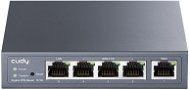
CUDY Gigabit Multi-WAN VPN Router
Router - 1 × GLAN, 1 × GWAN, 3 × G LAN/WAN (optional), 128MB RAM, 16MB Flash storage
Buy with code ALZADNY15 The discount code gives the option of applying a discount on a given product when entering the code in the shopping cart. Získejte slevu 15 % s kódem ALZADNY15. Klikněte a kód se uplatní automaticky. 849,-
999,-
Buy
In stock > 5 pcs
Order by midnight, get it at the AlzaBox in the morning.
Info
Order Code: CUD21k76
4.4 18×
CUDY Gigabit Multi-WAN VPN Router
Router - 1 × GLAN, 1 × GWAN, 3 × G LAN/WAN (optional), 128MB RAM, 16MB Flash storage
Buy with code ALZADNY15 The discount code gives the option of applying a discount on a given product when entering the code in the shopping cart. Získejte slevu 15 % s kódem ALZADNY15. Klikněte a kód se uplatní automaticky. 764,-
-10 % off new 899,- New 999,-
Buy
Unsealed - in stock 1 pcs
Order by midnight, get it at the AlzaBox in the morning.
Info
Order Code: CUD21k76

instructionsCo dělat, když nefunguje WiFi? Ve světě, kde jsme neustále online, může být výpadek WiFi připojení skutečnou katastrofou. Nefunkční WiFi může způsobit nemalé problémy jak v domácnostech, tak v kancelářích. Představte si situaci, kdy potřebujete narychlo odeslat důležitý email, sledovat online...
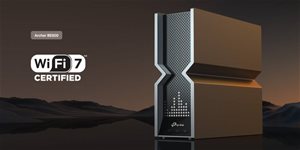
Patříte mezi náročné uživatele internetu a vyžadujete maximální stabilitu i současný streaming videa na více zařízení současně? V tom případě je nový standard WiFi 7 řešení přesně pro vás. Pořiďte si proto nové WiFi 7 routery od TP-Link a zefektivněte svou síť na...

Bádáte, jak připojit notebook k televizi či monitoru? Připravili jsme pro vás článek, který celý postup přehledně shrnuje, a navíc poskytuje informace o drátovém i bezdrátovém přenosu obrazu. Jak nastavit druhou obrazovku ve Windows, jaký propojovací kabel vybrat nebo...
P-DC1-WEB14