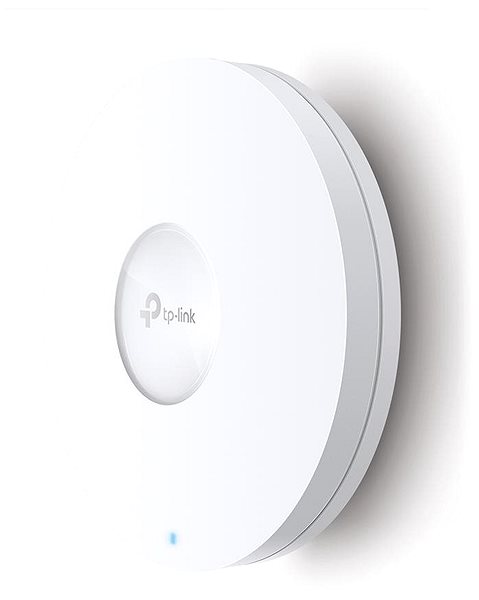
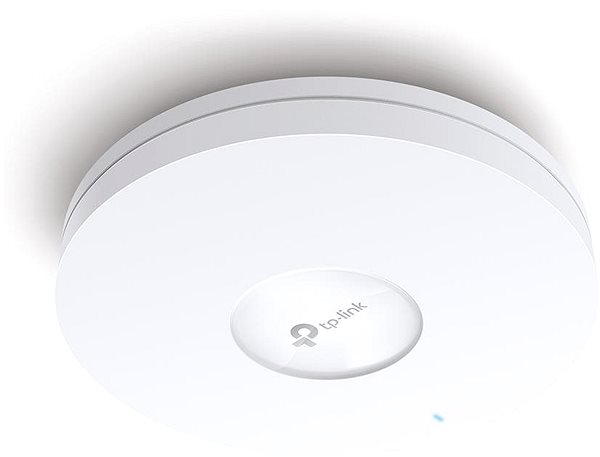
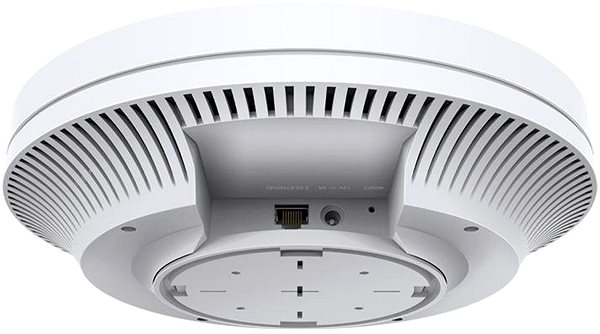
A quality access point helps expand your WiFi network, and you'll be able to get a more stable signal even in areas that are further away. The TP-Link EAP610, Omada is an advanced dual-band model, so it works with the 2.4Ghz and 5Ghz frequency bands. It'll keep a stable connection even in places that have a lot of outer network interference. In terms of its WiFi transmission, it can reach speeds up to 1775 Mb/s. This model from TP-Link pushes data security and its encryption functions is taken care by WPA2, WPA2-PSK, WPA-Enterprise, WPA2-Enterprise and WPA3.
TP-Link EAP610, Omada WiFi Access Point Key Features
Dvoupásmový WiFi Access Point will reliably extend your wireless network
WiFi signal transmitted at speeds up to 1775 Mb/s
TP-Link wifi access point can work with the standards of WiFi 6
Data is protected with the help of WPA2, WPA2-PSK, WPA-Enterprise, WPA2-Enterprise and WPA3
Total number of built-in antennas: 4
Antenna transmit power: 23 dBi
You can also use the function client, DHCP Client List and address Reservation
Powered by a data cable, doesn't require mains power
Faster transmission thanks to MU-MIMO
Access point can work within the WiFi Mesh system
WiFi Access Point TP-Link EAP610, Omada Practical Functions
This TP-Link EAP610, Omada wifi access point is directly powered through a data cable, so you have more options to place it where you want. It can achieves higher and more stable speeds, even with more demanding services Its MU-MIMO function generates multiple data streams. For more detailed network settings, you can adjust the DHCP functions client, DHCP Client List and address Reservation. The supported standards include 802,11a, 802,11g, 802,11n, 802,11ac and 802,11ax.
The frequency bands on which a router transmits a WiFi signal, typically including 2.4 GHz for greater coverage and 5 GHz for faster speeds and less interference.
The frequency bands on which a router transmits a WiFi signal, typically including 2.4 GHz for greater coverage and 5 GHz for faster speeds and less interference.
WiFi router type categorizes Wi-Fi routers by frequency bands, speed and range, and includes types such as single-band, dual-band, tri-band and quad-band.
WiFi encryption is a set of protocols and techniques for securing data on WiFi wireless networks, offering various encryption methods to protect against unauthorized access.
A connector on a router or modem for connection to a wide area network (WAN), usually using RJ-45, designed to connect to an external network such as the Internet.
Indicates the number of internal antennas in the device that are designed to provide a stable and strong signal but are not physically adjustable by the user.
Power over Ethernet (PoE) types describe different methods of delivering power over Ethernet cables. Passive PoE provides power without active management, while active PoE provides a more secure and flexible power delivery with automatic negotiation between the source and the device, minimizing the risk of damage.
PoE standards such as IEEE 802.3af (PoE), IEEE 802.3at (PoE+), and IEEE 802.3bt (PoE++) define the parameters for delivering power over Ethernet cables, ensuring device compatibility and secure, efficient, and flexible network installations. These standards facilitate power management and integration of various network devices.
TP-LINK Czech, s. r. o., Pekařská 695/10, Jinonice, 155 00 Praha 5, CZ +420 212 812 622 / SK +421 233 006 532, [email protected]
Note:
Specifications can be changed without notice. Images are for illustrative purposes only.
Jak je možné EAP610 uvést do továrního nastavení?
RESET párátkem jsem zkoušel... po víc než 10 sec. se modrá LED rozbliká...
po připojení na LAN a zadání továrního user a pass nahlásí špatné zadání...
existuje ještě nějaký fígl jak prvo nastavené a zapomenuté údaje lze resetovat?
Jak je možné EAP610 uvést do továrního nastavení?
RESET párátkem jsem zkoušel... po víc než 10 sec. se modrá LED rozbliká...
po připojení na LAN a zadání továrního user a pass nahlásí špatné zadání...
existuje ještě nějaký fígl jak prvo nastavené a zapomenuté údaje lze resetovat?
Mám router Archer C6, k tomu jsem dokoupil AP EAP610(AX1800). Pro řádné pokrytí celého bytu. Jsou spojené kabelem, i kvůli PoE napájení.
Docela laboruju s nastavením toho APčka. Obě zařízení prý podporují Mesh, ale nedaří se mi je spojit.
Nejdu přes jejich Omadu, jsem přihlášený přímo do AP.
Prostě se v docela slušně tom topím.
Mám router Archer C6, k tomu jsem dokoupil AP EAP610(AX1800). Pro řádné pokrytí celého bytu. Jsou spojené kabelem, i kvůli PoE napájení.
Docela laboruju s nastavením toho APčka. Obě zařízení prý podporují Mesh, ale nedaří se mi je spojit.
Nejdu přes jejich Omadu, jsem přihlášený přímo do AP.
Prostě se v docela slušně tom topím.
Dobrý den, Jak dlouhý je napájecí kabel od adaptéru?? Případně jak silný zdroj sehnat pro možnost napájení PoE při zachování plné maximální funkčnosti. Díky
Dobrý den, Jak dlouhý je napájecí kabel od adaptéru?? Případně jak silný zdroj sehnat pro možnost napájení PoE při zachování plné maximální funkčnosti. Díky
Magyarországra történő kiszállításért tekintse meg ezt a termékoldalt: TP-Link EAP610, Omada
Try our cookiesAlza.cz a. s., Company identification number 27082440, use cookies and other data to ensure the proper functioning of the website and, with your consent, also, among other things, to personalize advertising and the content of our websites. By clicking on the “I understand“ button, you agree to the use of cookies and the transfer of data regarding the behavior on the website for displaying targeted advertising on social networks and advertising networks on other websites.
We use 8 categories of cookies on our website:
Technical cookies
These are strictly necessary for the functioning of the website and the features you choose to use. Without them, our website would not work; you wouldn't be able to log in to your user account, for example.
Functionality cookies
These cookies allow us to remember your basic choices and improve the user experience. These include remembering your preferred language or allowing you to stay logged in permanently.
Social media cookies
These cookies allow us to easily link you to your social media profile and, for example, allow you to share products and services with your friends and family.
Content personalisation
These cookies allow us to show you content and ads according to the information we have about you to best meet your needs. This includes what content you have viewed, or on what device you are accessing our website.
Non-personalised advertising
These cookies allow us to show you general ads for products and services.
Personalised advertising
Thanks to these cookies, we and our partners can offer you relevant products and services based on your purchases, your shopping behaviour and your preferences.
Audience metrics
These cookies allow us to optimise our site for your convenience based on how you use it. The aim is to remember or anticipate your choices. This includes, for example, the use of features, their location, or the behaviour on the page.
By giving your consent to the processing of cookies, functionality and analytical cookies will be installed on the device you use to browse the website (click on the "I understand" button for both categories, or you can select only one of the categories by clicking on the "Settings" button). We always install technical cookies on your device, even without your explicit consent, because without them our website would simply not work.
You can revoke your consent to the processing of cookies. In connection with our company's cookie processing, you also have the following rights: the right to access cookies, delete, modify, supplement and correct them, restrict processing and the right to lodge a complaint with the Office for Personal Data Protection. Read more about your rights.