Graphics Software - Corel Essentials intended for 1 device(s), portable license, permanent license, software type: vector graphics, photo editing and 2D graphics, version in CZ, EN, DE, FR, IT, ES, PL, nl, install through download (electronically), appropriate for households and for businesses, intended for PC, compatible with Windows operating system(s), license key can be found in: "My Library" - "License"
CorelDRAW Essentials 2024 is an affordable version of professional graphics software designed for home users, novice graphic designers and small businesses. This version of the software offers a wide range of tools for creating graphics, vector design, photo editing and layout creation. With CorelDRAW Essentials 2024 you can create professional looking graphics for print, web or social media. Includes tools for drawing vector images, photo editing, creating a log, banners, leaflets, business cards and other design projects. Thanks to its user-friendly interface and ease of use, CorelDRAW Essentials 2024 is suitable for beginners, but at the same time offers sufficient options for advanced users. With this software, you will be able to implement your ideas quickly and easily without having to invest in expensive professional software.
Key features of CorelDRAW Essentials 2024 graphics software
CorelDRAW Essentials 2024 graphics software is easy to learn how to use
Create posters, cards, social media images and more
WebP support for web compatibility
CorelDRAW Essentials 2024 is suitable for beginners and advanced users
Includes a complete toolkit for high-end graphics
Includes: CorelDRAW Essentials and Corel PHOTO-PAINT Essentials
Fun affordable graphic design
Start easily creating page layouts for your home creative projects.
Add your exclusive brand
With CorelDRAW Essentials 2024, you can turn your passion into compelling graphics with creative tools.
Learn how to use it quickly and easily
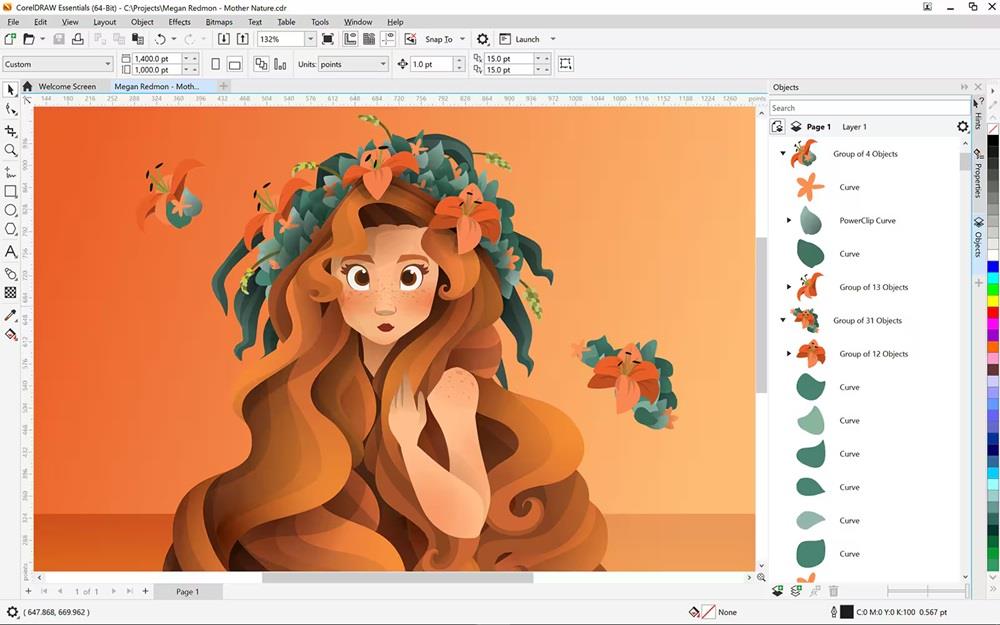
The Hints panel gives you instant feedback and tips right as you work.
Create vector and bitmap graphics
CorelDRAW Essentials is a complete solution for creating both vector and bitmap graphics. It will give you all the tools you need to create your graphic projects. You will have a wide range of tools at your disposal for creating vector illustrations and designing pages. With features for editing shapes, curves and text, you'll have full control over the look of your designs. In addition, the bitmap image features give you the ability to retouch and edit photo material directly in the program. With CorelDRAW Essentials you will have everything, what you need, so you can start creating graphic designs, whether it's creating logs, posters, leaflets, web graphics or other creative projects.
Create posters, postcards and calendars
For beginners in graphic design, CorelDRAW Essentials is the ideal solution for a wide range of creative projects. It allows you to quickly and easily create posters, greeting cards, postcards, calendars and much more with complete confidence. With vector illustration tools, you can turn basic lines and shapes into works of art. Create curves with versatile drawing and shaping tools that make it easy to express your creativity. Page layouts can be created for various purposes such as invitations, collages or multi-page layouts. Rulers, grids, and guides make it easy to organize and accurately position objects, improving the visual appeal of your designs. You can experiment with different text effects to make your final product stand out and attract the attention of your audience.
Object management
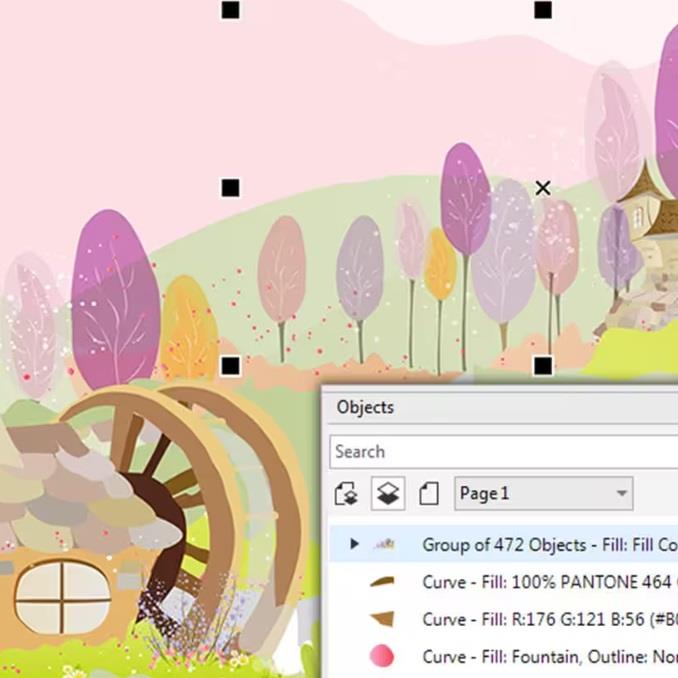
With the handy anchorable Objects panel, you can easily control every element in your document. This panel allows you to hide, search, and change the names and order of overlapping objects, improving your ability to organize and manipulate elements in your document.
Paints, fillers and foils
With CorelDRAW Essentials, you can easily add colour to your fills and outlines. Use colour swatches or generate harmonious colours to create an attractive design. You can also adjust the transparency of objects and fill them with different patterns, gradients, and other effects.
Bitmaps to vectors
With the QuickTrace feature in CorelDRAW Essentials, you can easily convert bitmap images to vector images with a single click. This intuitive feature allows you to quickly and easily transform your bitmaps into vectors directly from the app for illustrations and page layouts.
Technical specifications:
Windows 11 or Windows 10 (version 21H2 or later), 64-bit, with the latest updates
Intel Core i3/5/7/9 or AMD Ryzen 3/5/7/9/Threadripper, EPYC
OpenCL 1.2 compatible graphics card with more than 3 GB of VRAM
8GB RAM
3 GB of hard disk space for applications and installation files
Mouse, graphics tablet or multi-touch screen
Screen resolution 1280 × 720 at 100%
For optimal performance, make sure you have the latest device drivers provided by the manufacturer.
An internet connection is required to install and verify CorelDRAW Essentials and access some of the included software components, online features and content.
Dobrý den, prosím o informaci, zda je možné tuto licenci nainstalovat u jednoho uživatele na stolní PC a cestovní notebook. Tak, aby bylo možno pracovat jak v kanceláři, tak na cestách - nebude tedy běžet na obou stanicích zároveň. Děkuji za info.
Dobrý den, prosím o informaci, zda je možné tuto licenci nainstalovat u jednoho uživatele na stolní PC a cestovní notebook. Tak, aby bylo možno pracovat jak v kanceláři, tak na cestách - nebude tedy běžet na obou stanicích zároveň. Děkuji za info.
Try our cookiesAlza.cz a. s., Company identification number 27082440, use cookies and other data to ensure the proper functioning of the website and, with your consent, also, among other things, to personalize advertising and the content of our websites. By clicking on the “I understand“ button, you agree to the use of cookies and the transfer of data regarding the behavior on the website for displaying targeted advertising on social networks and advertising networks on other websites.
We use 8 categories of cookies on our website:
Technical cookies
These are strictly necessary for the functioning of the website and the features you choose to use. Without them, our website would not work; you wouldn't be able to log in to your user account, for example.
Functionality cookies
These cookies allow us to remember your basic choices and improve the user experience. These include remembering your preferred language or allowing you to stay logged in permanently.
Social media cookies
These cookies allow us to easily link you to your social media profile and, for example, allow you to share products and services with your friends and family.
Content personalisation
These cookies allow us to show you content and ads according to the information we have about you to best meet your needs. This includes what content you have viewed, or on what device you are accessing our website.
Non-personalised advertising
These cookies allow us to show you general ads for products and services.
Personalised advertising
Thanks to these cookies, we and our partners can offer you relevant products and services based on your purchases, your shopping behaviour and your preferences.
Audience metrics
These cookies allow us to optimise our site for your convenience based on how you use it. The aim is to remember or anticipate your choices. This includes, for example, the use of features, their location, or the behaviour on the page.
By giving your consent to the processing of cookies, functionality and analytical cookies will be installed on the device you use to browse the website (click on the "I understand" button for both categories, or you can select only one of the categories by clicking on the "Settings" button). We always install technical cookies on your device, even without your explicit consent, because without them our website would simply not work.
You can revoke your consent to the processing of cookies. In connection with our company's cookie processing, you also have the following rights: the right to access cookies, delete, modify, supplement and correct them, restrict processing and the right to lodge a complaint with the Office for Personal Data Protection. Read more about your rights.