


Dobrý den, dá se pomocí tohoto zařízení tisknout přímo z iPhonu?
TP-LINK TL-WPS510U
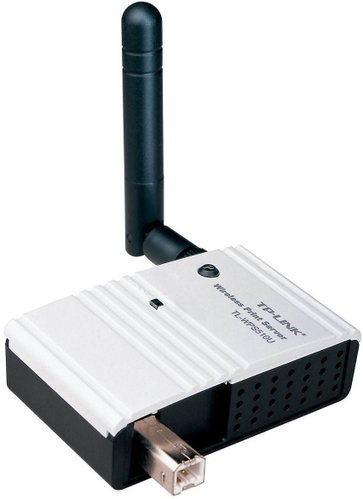

TP-LINK TL-WPS510U
Discontinued
TP-LINK TL-WPS510U

The TP-Link TL-WPS510U compact print server lets you conveniently share one USB printer over a wireless network. You can place it anywhere in your home or office, and you do not need a dedicated computer for it because all network users who have the right to use a shared printer can print from it.
The TP-Link TL-WPS510U supports multiple operating systems and is therefore the ideal print server for environments with different OSs. It works not only with Windows or Mac OS X platforms, but also with Linux. So, if you have different operating systems in your home or office, the TP-Link TL-WPS510U is the ideal solution for you.
Bundled software includes the Easy Setup Assistant, with which you can configure and start a new print server within minutes. The assistant will walk you through the installation process step by step. With a user-friendly Windows-based web utility, you can conveniently use and configure the print server from any computer on the network.
Parameters and Specifications:
Function:
One high-speed USB 2.0 port
IEEE 802.11g 802.11b standards
One RJ-45 LAN port 10/100 Mbps with Auto MDI/MDIX
LPD/LPR support (standard TCP/IP printer port)
DHCP client support
Power On Self Test (POST)
64/128-bit WEP encryption, Wireless WPA/WPA2/WPA-PSK / WPA2-PSK
Windows Web-based utility
Support for firmware upgrades
Interface:
USB 2.0 port
LED indication:
Power, wireless network
Wireless network features:
Wireless standards: IEEE 802.11g, IEEE 802.11b
Wireless security: WEP, WPA-PSK/WPA2-PSK
Software features:
Protocols: TCP/IP, IPX/SPX, NetBEUI, AppleTalk, LPR/LPD, IPP
Advanced Features: DHCP Client, Power On Self Test, Firmware Upgrade, Windows Based Utility
Manage: Web Administration, HP Web Jet Admin
Supported OS:
Windows 9x/ME, Windows 7/Vista/XP/2000
Mac OS 8.1 or later
UNIX / Linux
Netware 3.12 or later
Dimensions:
Dimensions: 65 x 40 x 19mm (L x W x H)
Standard Packaging:
Wireless print server
Removable omnidirectional antenna
Source CD
Quick Installation Guide

TP-LINK Czech s.r.o., Pekařská 10a, 15500 Praha 5, Česko, [email protected], www.tp-link.com
TP-LINK Czech, s. r. o., Pekařská 695/10, Jinonice, 155 00 Praha 5, CZ +420 212 812 622 / SK +421 233 006 532, [email protected]
Note:
Specifications can be changed without notice. Images are for illustrative purposes only.
