


Je tento monitor 4K, nebo jen Dual FullHD? 1080 totiž neodpovídá 4k Citace z Wikipedie: "Kdybychom chtěli rozlišení 4K označit stejným způsobem jako dřívější formáty, označili bychom ho nejčastěji jako 2160p"
49'' ASUS XG49VQ
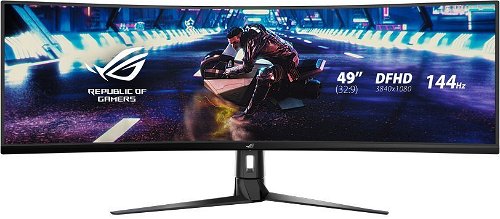


Monitor - VA, curved, 4K Ultra HD 3840 × 1080 (32:9), 144 Hz, matte display, 8 bit, 4 ms, FreeSync, adjustable height, speakers, HDMI and DisplayPort, VESA
Show full description
-5 % off new
17,890,-
New 18,990,-
 Installment calculator
4,9%
interest
from 411,- monthly
Installment calculator
4,9%
interest
from 411,- monthly
Shop faster with pickup at AlzaBox or in-store.
Warranty 36 months
Code:
WA049o9a
Product Fiche
Producer's Website:

49'' ASUS XG49VQ
17,890,-
Unsealed - in stock 1 pcs
Buy
49'' ASUS XG49VQ

49'' ASUS XG49VQ is an almost new item, in perfect condition, and comes with a full warranty. However, someone opened the original packaging before you. Why? It could have been an unwanted gift. For detailed information, click here.
- or almost new.
If you want to enjoy a visual feast when playing modern games, choose the premium ASUS ROG Strix XG49VQ ultra-wide monitor. In terms of features, it offers everything a demanding user could need. The ASUS ROG Strix XG49VQ monitor is equipped with an ultra-wide panel with a resolution of 3840 × 1080 pixels, which is an absolutely massive area. This gives you an overview in practically any game. If you currently use two monitors, you'll know that the bezels can be incredibly distracting during prolonged use. The ASUS ROG Strix XG49VQ offers a seamless work area equivalent to two 27" monitors. Plus, it has an 1800R curve.

49"
Screen Size
3840 × 1080 (4K)
Resolution (Resolution Type)
VA
Display Type
144Hz
Refresh Rate
4ms (GtG)
Response Time
Key Features of the 49" ASUS XG49VQ Monitor
- The monitor has a 49" screen and offers a resolution of 3840 × 1080 pixels
- The monitor uses a VA LCD panel and its curved design enhances the viewing experience
- The refresh rate is 144Hz and the response time is 4ms (GtG)
- The matte display surface eliminates reflections and FreeSync technology ensures a smooth picture
- The graphics interface includes DisplayPort 1.2 and HDMI 2.0, the data interface offers USB 3.0, and the audio interface includes a headphone output
- The monitor allows for height and tilt adjustment and is equipped with Flicker-Free technology and a blue light filter to protect your eyesight
- It is equipped with integrated speakers with an output of 2 × 5W
- Supports 100 × 100mm VESA mounting
144Hz Frequency
For a top gaming experience, you have a 144Hz refresh rate at your disposal. This gives you a significant advantage over your opponents, for example in FPS games. With FreeSync 2, the second generation of FreeSync technology, it combines HDR support with a variable refresh rate, enabling smoother gameplay.

Smart Hotkeys
With its 49" ultra-wide screen, multiple inputs, and Picture-by-Picture support, the ROG Strix XG49VQ allows you to view up to three content sources at once. Thanks to the control app, you can prepare hotkeys that quickly set up the screen split. For connecting image sources, there are 2× HDMI 2.0 or DisplayPort 1.2 ports. And even 2× USB 3.0 ports. Plus, the cabling is cleverly hidden right in the stand.

Technical Specifications of the Monitor
- Screen Size: 49"
- Display Type: VA
- Aspect Ratio: 32:9
- Maximum Brightness: 450cd/m²
- Contrast Ratio: 3,000:1
- Viewing Angles: 178°
- Response Time: 4ms (GtG)
- Refresh Rate: 144Hz
Package Contents
- 1× Stand
- 1× HDMI Cable
- 1× DisplayPort Cable
- 1× USB-A Cable

Colour Gamut
Determines how accurately a monitor can display colours. sRGB is ideal for web, films or games. DCI-P3/Adobe RGB is appreciated by graphic designers or professionals. The higher the stated value, the better the monitor displays colours. Maximum Brightness
A value given in nits or cd/m² determines the brightness of the monitor. A brightness of over 400 nits is key for HDR content and readability in sunlight, while standard office monitors are fine with values above 250. Refresh Rate and Response Time
Refresh rate (Hz) determines the number of frames displayed per second, so the higher the value, the smoother the image and the less eye strain. A lower response time (ms) eliminates motion blur. 144Hz+ is ideal for gaming, while values around 75Hz are suitable for office monitors.Specifications
49" (124.46 cm)
3840 × 1080
Construction
Panel technology
Display diagonal and resolution
Construction
Construction
Panel and screen technology
Panel technology
Panel type
Refresh rate
Response time
Maximum brightness
Native contrast
Surface display
Technology
Aspect Ratio
Aspect Ratio Type
Aspect Ratio
Backlight and colour
Colour depth
Connection
Graphical user interface (GUI) standards
Audio interface
HDMI
DisplayPort
USB
Features and functions
Colour
Black
Dimensions and weight
Width
Height
Depth
Weight
VESA mounting
Packaging
Cables included
Warranty
Extended warranty
Energy specifications
Energy efficiency class in SDR mode
Energy consumption in SDR mode
109 kWh/1000h
Energy efficiency class in HDR mode
More Specifications

ASUSTek COMPUTER INC. 1F.,No.15, Lide Rd., Beitou Dist., Taipei City 112 Tel: +886-2-2894-3447 Tel: +886-2-2890-7798 https://gr.asus.com/ProductSafety ASUS COMPUTER GmbH Harkortstrasse 21-23 40880 Ratingen Germany, Europe Email: [email protected]
ASUS COMPUTER GmbH, Harkortstrasse 21-23, 40880 Ratingen, Germany, Europe, [email protected]
ASUS is a symbol of the growth of Taiwan's economy. The firm's beginnings date back to April 2, 1989, when as a small manufacturer of motherboards began his work with a few employees. Today, Asus employs more than 12,500 employees worldwide.
ASUS products can be found in almost every category of the information technology marketplace. ASUS is focused on desktops, laptops, phones, optical drives and components. In the manufacture of motherboards, the company is now the dominant player with a staggering 40% market share.
Note:
Specifications can be changed without notice. Images are for illustrative purposes only.
