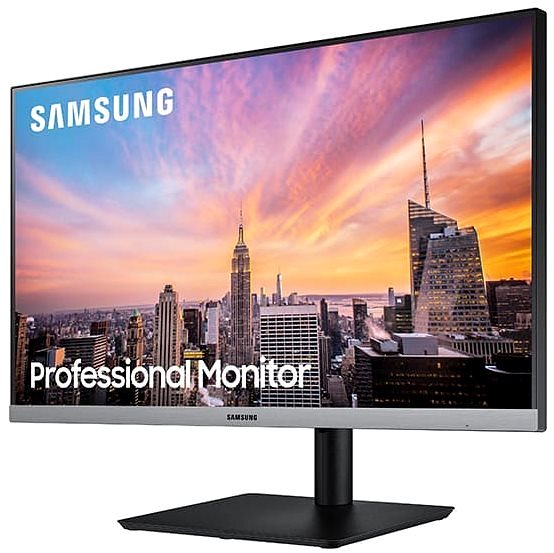
This Samsung LCD monitor will extend your computer with display with a screen measuring 24". The aspect ratio is 16:9. This LCD monitor works with IPS technology, boasting a high colour quality and excellent viewing angles. The resolution of this monitor is 1920 × 1080 px. The response time of 5 ms is sufficiently quick for work, as well as games. Its refresh rate of 75 Hz represents the regular standard. The Samsung monitor has a brightness of 250 cd/m2. The DisplayPort 1.2, HDMI 1.4 and VGA can be used for connecting to your PC.
24" Samsung S24R650 LCD Monitor Key Features
Maximum supported resolution: 1920 × 1080 px
LCD monitor uses IPS technology
The matte surface of this LCD monitor reduces sun glare
5 ms response time and refresh rate of 75 Hz
Maximum brightness of 250 cd/m2
FreeSync for synchronisation with AMD graphics cards
LCD monitor compatible with: 100×100 VESA mounting
Free pivot rotation
Stand with adjustable height
Integrated USB hub for easy device connectivity
Blue light filter for good sleep
24" Samsung S24R650 typical power consumption is equal to 18 W
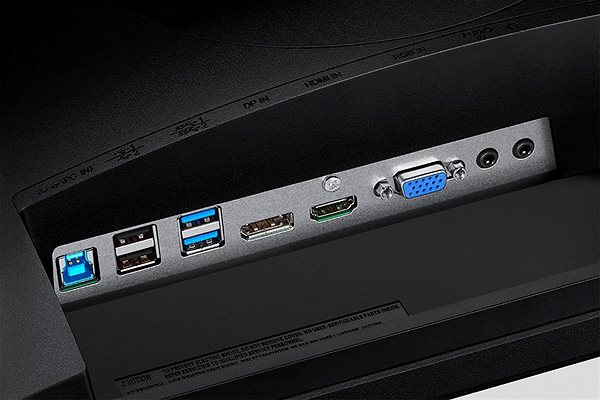
Connectivity: usb 2.0, headphone output and usb 3.2 gen 1 (usb 3.0)
24" Samsung S24R650 Monitor Design
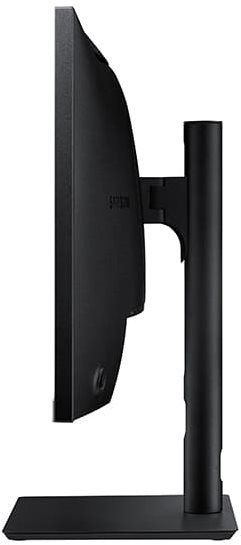
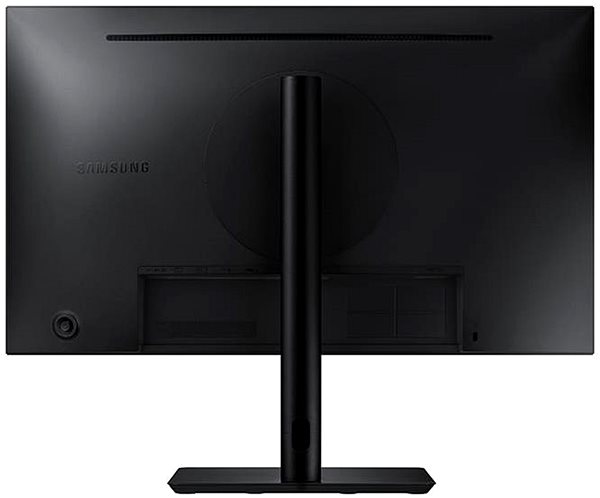
This Samsung computer monitor has a size measuring 53.94 × 47.38 × 20.05 cm, and you can adjust the height according to your preferences. In addition to a classic mount, the monitor can be hung on the wall using a VESA mount. The computer monitor model has a weight of 5.1 kg. A nice degree of versatility is made possible by the pivot function, meaning the monitor can be turned 90°. For maximum work comfort, this model also serves as a USB hub. The input interface is essential. The 24" Samsung S24R650 has the DisplayPort 1.2, HDMI 1.4 and VGA type. You can connect headphones directly to the monitor.
Modern Functions of the 24" Samsung S24R650 Monitor
When working in the dark, you will surely appreciate the blue light filter on this monitor that will help improve sleep quality. The Flicker-Free function provides an effective protection against eye strain by eliminating image flickering. The monitor includes an exclusive feature for any gamer called FreeSync, which is precision image synchronisation with AMD graphics cards.
Denotes the distance between the lower left and upper right corner of the screen. It is quoted in inches,while 1 "= 2.54 cm. How big a diagonal measurement to choose with which device and what are the benefitsand the disadvantages?
The monitor resolution type refers to the number of pixels that can be displayed on the monitor screen. Choosing the right resolution type can have a significant impact on the overall experience of using your monitor, whether it's for work, gaming or watching movies.
Monitor resolution refers to the number of pixels on the monitor screen, expressed as width × height. Higher resolutions provide a more detailed and clearer image, while lower resolutions may be suitable for smaller monitors or to save power.
Denotes the distance between the lower left and upper right corner of the screen. It is quoted in inches,while 1 "= 2.54 cm. How big a diagonal measurement to choose with which device and what are the benefitsand the disadvantages?
The monitor resolution type refers to the number of pixels that can be displayed on the monitor screen. Choosing the right resolution type can have a significant impact on the overall experience of using your monitor, whether it's for work, gaming or watching movies.
Monitor resolution refers to the number of pixels on the monitor screen, expressed as width × height. Higher resolutions provide a more detailed and clearer image, while lower resolutions may be suitable for smaller monitors or to save power.
The monitor connection type refers to the interface that is used to transmit the video signal from the source (e.g. computer) to the monitor. Different connection types support different resolutions and refresh rates and can affect the quality and performance of the display on the monitor.
Samsung Electronics Czech and Slovak, s.r.o., V parku 2323/14, Chodov, 148 00 Praha 4, 800 726 786, [email protected]
Creating a better world – the immodest vision which has driven Samsung since its inception in 1938. The courage to invest in the development of new technologies is typical for the company, as evidenced by a series of visionary solutions. Currently, Samsung is the largest group of companies in South Korea and the third largest worldwide conglomerate by revenue.
Samsung consumers associate the brand with high-quality consumer electronics. It is known for its Galaxy series, one of the best and most sought after mobile phones in its class. One must also mention Samsung TVs, where the company has long been at the cutting edge in technology and quality. The competence of the company is much broader. It is active in machinery and heavy industry, chemicals, construction, retail, and financial services.
Note:
Specifications can be changed without notice. Images are for illustrative purposes only.
Dobrý den.
Poslední dobu, když chci vybírat externí monitor značky Samsung, od expertů pořád čtu upozornění a možné nekompatibilitě se zařízeními jiných značek.
Přitom nikde v žádné recenzi, od žádného uživatele jsem o tom nečetl stížnost. Jak je to vlastně? K čemu se monitor připojuje, když ne k notebooku? Přitom firma Samsung již nějakou dobu na našem trhu notebooky nemá.
Dobrý den.
Poslední dobu, když chci vybírat externí monitor značky Samsung, od expertů pořád čtu upozornění a možné nekompatibilitě se zařízeními jiných značek.
Přitom nikde v žádné recenzi, od žádného uživatele jsem o tom nečetl stížnost. Jak je to vlastně? K čemu se monitor připojuje, když ne k notebooku? Přitom firma Samsung již nějakou dobu na našem trhu notebooky nemá.
Dobrý den, při připojení notebooku přes hdmi kabel přestane jít zvuk. Můžete prosím poradit co s tím? Zkoušel jsem připojit do monitoru přes jack, ale nepomohlo to.
Dobrý den, při připojení notebooku přes hdmi kabel přestane jít zvuk. Můžete prosím poradit co s tím? Zkoušel jsem připojit do monitoru přes jack, ale nepomohlo to.
Dobrý den,
mám dotaz, zdali je moźné vypnout napájení USB portů v případě STAND BY režimu. Po vypnutí PC je nutné vypnout vše co je k monitoru připojeno (osvětlení klávesnice, lampičky etc.). U sedm let starých modelů (i levnějších) to nebyl problém, zde to nemohu v menu najít.
Děkuji.
Dobrý den,
mám dotaz, zdali je moźné vypnout napájení USB portů v případě STAND BY režimu. Po vypnutí PC je nutné vypnout vše co je k monitoru připojeno (osvětlení klávesnice, lampičky etc.). U sedm let starých modelů (i levnějších) to nebyl problém, zde to nemohu v menu najít.
Děkuji.
Magyarországra történő kiszállításért tekintse meg ezt a termékoldalt: 24" Samsung S24R650
Try our cookiesAlza.cz a. s., Company identification number 27082440, use cookies and other data to ensure the proper functioning of the website and, with your consent, also, among other things, to personalize advertising and the content of our websites. By clicking on the “I understand“ button, you agree to the use of cookies and the transfer of data regarding the behavior on the website for displaying targeted advertising on social networks and advertising networks on other websites.
We use 8 categories of cookies on our website:
Technical cookies
These are strictly necessary for the functioning of the website and the features you choose to use. Without them, our website would not work; you wouldn't be able to log in to your user account, for example.
Functionality cookies
These cookies allow us to remember your basic choices and improve the user experience. These include remembering your preferred language or allowing you to stay logged in permanently.
Social media cookies
These cookies allow us to easily link you to your social media profile and, for example, allow you to share products and services with your friends and family.
Content personalisation
These cookies allow us to show you content and ads according to the information we have about you to best meet your needs. This includes what content you have viewed, or on what device you are accessing our website.
Non-personalised advertising
These cookies allow us to show you general ads for products and services.
Personalised advertising
Thanks to these cookies, we and our partners can offer you relevant products and services based on your purchases, your shopping behaviour and your preferences.
Audience metrics
These cookies allow us to optimise our site for your convenience based on how you use it. The aim is to remember or anticipate your choices. This includes, for example, the use of features, their location, or the behaviour on the page.
By giving your consent to the processing of cookies, functionality and analytical cookies will be installed on the device you use to browse the website (click on the "I understand" button for both categories, or you can select only one of the categories by clicking on the "Settings" button). We always install technical cookies on your device, even without your explicit consent, because without them our website would simply not work.
You can revoke your consent to the processing of cookies. In connection with our company's cookie processing, you also have the following rights: the right to access cookies, delete, modify, supplement and correct them, restrict processing and the right to lodge a complaint with the Office for Personal Data Protection. Read more about your rights.