




Pozor, nejedna se o 10bit monitor, ale pouze o 8bit+RFC. zdroj: External Link
27" BenQ SW2700PT

LCD Monitor - Quad HD 2560 × 1440, IPS, 16:9, 5ms, 10bit, 350cd/m2, 1000:1 contrast, DisplayPort, DisplayPort 1.2, DVI, HDMI 1.4, USB, headphone output, pivot
Show full description
Code:
WT157s
Producer's Website:
Don't like the alternatives? Choose from the full product list

27" BenQ SW2700PT
Discontinued
27" BenQ SW2700PT


The professional 27" monitor for BenQ SW2700PTs offers a 2560x1440 QHD IPS display, 99% Adobe RGB color space coverage, Delta E <2, 14bit 3D LUT, Black and White mode, and hardware calibration.
BenQ Flicker-free and Low Blue Light will protect your eyes and keep your attention with less eye strain.
Supplied as standard with Display Port, HDMI, and DVI cables.
BenQ understands the desire of photographers to achieve perfect color accuracy and true picture quality. Responding to these needs, the BenQ SW2700PT is a BenQ monitor that offers unique technology to revive creative visions, and preserve every unique moment.
This photo is disabled from the lightbox and will not be displayed.

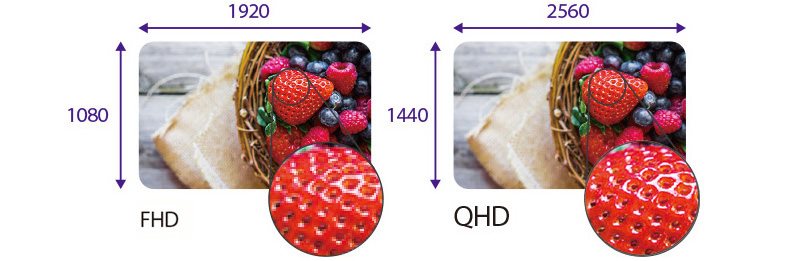
QHD resolution of 2560x1440 for sharper display
When editing and reviewing your results, the pixel density of these monitors delivers the high performance needed to express your creativity in extreme detail.
109 pixels per inch for fantastic sharpness
Thanks to the extremely high pixel density, each photo frame is displayed with great sharpness, resolution, and precision, allowing you to view all the details of the pictures in their entirety on the screen.
This photo is disabled from the lightbox and will not be displayed.
99% Adobe RGB
Show real colors of nature! Enjoy the full potential of your digital SLR camera using the BenQ Adobe RGB color space and a set of new color management features. They offer a larger color reproduction range for the blue and green shades that are more faithful to the color rendering for indoor, and outdoor photography.
This photo is disabled from the lightbox and will not be displayed.

This photo is disabled from the lightbox and will not be displayed.

14-bit 3D LUT and Delta E <2
The 14-bit Look Up Table (LUT) improves the RGB color mixing accuracy, resulting in perfect color reproduction. Thanks to the Delta E <2 in the Adobe RGB and sRGB colors, the most faithful and most representative image of the original image is available.
Hardware calibration
Hardware calibration allows you to set the image processing chip in the monitor without changing the graphics card output data. It preserves the image faithful to copies of the original, which is not influenced by the graphics settings.
This photo is disabled from the lightbox and will not be displayed.

This photo is disabled from the lightbox and will not be displayed.

Custom calibration software Palette Master Element
Using the Palette Master Element and the calibrator, you can fine-tune and maintain the monitor's color performance in the most optimal state.
OSD driver
The OSD driver is a remote control supplied with three preset buttons, each of which can be assigned to custom display settings such as photo editing, entertainment, or web browsing. This makes it easy to switch between preferences without having to go through complicated settings. The OSD driver is also equipped with a quick OSD navigation and setup button.
This photo is disabled from the lightbox and will not be displayed.

Black and white mode
Just click a button to see a black and white preview of color photos before adding a custom effect.
This photo is disabled from the lightbox and will not be displayed.

Shade screen
Ambient light and reflections can often influence the perception of color reproduction by the user. Therefore, the SW series uses a removable shield designed specifically to reduce glare and use in areas where the level of ambient lighting is not possible.
This photo is disabled from the lightbox and will not be displayed.

This photo is disabled from the lightbox and will not be displayed.

BenQ Eye-care
The latest BenQ Eye-care monitors ensure maximum eye protection while providing the most enjoyable, and comfortable picture experience. It features advanced Flicker-free and Low Blue Light technologies
BenQ Flicker-free
BenQ Flicker-free technology eliminates blinking of the image at all levels of brightness and effectively reduces eye fatigue. Standard LCD screens with LED backlight blink at 200x per second. Your eyes do not have to see blinking, but they definitely feel it. Relieve your eyes from blinking by moving to the SW2700PT monitor.
This photo is disabled from the lightbox and will not be displayed.

This photo is disabled from the lightbox and will not be displayed.

This photo is disabled from the lightbox and will not be displayed.

BenQ Low Blue Light
Each monitor produces blue light, which is one of the main causes of eye damage, eye fatigue, headaches, and sleep disturbances. Unique BenQ Low Blue Light technology eliminates the harmful blue light spectrum of colors transmitted by regular computer screens and lets you spend time in front of your computer in healthier conditions.
Specifications
Extended warranty
685.8 mm (27 ")
2560 × 1440 Quad HD
Construction
Warranty
Extended warranty
Display diagonal and resolution
Construction
Construction
Panel and screen technology
Panel type
Refresh rate
Response time
Maximum brightness
Native contrast
Aspect Ratio
Aspect Ratio Type
Aspect Ratio
Backlight and colour
Colour depth
Connection
Graphical user interface (GUI) standards
Audio interface
HDMI
DVI
DisplayPort
USB
Features and functions
Features
Functions
Dimensions and weight
Width
Height
Depth
Weight
Packaging
Cables included
Colour
Black
More Specifications

This Taiwanese corporation has offices around the world and is well-known for its consumer electronics. It has further offerings in communication and computing technology, and thanks to several strategic acquisitions, has been able to enter new markets and gain prominence. It is also a major sponsor of e-sports competitions, which has brought it to prominence among younger consumers. Millions of satisfied customers around the globe can attest to BenQ's matchless quality and innovation.
Note:
Specifications can be changed without notice. Images are for illustrative purposes only.
