


Dobry den, Mam dotaz na zakazniky nebo odbornika Dell. Mam monitor P2723DE a rad bych si koupil jeste jeden, ale musi byt designove stejny. Tento monitor se uz bohuzel neprodava, ale nasel jsem model P2725DE, ktery je primym nasledovnikem meho starsiho kousku. Mam jediny dotaz, kdyz je postavim vedle sebe, budou stejne? Jedna se mne o sirku ramecku kolem LCD panelu, aby mne to nerusilo, ze kazdy bude jinak siroky atd. Moc dekuji
27" Dell Pro 27 Plus (P2725DE)
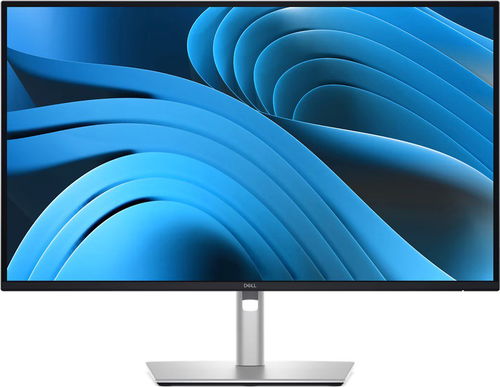


Monitor - IPS, Quad HD 2560 × 1440 (16:9), 100 Hz, Anti-Glare display, 8 bit, 8 ms, adjustable height, Power Delivery max. 90 W, HDMI, USB-C and DisplayPort, USB-C and RJ-45 (LAN) data interface, VESA
Show full description
Discounted -5 %
7,199,-
7,599,-
Price Guarantee
 Installment calculator
4,9%
interest
from 166,- monthly
Installment calculator
4,9%
interest
from 166,- monthly
Shop faster with pickup at AlzaBox or in-store.
Warranty 36 months
Code:
ADL27u21
Product Fiche
Producer's Website:
- Reviews 3
- Help and manuals 8
- Specifications
- Photos & Videos 7
- Alternatives 8
- Accessories and suggested products

27" Dell Pro 27 Plus (P2725DE)
7,599,-
7,199,-
In stock > 5 pcs
Buy
27" Dell Pro 27 Plus (P2725DE)
The Dell P2725DE is a professional 27" Quad HD display that increases productivity in the modern workplace. It is based on an IPS screen with a fine resolution of 2560 × 1440 pixels, which provides crisp and detailed visual content. With a refresh rate of 100Hz, cursor movement and content scrolling are noticeably smoother. This ergonomic display becomes the focal point of your desk. The flicker-free function eliminates the invisible backlight flicker that tires the eyes. The ComfortView Plus function permanently reduces blue light emissions without adversely affecting colour fidelity.

27"
Screen Size
2560 × 1440 (Quad HD)
Resolution (Resolution Type)
IPS Panel
Display Type
100Hz
Refresh Rate
8ms (GtG)
Response Time
Key Features of the 27" Dell Pro 27 Plus (P2725DE) Monitor
- Colour reproduction is handled by an IPS screen with a 99% sRGB range
- The USB-C hub supplies power to a laptop up to 90W
- The built-in RJ-45 connector is used for a stable network connection
- The stand offers comprehensive ergonomic adjustment of vertical position, tilt, swivel and 90° pivot
- The display allows VESA mounting
- Flicker-free function and ComfortView Plus protect your eyesight
Detailed and Smooth Visual Content
The visualisation is based on a 27" IPS screen with a fine resolution of 2560 × 1440 pixels, which displays fine details and clear fonts. The 100Hz refresh rate contributes to smoother scrolling of web pages, text files and an overall snappier cursor movement. The display covers 99% of the sRGB colour gamut, displays 16.7 million colours and works with a contrast ratio of 1,500:1, which gives visual content the necessary depth. A brightness of 350 candelas per square metre, together with a matte surface, ensures good visibility even in brighter spaces.

Ergonomics for Extended Use
The stand of the Dell Pro 27 Plus P2725DE display offers extensive adjustment options to create a comfortable workstation. You can adjust the vertical position of the screen within a range of 150mm, so you can easily adjust it to your eye level. You can also tilt the screen from -5° to 21° or swivel it sideways by 45° for presentations with colleagues. Pivoting the screen 90 degrees to a portrait orientation makes it easier to work with large spreadsheets, coding or viewing text files. A VESA standard is used for wall mounting.

Wide Connectivity Options
Thanks to the USB-C connector with power delivery up to 90W, you can connect your laptop with a single connecting cable that provides visual content, data and power transmission. The integrated RJ-45 connector provides a stable network connection. To optimise your workflow with multiple displays, there is a DisplayPort output connector with MST (Multi-Stream Transport) function, which simplifies the connection of additional displays directly from the first one, thus reducing the number of cables leading to the main device.
- 1× HDMI 2.1
- 2× DisplayPort 1.4
- 2× USB 5Gbps Type-C
- 3× USB 5Gbps Type-A
- 1× RJ-45 Ethernet

Monitor Technical Specifications
- Screen Size: 27"
- Display Type: IPS
- Backlight: LED
- Aspect Ratio: 16:9
- Maximum Brightness: 350 nits
- Contrast Ratio: 1,500:1
- Viewing Angles: 178°/178°
- Response Time: 8ms (GtG)
- Refresh Rate: 100Hz
Package Contents
- 1× monitor
- 1× stand
- 1× power cable
- 1× DisplayPort 1.4 cable (DisplayPort → DisplayPort)
- 1× USB-C → USB-C cable
- 1× USB 5Gbps cable (USB-C → USB-A)

Colour Coverage (Gamut)
Determines how accurately a monitor can display colours. sRGB is ideal for the web, films or games. DCI-P3/Adobe RGB is appreciated by graphic designers or professionals at work. The higher the stated value, the better the monitor displays colours. Maximum Brightness
The value given in nits or cd/m² determines the brightness of the monitor. A brightness above 400 nits is key for HDR content and readability in sunlight, while standard office monitors are fine with values above 250. Refresh Rate and Response Time
The refresh rate (Hz) determines the number of frames displayed per second, so the higher the value, the smoother the image and the less eye strain. A lower response time (ms) value eliminates motion blur. 144Hz+ is ideal for gaming, while values around 75Hz are suitable for office monitors.Specifications
27" (68.58 cm)
2560 × 1440
Construction
Panel technology
Display diagonal and resolution
Construction
Construction
Panel and screen technology
Panel technology
Panel type
Refresh rate
Response time
Maximum brightness
Native contrast
Surface display
Aspect Ratio
Aspect Ratio Type
Aspect Ratio
Backlight and colour
Colour depth
Connection
DisplayPort, HDMI, USB-C
Graphical user interface (GUI) standards
Data interface
HDMI
DisplayPort
USB-C
USB
Colour gamut
99 %
Features and functions
Features
Functions
Maximum Power Delivery performance
Colour
Black, Silver
Dimensions and weight
Width
Height
Depth
Weight
VESA mounting
Packaging
Cables included
Power outlet type
Country
Energy specifications
Energy efficiency class in SDR mode
Energy consumption in SDR mode
Standby consumption
Maximum power consumption
More Specifications

Dell Products, Raheen Business Park, Limerick, Ireland, [email protected], www.dell.com
This American multinational corporation based in Round Rock (Texas, USA) is a leading player in the field of information technology. The Dell brand carries the hallmark of quality and is known throughout the world. In 2010, it ranked fifth in the poll of most admired computer companies.
Dell's operations are incredibly broad - the company can be found not only in personal computers, servers, storage devices, switches, software and peripherals, but also HDTV, cameras, printers and MP3 players. The company, whose history began in 1984, now ranks among the giants in the field.
Note:
Specifications can be changed without notice. Images are for illustrative purposes only.
