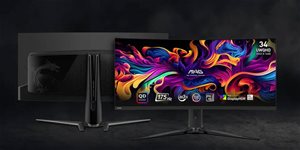
MSI Gaming Monitor with a Quality, New-Generation QD-OLED Panel
Race straight to victory with the MSI MPG 491CQP gaming monitor, which uses a new-generation QD-OLED panel. You'll enjoy brilliant colour reproduction full of detail in high UWQHD resolution (5120 × 1440) with a 1800R curvature radius. In fast-paced gaming action, you'll appreciate the 144Hz refresh rate and response time reaching just 0.03ms GTG. Certification for VESA ClearMR 8000 and DisplayHDR True Black 400 means that the image on the MSI MPG 491CQP QD-OLED monitor will be incredibly vibrant, full of colour, and with excellent contrast. Console gamers will appreciate the HDMI 2.1 ports supporting 120Hz, VRR, and ALLM. A monitor from the MPG (MSI Performance Gaming) series is an unbeatable tool for all passionate gamers because it combines quality craftsmanship, modern technology, practical features, and an appealing design.
Key Features of the MSI MPG 491CQP QD-OLED Gaming Monitor
Gaming monitor with 5K resolution of 5120 × 1440 uses a 3rd generation QD-OLED panel
Widescreen 32:9 aspect ratio
Curved monitor with a 1800R curvature
High contrast and brightness
0.03ms GtG response time and 144Hz refresh rate
Excellent colour reproduction and precise details are ensured by Delta E≤2 and VESA DisplayHDR True Black 400
Adaptive Sync technology minimises screen tearing, blurring, and annoying glare
MSI OLED Care 2.0 reduces the risk of OLED image sticking / burn-in
KVM function for controlling multiple devices with one set of keyboard, mouse and monitor
Advanced eye-care features reduce eye strain when viewing the monitor
Support for 90W PD via USB-C
Console mode provides HDMI 2.1 with full bandwidth
Easy repositioning of the monitor for maximum ergonomics
3-year warranty against burn-in
Gaming Monitor with 3rd Generation QD-OLED Panel
Excellent Detail and Clarity
The MSI MPG 491CQP gaming monitor is equipped with the latest generation QD-OLED display, which provides an excellent image full of detail and great clarity. The sub-pixel arrangement provides a sharper image, finer details, and clearer text.
The Speed of the MSI MPG 491CQP Knows No Bounds
Enjoy gaming to the fullest and be captivated by the smoothness of the picture. The MSI MPG 491CQP gaming monitor is equipped with a high-quality QD-OLED panel with a refresh rate reaching 144Hz and a response time of just 0.03ms GTG. You will especially appreciate this speed when playing action, racing and sports titles, where you will be able to react instantly to the situation at hand.
Enjoy a Smooth Picture with Adaptive Sync
The MSI MPG 491CQP QD-OLED gaming monitor is equipped with Adaptive Sync, which takes care of synchronising the refresh rate of the monitor and the graphics card. They will be aligned and the resulting image will be smooth, without annoying stuttering, screen tearing or artifacts. You will particularly appreciate this feature of the MSI MPG 491CQP QD-OLED monitor during fast-paced gaming action.
A Gaming Monitor That's Easy on Your Eyes
The display of the MSI MPG 491CQP QD-OLED gaming monitor features MSI Anti-Flicker technology, which reduces the monitor's flicker rate. Your eyes won't be so tired after prolonged viewing. This feature is certified by TÜV Rheinland. In addition, the MSI monitor emits less harmful blue light.
VESA DisplayHDR True Black 400 Certification
The OLED panel of the MSI MPG 491CQP gaming monitor can control the dimming of all pixels much better, making black truly black. That's why the MSI gaming monitor offers high contrast and overall better colour reproduction with richer and brighter colours.
The MSI MPG 491CQP Excels in Accurate Colour Reproduction
The picture on the MSI MPG 491CQP QD-OLED monitor is almost breathtaking. The manufacturer has designed and calibrated it to provide superior colour fidelity of DELTA E≤ 2. The 10-bit RGB panel ensures absolute colour accuracy and smooth colour transitions. This is also why the gaming monitor meets 99% coverage of the DCI-P3 colour gamut.
KVM Support
With KVM support, you can seamlessly control multiple devices via your monitor, mouse and the MSI MPG 491CQP QD-OLED gaming monitor. This will make your devices easier to use and increase your overall comfort.
The MSI MPG 491CQP QD-OLED has Technologies to Make Gaming Easier
The gaming monitor is equipped with a range of technologies and features to enhance your overall gaming experience. For example, AI Vision is used to enrich the overall brightness, contrast and colour, so that details stand out better even in dark areas. With the Smart Crosshair feature, you'll see the crosshair under all circumstances. Sometimes the crosshair can blend into the background, but that won't happen with the MSI MPG 491CQP QD-OLED monitor, as it automatically changes the crosshair colour to make it always visible. The OLED monitor features an Optix Scope function to zoom in on enemies using keyboard shortcuts. It doesn't matter what weapon you're using, you can become a sniper with practically anything.
Console Mode with VRR Support
The gaming monitor uses VRR technology to reduce or completely eliminate problems with lag, screen tearing or interruptions, so the gaming experience will be absolutely smooth. The MSI MPG 491CQP QD-OLED will give you a fabulous gaming experience without image suppression or compromising on quality.
Convenient Adjustment of the MSI Monitor
The 5-way Navigator joystick has been moved to the bottom of the MSI MPG 491CQP QD-OLED monitor, making its setup much more convenient.
The Monitor Has Modern Technologies to Make it Easier to Use
The MSI MPG 491CQP QD-OLED is equipped with a USB-C connector, through which up to 90W of power can be delivered via the monitor. You'll also find additional USB ports on the monitor, which can be used to connect other necessary peripherals. To activate them, you need to connect the monitor to your computer via the USB Type-B port using the supplied cable.
Denotes the distance between the lower left and upper right corner of the screen. It is quoted in inches,while 1 "= 2.54 cm. How big a diagonal measurement to choose with which device and what are the benefitsand the disadvantages?
The monitor resolution type refers to the number of pixels that can be displayed on the monitor screen. Choosing the right resolution type can have a significant impact on the overall experience of using your monitor, whether it's for work, gaming or watching movies.
Monitor resolution refers to the number of pixels on the monitor screen, expressed as width × height. Higher resolutions provide a more detailed and clearer image, while lower resolutions may be suitable for smaller monitors or to save power.
Denotes the distance between the lower left and upper right corner of the screen. It is quoted in inches,while 1 "= 2.54 cm. How big a diagonal measurement to choose with which device and what are the benefitsand the disadvantages?
The monitor resolution type refers to the number of pixels that can be displayed on the monitor screen. Choosing the right resolution type can have a significant impact on the overall experience of using your monitor, whether it's for work, gaming or watching movies.
Monitor resolution refers to the number of pixels on the monitor screen, expressed as width × height. Higher resolutions provide a more detailed and clearer image, while lower resolutions may be suitable for smaller monitors or to save power.
The monitor connection type refers to the interface that is used to transmit the video signal from the source (e.g. computer) to the monitor. Different connection types support different resolutions and refresh rates and can affect the quality and performance of the display on the monitor.
The sRGB colour coverage of a monitor is a measure of how much of the range of colours defined in the sRGB (Standard Red Green Blue) standard the monitor is able to display. A higher percentage of sRGB coverage means that the monitor can display a wider and richer range of colors.
The European Commission has recently approved new energy labels for household appliances. You will find them in stores starting from the 2021. Which appliances are affected by the changes? What should the consumer prepare for and what will the new energy labels look like? In this article, we bring you an overview of the most important changes.
50 kWh/1000h
Energy efficiency class in HDR mode
G
More Specifications
Micro-Star International Co Ltd. C/O MSI Computer Europe BV, Science Park Eindhoven 5706, 5692 ER, Son, Netherlands, [email protected]
The Taiwanese company MSI (Micro-Star International) has earned a solid place in the world of IT, mainly producing motherboards for desktop computers. However, it also produces high quality graphics cards, barebone computers, notebook computers, networking products, servers, and many other computer components. MSI products support the latest technologies and provide the performance necessary for all applications. Recently, the company has begun making a name for itself in the growing segment of gaming notebooks.
Specifications can be changed without notice. Images are for illustrative purposes only.
Dobrý den,
Je možno připojit jeden notebook dvakrát, aby ten notebook viděl tenhle monitor jako dva monitory? Problém je v tom, že můj pracovní notebook podporuje max 4K a to při 60 Hz, to se mi nelíbí.
Představoval bych si to tak, že by byl připojen dvakrát při vyšší frekvenci.
Předem děkuji za odpověď.
Dobrý den,
Je možno připojit jeden notebook dvakrát, aby ten notebook viděl tenhle monitor jako dva monitory? Problém je v tom, že můj pracovní notebook podporuje max 4K a to při 60 Hz, to se mi nelíbí.
Představoval bych si to tak, že by byl připojen dvakrát při vyšší frekvenci.
Předem děkuji za odpověď.
Dobrý den. Přes co je lepší monitor propojit DP 1.4 nebo HDMI 2.1? Mám grafickou kartu rx 6800 která podporuje oboje, ale jde mi o to aby jel monitor na 5k 144Hz a 10bit. Podle specifikace DP a HDMI umí jen 5k 60Hz. Děkuji za odpověď
Dobrý den. Přes co je lepší monitor propojit DP 1.4 nebo HDMI 2.1? Mám grafickou kartu rx 6800 která podporuje oboje, ale jde mi o to aby jel monitor na 5k 144Hz a 10bit. Podle specifikace DP a HDMI umí jen 5k 60Hz. Děkuji za odpověď
Je mozne pripojit k notebook k monitoru pouze pomoci USB-C, ktere bude slouzit jako Power Delivery, ale take k prenosu obrazu a pripadne vstupu z pripojenych zarizeni pomoci klasickych USB portu?
Je mozne pripojit k notebook k monitoru pouze pomoci USB-C, ktere bude slouzit jako Power Delivery, ale take k prenosu obrazu a pripadne vstupu z pripojenych zarizeni pomoci klasickych USB portu?
Try our cookiesAlza.cz a. s., Company identification number 27082440, use cookies and other data to ensure the proper functioning of the website and, with your consent, also, among other things, to personalize advertising and the content of our websites. By clicking on the “I understand“ button, you agree to the use of cookies and the transfer of data regarding the behavior on the website for displaying targeted advertising on social networks and advertising networks on other websites.
We use 8 categories of cookies on our website:
Technical cookies
These are strictly necessary for the functioning of the website and the features you choose to use. Without them, our website would not work; you wouldn't be able to log in to your user account, for example.
Functionality cookies
These cookies allow us to remember your basic choices and improve the user experience. These include remembering your preferred language or allowing you to stay logged in permanently.
Social media cookies
These cookies allow us to easily link you to your social media profile and, for example, allow you to share products and services with your friends and family.
Content personalisation
These cookies allow us to show you content and ads according to the information we have about you to best meet your needs. This includes what content you have viewed, or on what device you are accessing our website.
Non-personalised advertising
These cookies allow us to show you general ads for products and services.
Personalised advertising
Thanks to these cookies, we and our partners can offer you relevant products and services based on your purchases, your shopping behaviour and your preferences.
Audience metrics
These cookies allow us to optimise our site for your convenience based on how you use it. The aim is to remember or anticipate your choices. This includes, for example, the use of features, their location, or the behaviour on the page.
By giving your consent to the processing of cookies, functionality and analytical cookies will be installed on the device you use to browse the website (click on the "I understand" button for both categories, or you can select only one of the categories by clicking on the "Settings" button). We always install technical cookies on your device, even without your explicit consent, because without them our website would simply not work.
You can revoke your consent to the processing of cookies. In connection with our company's cookie processing, you also have the following rights: the right to access cookies, delete, modify, supplement and correct them, restrict processing and the right to lodge a complaint with the Office for Personal Data Protection. Read more about your rights.