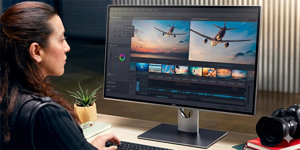
14" Dell Pro 14 Plus (P1425) 5,849,- In stock > 5 pcs at the supplier's
Buy
14" Dell Pro 14 Plus (P1425)
The Dell Pro 14 Plus (P1425) portable monitor extends your laptop's desktop wherever you are. This 14" IPS monitor with a 1920×1200 pixel resolution and 16:10 aspect ratio provides more vertical space for applications and documents. With a low weight of just 0.6kg and a slim profile, you can easily carry it in a bag with your laptop. The screen's 60Hz refresh rate and 7ms (GtG) response time offer smooth visuals for everyday office work. A key feature is modern USB-C connectivity, which simplifies connection with a single cable for both video and power. This makes the Dell portable monitor a practical tool for increasing productivity on business trips, in the field, or when working from home and needing a second display.
14"
Screen Size
1920 × 1200 (Full HD)
Resolution (Resolution Type)
IPS
Display Type
60 Hz
Refresh Rate
7 ms (GtG)
Response Time
Key Features of the 14" Dell Pro 14 Plus (P1425) Monitor
14" monitor with Full HD 1920 × 1200 pixel resolution
Uses an IPS panel
Provides a 60Hz refresh rate
Delivers a maximum Power Delivery output of 65W
Covers 100% of the sRGB colour space
The display has an anti-glare surface
Features a 16:10 aspect ratio
Displays 8-bit colour depth
Connects via a USB-C interface
Allows for 100 × 100mm VESA mounting
Detailed Image with Accurate Colours
The core is a 14" IPS panel which, thanks to its 16:10 aspect ratio, offers more vertical space for working with documents and applications. The screen, with a high brightness of 400cd/m² and a 1,500:1 contrast ratio, displays content clearly even in brightly lit spaces. One hundred percent coverage of the sRGB colour space, combined with 8-bit colour depth, ensures accurate and consistent colour reproduction, which is important for graphic work as well as general content viewing. The anti-glare display surface actively suppresses unwanted reflections from surrounding light sources.
Low Power Consumption
ComfortView Plus technology is a hardware solution that reduces harmful blue light emissions directly at the panel level. Unlike software filters, this means there is no colour distortion or yellow tint to the image. The monitor is rated in energy class B and designed for efficient operation. Its typical consumption in SDR mode is 5.4W, which places a minimal load on the connected laptop's battery, thus extending the total working time on the go without needing to find a socket.
Flexibility Thanks to VESA Mounting
Although the monitor is primarily designed for mobile use, its versatility is enhanced by VESA standard support. On the rear, there are mounting holes with a 100 × 100mm spacing. This preparation for mounting on a bracketor arm gives you the option to create a stable workstation in the office or at home. The monitor can be easily integrated into a multi-monitor setup, attached to a wall, or placed on an adjustable stand for better ergonomics during prolonged work.
Connectivity Options
Connection to a laptop or other device is handled by two multifunctional USB-C 3.2 ports. These connectors are used to transmit the video signal and data with a single cable. Furthermore, one of the ports supports Power Delivery with an output of up to 65W, so it can efficiently power a connected laptop. The second port can be used for pass-through charging, where you connect a mains adapter to the monitor, and it simultaneously powers both the monitor and the laptop.
2× USB-C 3.2
Monitor Technical Specifications
Screen Size: 14"
Display Type: IPS panel
Backlight: LED
Aspect Ratio: 16:10
Maximum Brightness: 400cd/m²
Contrast Ratio: 1,500:1
Viewing Angles: 178°
Response Time: 7ms (GtG)
Refresh Rate: 60Hz
Package Contents
1× USB-C Cable
1× Stand
Colour Gamut
Determines how accurately a monitor can display colours. sRGB is ideal for the web, films, or games. DCI-P3/Adobe RGB is appreciated by graphic designers or professionals. The higher the stated value, the better the monitor displays colours.
Maximum Brightness
The value, given in nits or cd/m², determines the brightness level of the monitor. Brightness above 400 nits is key for HDR content and readability in sunlight, while standard office monitors are sufficient with values above 250.
Refresh Rate and Response Time
The refresh rate (Hz) determines the number of frames displayed per second, so the higher the value, the smoother the image and the less eye strain. A lower response time (ms) eliminates motion blur. 144Hz+ is ideal for gaming, while values around 75Hz are suitable for office monitors.
Denotes the distance between the lower left and upper right corner of the screen. It is quoted in inches,while 1 "= 2.54 cm. How big a diagonal measurement to choose with which device and what are the benefitsand the disadvantages?
The monitor resolution type refers to the number of pixels that can be displayed on the monitor screen. Choosing the right resolution type can have a significant impact on the overall experience of using your monitor, whether it's for work, gaming or watching movies.
Monitor resolution refers to the number of pixels on the monitor screen, expressed as width × height. Higher resolutions provide a more detailed and clearer image, while lower resolutions may be suitable for smaller monitors or to save power.
Denotes the distance between the lower left and upper right corner of the screen. It is quoted in inches,while 1 "= 2.54 cm. How big a diagonal measurement to choose with which device and what are the benefitsand the disadvantages?
The monitor resolution type refers to the number of pixels that can be displayed on the monitor screen. Choosing the right resolution type can have a significant impact on the overall experience of using your monitor, whether it's for work, gaming or watching movies.
Monitor resolution refers to the number of pixels on the monitor screen, expressed as width × height. Higher resolutions provide a more detailed and clearer image, while lower resolutions may be suitable for smaller monitors or to save power.
The monitor connection type refers to the interface that is used to transmit the video signal from the source (e.g. computer) to the monitor. Different connection types support different resolutions and refresh rates and can affect the quality and performance of the display on the monitor.
The sRGB colour coverage of a monitor is a measure of how much of the range of colours defined in the sRGB (Standard Red Green Blue) standard the monitor is able to display. A higher percentage of sRGB coverage means that the monitor can display a wider and richer range of colors.
Dell Products, Raheen Business Park, Limerick, Ireland, [email protected], www.dell.com
This American multinational corporation based in Round Rock (Texas, USA) is a leading player in the field of information technology. The Dell brand carries the hallmark of quality and is known throughout the world. In 2010, it ranked fifth in the poll of most admired computer companies.
Dell's operations are incredibly broad - the company can be found not only in personal computers, servers, storage devices, switches, software and peripherals, but also HDTV, cameras, printers and MP3 players. The company, whose history began in 1984, now ranks among the giants in the field.
Note:
Specifications can be changed without notice. Images are for illustrative purposes only.
Dobry den
viete mi prosim zistit kapacitu baterie, pripadne kolko hodin vydrzi byt monitor napajany iba vstavanou bateriou?
Dobry den
viete mi prosim zistit kapacitu baterie, pripadne kolko hodin vydrzi byt monitor napajany iba vstavanou bateriou?
Try our cookiesAlza.cz a. s., Company identification number 27082440, use cookies and other data to ensure the proper functioning of the website and, with your consent, also, among other things, to personalize advertising and the content of our websites. By clicking on the “I understand“ button, you agree to the use of cookies and the transfer of data regarding the behavior on the website for displaying targeted advertising on social networks and advertising networks on other websites.
We use 8 categories of cookies on our website:
Technical cookies
These are strictly necessary for the functioning of the website and the features you choose to use. Without them, our website would not work; you wouldn't be able to log in to your user account, for example.
Functionality cookies
These cookies allow us to remember your basic choices and improve the user experience. These include remembering your preferred language or allowing you to stay logged in permanently.
Social media cookies
These cookies allow us to easily link you to your social media profile and, for example, allow you to share products and services with your friends and family.
Content personalisation
These cookies allow us to show you content and ads according to the information we have about you to best meet your needs. This includes what content you have viewed, or on what device you are accessing our website.
Non-personalised advertising
These cookies allow us to show you general ads for products and services.
Personalised advertising
Thanks to these cookies, we and our partners can offer you relevant products and services based on your purchases, your shopping behaviour and your preferences.
Audience metrics
These cookies allow us to optimise our site for your convenience based on how you use it. The aim is to remember or anticipate your choices. This includes, for example, the use of features, their location, or the behaviour on the page.
By giving your consent to the processing of cookies, functionality and analytical cookies will be installed on the device you use to browse the website (click on the "I understand" button for both categories, or you can select only one of the categories by clicking on the "Settings" button). We always install technical cookies on your device, even without your explicit consent, because without them our website would simply not work.
You can revoke your consent to the processing of cookies. In connection with our company's cookie processing, you also have the following rights: the right to access cookies, delete, modify, supplement and correct them, restrict processing and the right to lodge a complaint with the Office for Personal Data Protection. Read more about your rights.