


Má tento displej skutečně senzor přítomnosti? Nikde jinde než zde se o něm nepíše, v manuálu jsem také žádnou zmínku nenašel (pouze automatickou regulaci jasu). Díky.
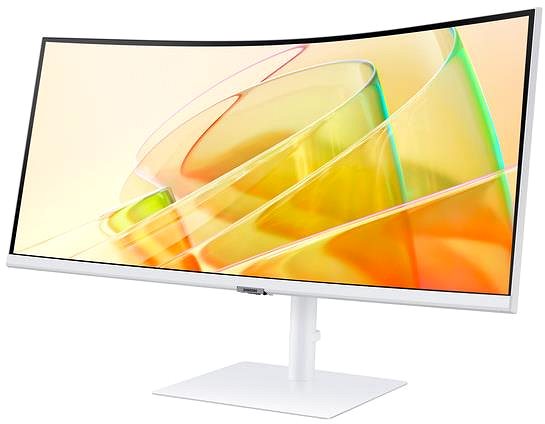
34" Samsung ViewFinity S65TC


Monitor - VA, curved, Ultra Wide QHD 3440 × 1440 (21:9), 100 Hz, matte display, 5 ms, FreeSync, adjustable height, Power Delivery, automatic brightness adjustment, speakers, HDMI, USB-C, DisplayPort and ThunderBolt, RJ-45 (LAN) data interface, VESA
Show full description
Buy with code
ALZADNY25
9,488,-
Discounted -2 %
12,650,-
12,990,-
Price Guarantee
 Installment calculator
4,9%
interest
from 218,- monthly
Installment calculator
4,9%
interest
from 218,- monthly
Shop faster with pickup at AlzaBox or in-store.
Warranty 24 months
Code:
WH605h10a1c
Product Fiche
Producer's Website:
- Reviews 1
- Help and manuals 3
- Specifications
- Photos & Videos 16
- Alternatives 7
- Accessories and suggested products

34" Samsung ViewFinity S65TC
12,990,-
12,650,-
In stock > 5 pcs
Buy
34" Samsung ViewFinity S65TC
This 34" Samsung LCD monitor can handle working in Ultra Wide QHD (3440 × 1440) resolution. Thanks to its high contrast, its VA panel delivers significantly deeper blacks. This makes objects more discernible, even in darker areas. The display's matte-finish surface doesn't reflect room light from the monitor and also helps against light from a window. The widescreen monitor with a 21:9 aspect ratio is ideal for multitasking or streaming, where you can have multiple windows open side by side. A maximum brightness of 350cd/m² is a good choice for working out of direct sunlight and is also suitable for rooms that are not too brightly lit. It can be mounted using a 100×100 VESA mount on a wall or a stand. This makes it easy to place several monitors in your office.
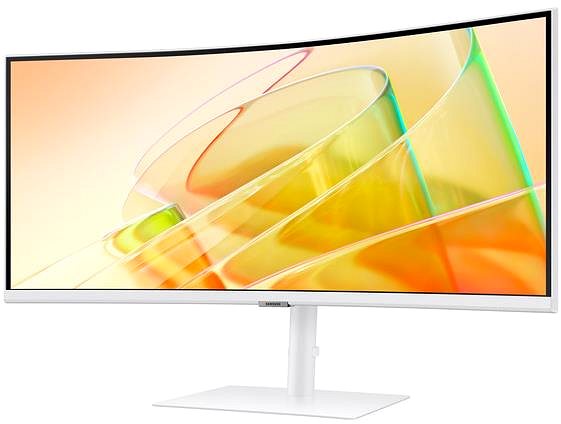
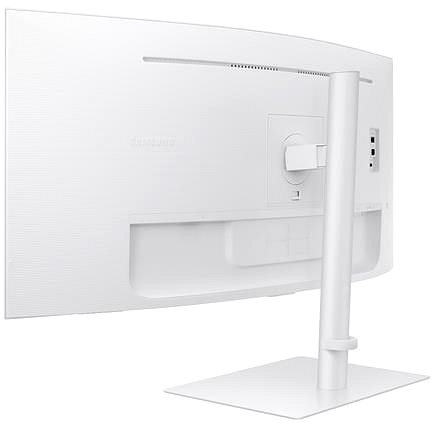
Key Features of the 34" Samsung ViewFinity S65TC Monitor
- Work efficiently with this 34" Samsung LCD monitor with Ultra Wide QHD (3440 × 1440) resolution
- It uses a VA panel for colour display with a refresh rate of up to 100Hz and a response time of 5ms
- The matte display surface helps prevent glare and reduces eye strain
- The widescreen 21:9 aspect ratio is ideal for multitasking
- A maximum brightness of 350cd/m² is optimal for working out of the sun and in less brightly lit rooms
- FreeSync technology is responsible for smooth image rendering
- Curved monitor design
The Samsung monitor offers plenty of interesting features and functions
The 34" VA PC monitor features a curved display design that provides a more natural experience thanks to an optimal field of view. In your free time, you'll also get a better experience watching films or playing games. It has a filter that produces less blue light and a Flicker-free function that reduces the frequency of monitor flicker. This can help reduce eye fatigue and improve sleep quality. Automatic ambient light sensing allows the display to adjust its brightness so that it doesn't shine too brightly at night and ensures readability during the day. The PiP (Picture in Picture) function displays a small window with a second image or video on the main display. This makes it easy to switch between the main image and the smaller embedded window, so you don't have to cancel the main activity on the screen. You can tilt the monitor and adjust it to the required height so that its top side corresponds to eye level, thus promoting correct posture, which relieves the cervical spine and helps prevent scoliosis. The ability to tilt the monitor will be especially appreciated by people who stand at their desks while working.
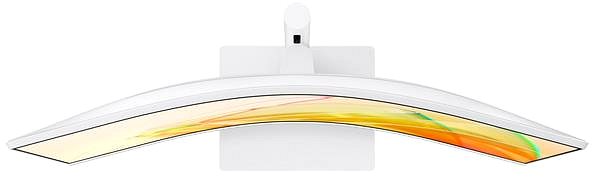
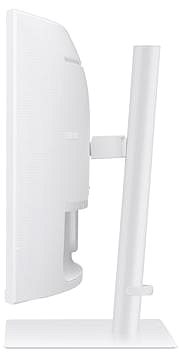
You'll be delighted by the Samsung monitor's features
You can connect the monitor to a computer or laptop using HDMI, USB-C, DisplayPort, and Thunderbolt. If your computer doesn't have a suitable connector, you can expand its connectivity by purchasing a compatible port replicator. A port replicator is also useful when you want to connect two monitors. Support for Thunderbolt 4 will please Apple product users and owners of other newer devices. The built-in speakers are a convenient solution for both audio and video in one device. In addition to the monitor itself, you'll also find an HDMI and USB-A cable in the package.
Choose a monitor with native contrast in mind
The Samsung monitor offers a native contrast of 3,000:1. The difference between the brightest and darkest points a monitor can display is expressed by the native contrast ratio. If a monitor's contrast ratio is 3,000:1, it means that the brightest point (white) is 3,000× brighter than the darkest point (black).
Data on the monitor's energy label:
- The manufacturer and model of the monitor are listed in the header
- The scale of energy classes (left), the specific energy class of the product (right)
- kWh/1000h: energy consumption in kilowatt-hours per 1,000 hours of operation
- SDR kWh/1000h: energy consumption in SDR mode in kilowatt-hours per 1,000 hours of operation
- HDR kWh/1000h: energy consumption in HDR mode in kilowatt-hours per 1,000 hours of operation
- Pixels: vertical and horizontal display resolution (3440 × 1440 px)
- Units in inches and centimetres: screen screen size
__________________________________________________________________
After scanning the QR code, you will be redirected to the European EPREL database, where you will see the display type, the technology used in its production (e.g., LCD, QLED), and other monitor specifications.
screen size:
34"
Graphics Interface:
HDMI, USB-C, DisplayPort and Thunderbolt
Graphics Interface Standards:
DisplayPort 1.2, HDMI 2.0, Thunderbolt 4 and Thunderbolt 3
Energy Class in SDR Mode:
G
Consumption in SDR mode:
32 kWh/1000h
Energy Class in HDR Mode:
G
Consumption in HDR mode:
52 kWh/1000h
Dimensions:
56.2 × 80.7 × 24.1cm (H×W×D)
Weight:
8.1kg
Specifications
34" (86.36 cm)
3440 × 1440
Construction
Panel technology
Display diagonal and resolution
Construction
Construction
Panel and screen technology
Panel technology
Panel type
Refresh rate
Response time
Maximum brightness
Native contrast
Surface display
Technology
Aspect Ratio
Aspect Ratio Type
Aspect Ratio
Connection
DisplayPort, HDMI, ThunderBolt, USB-C
Graphical user interface (GUI) standards
Data interface
Audio interface
HDMI
DisplayPort
Thunderbolt / USB 4
USB
Features and functions
Features
Functions
Equipment
Colour
White
Dimensions and weight
Width
Height
Depth
Weight
VESA mounting
Packaging
Cables included
Warranty
Extended warranty
Power outlet type
Country
Energy specifications
Energy efficiency class in SDR mode
Energy consumption in SDR mode
52 kWh/1000h
Energy efficiency class in HDR mode
More Specifications

Samsung Electronics Czech and Slovak, s.r.o., V parku 2323/14, Chodov, 148 00 Praha 4, 800 726 786, [email protected]
Creating a better world – the immodest vision which has driven Samsung since its inception in 1938. The courage to invest in the development of new technologies is typical for the company, as evidenced by a series of visionary solutions. Currently, Samsung is the largest group of companies in South Korea and the third largest worldwide conglomerate by revenue.
Samsung consumers associate the brand with high-quality consumer electronics. It is known for its Galaxy series, one of the best and most sought after mobile phones in its class. One must also mention Samsung TVs, where the company has long been at the cutting edge in technology and quality. The competence of the company is much broader. It is active in machinery and heavy industry, chemicals, construction, retail, and financial services.
Note:
Specifications can be changed without notice. Images are for illustrative purposes only.
