


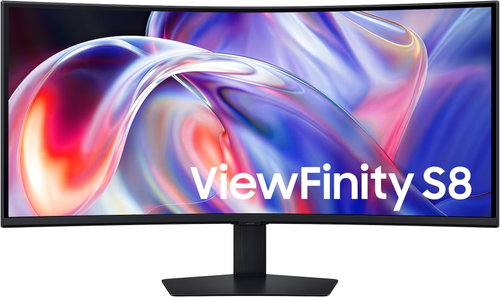
40" Samsung ViewFinity S8 (S85TH)

 Installment calculator
4,9%
interest
from 678,- monthly
Installment calculator
4,9%
interest
from 678,- monthly
- Help and manuals
- Specifications
- Photos & Videos 14
- Alternatives 8
- Accessories and suggested products

40" Samsung ViewFinity S8 (S85TH)
40" Samsung ViewFinity S8 S85TH Monitor

The 40" Samsung ViewFinity S8 S85TH monitor is designed for demanding work, multitasking, creative projects and the convenient use of multiple devices. The curved VA panel with WUHD resolution of 5,120 × 2,160px and a 21:9 aspect ratio offers an exceptionally wide workspace, making it easier to work with multiple windows side-by-side. The features are complemented by HDR10+, Thunderbolt™ 5, KVM Switch, Picture-by-Picture, Picture-in-Picture, built-in speakers, LAN, a USB hub, a 144Hz refresh rate, AMD FreeSync Premium, and an ergonomic stand with height, tilt and swivel adjustment.

40"
Screen Size
5,120 × 2,160px
Resolution
VA Panel
Display Type
144Hz
Refresh Rate
Key Features of the Samsung ViewFinity S8 S85TH Monitor
- 40" Samsung ViewFinity S8 S85TH monitor for work, creative activities and multitasking
- Curved VA panel with 1000R curvature
- WUHD resolution of 5,120 × 2,160px
- Ultrawide 21:9 aspect ratio for a wider workspace
- Brightness 350cd/m²
- Contrast 3,000:1
- HDR10+ and display of up to 1.07 billion colours
- Refresh rate up to 144Hz
- Response time 4ms GTG
- Thunderbolt™ 5 with data transfer up to 80Gb/s and power up to 140W
- Daisy Chain for connecting another display
- Easy Connection for more convenient device connection
- Integrated LAN port for a stable network connection
- KVM Switch for controlling two devices with one keyboard and mouse
- Picture-in-Picture and Picture-by-Picture for working with multiple sources
- Samsung Display Manager for faster management of monitor functions
- Built-in 2×5W speakers
- Intelligent Eye Care, Eye Saver Mode and Flicker Free
- AMD FreeSync Premium for a smoother picture
- Ergonomic stand with height, tilt and swivel adjustment
- VESA mount 100×100mm
- TCO, EPEAT Gold and TÜV certified
Wide Workspace in WUHD Resolution
The Samsung ViewFinity S8 S85TH offers a 40" curved screen with a WUHD resolution of 5,120 × 2,160px, which provides more horizontal space than standard UHD monitors. The 21:9 aspect ratio is ideal for working with multiple windows, video editor timelines, spreadsheets, graphic design tools, and extensive documents. A wider workspace helps to reduce constant switching between windows and makes daily multitasking clearer.

HDR10+ and Rich Colour Reproduction
HDR10+ support helps display a wider range of colours, deeper dark shades, and more prominent bright parts of the image. The monitor can work with up to 1.07 billion colours, so transitions appear smoother and the image gains a more natural depth. You'll appreciate the more detailed rendering of both light and dark scenes when watching content, doing creative work, and editing visual materials.

Thunderbolt™ 5 for Fast Transfer and Power
Thunderbolt™ 5 makes it easier to work with data-intensive tasks, high resolutions, and modern laptops. It offers data transfer speeds of up to 80Gb/s and can power a compatible device with up to 140W. The monitor also supports a dual-display setup, so you can create a more extensive workspace without compromising on performance. A single connection can thus handle image, data, and power in a practical work setup.

Easy Connection for More Convenient Device Hookup
The Easy Connection feature brings important connectors closer to the user, so you don't have to struggle to find hard-to-reach ports on the back of the monitor. You can connect peripherals, external storage, or other accessories more quickly, and your desk remains better organised. More convenient access to connectors saves time when connecting devices every day.

Stable Network and Wide Connectivity
The integrated LAN port allows you to use a stable Ethernet connection, which you'll appreciate when working with the cloud, video calls, transferring larger files, or on a corporate connection. In addition to Thunderbolt™ 5, there are also HDMI, DisplayPort, USB-A, USB-C, a headphone output, and other ports for connecting work accessories. The Samsung ViewFinity S8 monitorcan thus function as a practical hub for your entire work setup.

KVM Switch for Working with Two Devices
The integrated KVM Switch allows you to control two connected devices using a single keyboard and mouse. This makes it easy to switch between a work laptop and a desktop computer, for example, without having to reconnect peripherals. Simpler control of multiple devices helps keep your workspace tidy and speeds up the transition between tasks.

Easy Setup Stand and Ergonomic Adjustment
The Easy Setup Stand allows for quick assembly of the monitor without complicated installation. Once placed on the desk, you can easily adjust the screen to your working position – the monitor's height can be adjusted, tilted, and swivelled. Ergonomic adjustment helps you find a more comfortable position for long work, study, or creative activities.

40" Samsung ViewFinity S8 Monitor with Built-in Speakers
The Samsung ViewFinity S8 monitor is equipped with built-in 2×5W speakers, so you don't need separate speakers for regular playback of videos, music, or online calls. This means your desk can stay cleaner and free of extra cables. Sound directly from the monitor simplifies daily use for both work and entertainment.

Intelligent Eye Care for More Comfortable Viewing
Intelligent Eye Care technology helps to adjust the brightness and colour temperature to the surrounding environment. Eye Saver Mode reduces blue light, and Flicker Free reduces screen flicker, which can be unpleasant during prolonged use. You'll appreciate the more comfortable image during long workdays, evening work, and when reading extensive documents.

Samsung Display Manager for Faster Management
Samsung Display Manager makes it easy to access selected monitor functions directly from your computer. You can work more quickly with Split Screen, brightness adjustment, KVM, PiP/PbP, or colour calibration. For corporate environments, there is also a MAPT function, which helps administrators better recognise connected devices on the network. Faster control of monitor functions simplifies daily work and the management of workstations.


Smoother Picture with 144Hz
The 144Hz refresh rate helps improve motion smoothness when watching videos, working with dynamic content, creative projects, and gaming. The image appears snappier than on standard 60Hz monitors, and faster motion is clearer. Smoother display reduces motion blur and makes using the monitor more pleasant for both work and entertainment.

AMD FreeSync Premium for Smoother Action
AMD FreeSync Premium uses a variable refresh rate that helps sync the Samsung ViewFinity S8 monitor with a compatible graphics card. This reduces screen tearing, stuttering, and distracting lags during fast-paced scenes. You'll appreciate the more stable image when gaming, watching videos, or working with smooth motion, where a continuous and clean picture is important.

Technical Specifications
- Device Type: monitor
- Model: Samsung ViewFinity S8 S85TH / LS40H850TAUXEN
- Screen Size: 40"
- Panel Type: VA, curved display
- Curvature: 1000R
- Resolution: WUHD, 5,120 × 2,160px
- Aspect Ratio: 21:9
- Brightness: 350cd/m²
- Contrast: 3,000:1
- HDR: HDR10+
- Response Time: 4ms GTG
- Refresh Rate: up to 144Hz
- Viewing Angles: 178° horizontal / 178° vertical
- Number of Colours: up to 1.07 billion
- Image Functions: Picture-in-Picture, Picture-by-Picture, Image Size, Auto Source Switch+, Adaptive Picture
- Work Functions: Thunderbolt™ 5, Daisy Chain, KVM Switch, Samsung Display Manager
- Gaming Functions: AMD FreeSync Premium
- Eye Care Technologies: Intelligent Eye Care, Eye Saver Mode, Flicker Free
- Connectivity: Thunderbolt™ 5, DisplayPort 1.4, HDMI, USB-A, USB-C, Ethernet LAN, headphone output
- USB Ports: 5× USB-A, 1× USB-C downstream
- Speakers: yes, 2×5W
- Ergonomics: height adjustment 120mm, tilt, swivel
- Pivot: no
- VESA Mount: 100×100mm
- Energy Class: G
- Power Consumption (on): 42W
- Power Consumption (standby): 0.5W
- Dimensions with stand: 928.6 × 599.9 × 362.1mm
- Dimensions without stand: 928.6 × 422.8 × 198.9mm
- Weight with stand: 14.0kg
- Weight without stand: 9.0kg
Package Contents
- Samsung ViewFinity S8 S85TH Monitor
- Power cable 1.5m
- HDMI cable

Colour Coverage (Gamut)
Determines how accurately the monitor can display colours. sRGB is ideal for the web, films, or games. DCI-P3/Adobe RGB is appreciated by graphic designers or professionals. The higher the stated value, the better the monitor displays colours.Maximum Brightness
The value, given in nits or cd/m², determines the brightness level of the monitor. Brightness above 400 nits is key for HDR content and readability in sunlight, while standard office monitors are fine with values above 250.Refresh Rate and Response Time
The refresh rate (Hz) determines the number of frames displayed per second, so the higher the value, the smoother the image and the less eye strain. A lower response time value (ms) eliminates motion blur. 144Hz+ is ideal for gaming, while values around 75Hz are suitable for office monitors.¹ The page may contain images and videos created or modified using AI tools.
² Images are simulated for illustrative purposes.
³ The actual data transfer speed and charging performance of Thunderbolt™ 5 may vary depending on the computer environment and connected device. Compatibility may also vary depending on the operating system and device configuration.
⁴ For Apple devices, display compatibility depends on the macOS version. Apple Silicon Macs require macOS 14.5 Sonoma or later, Intel Macs require macOS 15 Sequoia or later.
⁵ On selected computers with Intel processors and some versions of Windows, the display may not function correctly. The minimum requirement is Intel 12th generation or newer and Windows 11 or newer.
⁶ Intelligent Eye Care is certified by TÜV Rheinland.
⁷ Samsung Display Manager requires the program to be installed on each PC. The program is available for download from the Samsung website or the Microsoft Store. Samsung Display Manager features require a PC with Windows 10 or newer.
⁸ Colour calibration in Samsung Display Manager is compatible with Samsung Galaxy devices. The MAPT function only supports individual monitors.
⁹ Some features may require the latest version of the firmware downloaded from the Samsung website; an update requires a USB drive.
Specifications
Display diagonal and resolution
Construction
Panel and screen technology
Aspect Ratio
Backlight and colour
Connection
Colour gamut
Features and functions
Colour
Dimensions and weight
Packaging
Energy specifications

Samsung Electronics Czech and Slovak, s.r.o., V parku 2323/14, Chodov, 148 00 Praha 4, 800 726 786, [email protected]
Creating a better world – the immodest vision which has driven Samsung since its inception in 1938. The courage to invest in the development of new technologies is typical for the company, as evidenced by a series of visionary solutions. Currently, Samsung is the largest group of companies in South Korea and the third largest worldwide conglomerate by revenue.
Samsung consumers associate the brand with high-quality consumer electronics. It is known for its Galaxy series, one of the best and most sought after mobile phones in its class. One must also mention Samsung TVs, where the company has long been at the cutting edge in technology and quality. The competence of the company is much broader. It is active in machinery and heavy industry, chemicals, construction, retail, and financial services.
Specifications can be changed without notice. Images are for illustrative purposes only.
