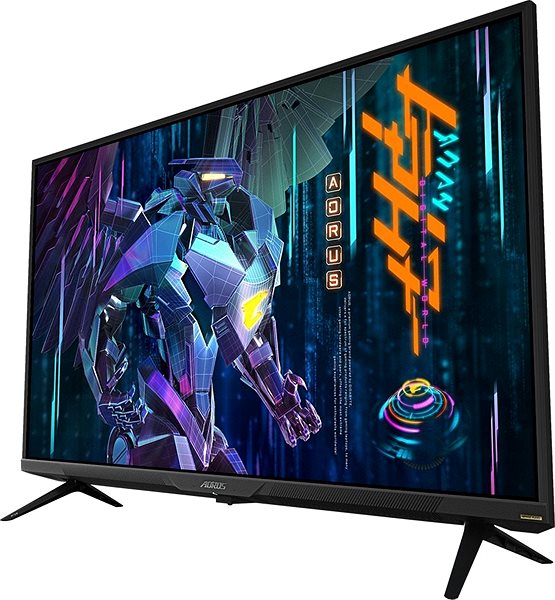
Whether you're working, you want some quality advertising, or you are simply presenting, you're going to want a quality display. This GIGABYTE large-format display is the ideal product for such occasions. Its QLED monitor will ensure quality colouring and more. This display has integrated speakers, allowing you to create a truly immersive experience. This model also has Flicker-Free technology, which is easier on the eyes. This technology eliminates the flickering of LCD monitors with LED backlighting. Another feature on this model that's good for the eyes is its blue light filter. This filter limits tiring blue light. Do you want to watch two programs at the same time? Picture in picture is here to help. This nifty feature will let you watch two things at once. For easy installation, you can use the 200×200 VESA mount.
43" GIGABYTE AORUS FV43U Large-Format Display Key Features
43" large-format display is ideal for information and presentations
Designed for long-term operation
GIGABYTE display resolution: 3840 × 2160
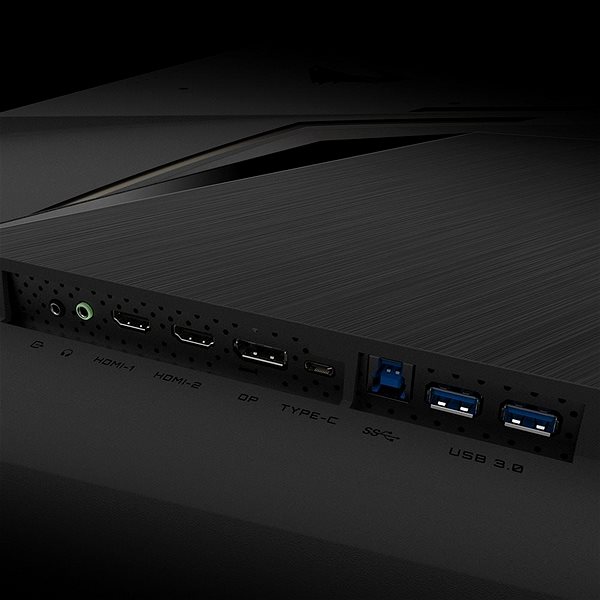
Connection with HDMI, USB-C and DisplayPort
Flicker-Free technology is easy on eyes
Screen has a blue light filter
Cable included in packaging: HDMI, DisplayPort and USB
Additional Monitor Parameters
Its size of 43" is ideal for presenting rooms without a projector, where even a regular screen would be suitable. Large-format screens, however, are made for uninterrupted use. This display by GIGABYTE has an aspect ratio of 16:9, which is perfect for multimedia playback. The refresh rate of the 43" GIGABYTE AORUS FV43U large-format display is 144 Hz. That means it isn't so hard on the eyes. This variant supports 10bit colours. This monitor offers great connectivity options. You will be able to connect to it via the HDMI, USB-C and DisplayPort connector.
Denotes the distance between the lower left and upper right corner of the screen. It is quoted in inches,while 1 "= 2.54 cm. How big a diagonal measurement to choose with which device and what are the benefitsand the disadvantages?
The monitor resolution type refers to the number of pixels that can be displayed on the monitor screen. Choosing the right resolution type can have a significant impact on the overall experience of using your monitor, whether it's for work, gaming or watching movies.
Monitor resolution refers to the number of pixels on the monitor screen, expressed as width × height. Higher resolutions provide a more detailed and clearer image, while lower resolutions may be suitable for smaller monitors or to save power.
Denotes the distance between the lower left and upper right corner of the screen. It is quoted in inches,while 1 "= 2.54 cm. How big a diagonal measurement to choose with which device and what are the benefitsand the disadvantages?
The monitor resolution type refers to the number of pixels that can be displayed on the monitor screen. Choosing the right resolution type can have a significant impact on the overall experience of using your monitor, whether it's for work, gaming or watching movies.
Monitor resolution refers to the number of pixels on the monitor screen, expressed as width × height. Higher resolutions provide a more detailed and clearer image, while lower resolutions may be suitable for smaller monitors or to save power.
The monitor connection type refers to the interface that is used to transmit the video signal from the source (e.g. computer) to the monitor. Different connection types support different resolutions and refresh rates and can affect the quality and performance of the display on the monitor.
The sRGB colour coverage of a monitor is a measure of how much of the range of colours defined in the sRGB (Standard Red Green Blue) standard the monitor is able to display. A higher percentage of sRGB coverage means that the monitor can display a wider and richer range of colors.
The European Commission has recently approved new energy labels for household appliances. You will find them in stores starting from the 2021. Which appliances are affected by the changes? What should the consumer prepare for and what will the new energy labels look like? In this article, we bring you an overview of the most important changes.
85 kWh/1000h
Energy efficiency class in HDR mode
G
More Specifications
SIL Servis Partner a.s., Těšínská 1970/56, 710 00 Slezská Ostrava, Czech Republic, +420 552 301 141, [email protected]
Gigabyte, founded in 1986, is an irreplaceable player in the field of computer components. They put great emphasis on key technologies and the strictest quality standards. The company produces a wide range of basic computer components such as motherboards and graphics cards, but also have many computer peripherals, laptops, tablets, desktops and even network solutions and servers on offer. Recently they also introduced a line of Gigabyte mobile phones.
Note:
Specifications can be changed without notice. Images are for illustrative purposes only.
Dotaz : Pri nastaveni UHD 3840x2160 rozliseni pak pri pouziti hdmi 2.1 nebo dp1.4a propojeni jak ziskam 144Hz obnovovaci frekvenci kdyz maximalni hranice je 120Hz u obou kabelu ? Zatim jsem zkousel jen do 4K "4096x2160@100Hz" TV kde postacil HDMI kabel nicmene me zajima jak bude fungovat tento monitor na 144Hz. Dekuji za odpoved.
Dotaz : Pri nastaveni UHD 3840x2160 rozliseni pak pri pouziti hdmi 2.1 nebo dp1.4a propojeni jak ziskam 144Hz obnovovaci frekvenci kdyz maximalni hranice je 120Hz u obou kabelu ? Zatim jsem zkousel jen do 4K "4096x2160@100Hz" TV kde postacil HDMI kabel nicmene me zajima jak bude fungovat tento monitor na 144Hz. Dekuji za odpoved.
USB-C power delivery a DP alt mode - Dobrý den, v popisu se uvádí, že k monitoru připojím notebook jedním kabelem, z čehož usuzuji, že by měl být schopen notebook nabíjet. V dokumentaci jsem se ale dočetl, že má výstupní výkon pár wattů. Můžete prosím někdo vyzkoušet a potvrdit, jestli notebook nabije (případně kolik W max), nebo je to marketingový chyták? A umí na USB-C display port alt mode? Děkuju
USB-C power delivery a DP alt mode - Dobrý den, v popisu se uvádí, že k monitoru připojím notebook jedním kabelem, z čehož usuzuji, že by měl být schopen notebook nabíjet. V dokumentaci jsem se ale dočetl, že má výstupní výkon pár wattů. Můžete prosím někdo vyzkoušet a potvrdit, jestli notebook nabije (případně kolik W max), nebo je to marketingový chyták? A umí na USB-C display port alt mode? Děkuju
Dobrý deň chcel by som sa spýtať jednu vec. Nech zapojím monitor do DP alebo do HDMI tak sa mi stáva jedna vec a to že keď sa uspí monitor a pohnem myšou tak sa mi zapne až po 7 sekundách. Alebo keď som v hre a chcem sa prehodiť na plochu tak monitor sa akoby reštartuje a až po 7 sekundách sa mi prehodí na plochu. Viete mi poradiť nejaké nastavenie v monitore alebo na pc lebo zatiaľ sa mi takéto niečo pri žiadnom monitor nestalo. Ďakujem
Dobrý deň chcel by som sa spýtať jednu vec. Nech zapojím monitor do DP alebo do HDMI tak sa mi stáva jedna vec a to že keď sa uspí monitor a pohnem myšou tak sa mi zapne až po 7 sekundách. Alebo keď som v hre a chcem sa prehodiť na plochu tak monitor sa akoby reštartuje a až po 7 sekundách sa mi prehodí na plochu. Viete mi poradiť nejaké nastavenie v monitore alebo na pc lebo zatiaľ sa mi takéto niečo pri žiadnom monitor nestalo. Ďakujem
Dobrý den už dlouho se rozhodují mezi tímto monitorem a televizí lg c1 doma hraju na ps5 a chtěl bych z něj vyždímat maximum nejvíc hraju fps tituly jako CoD warzone,fortnite atd. sem tam dám nějakou příběhovku a proto se ptám co je pro mě lepší volba co mi umožní nejlepší zážitek.
Dobrý den už dlouho se rozhodují mezi tímto monitorem a televizí lg c1 doma hraju na ps5 a chtěl bych z něj vyždímat maximum nejvíc hraju fps tituly jako CoD warzone,fortnite atd. sem tam dám nějakou příběhovku a proto se ptám co je pro mě lepší volba co mi umožní nejlepší zážitek.
Dobrý den, mam monitor cca 2 mesíce a stale čím dal čatěji se stava že sam od sebe najednou zčerná monitor a po chvilce zase naskoci obcas je to i 30 sekund nebo musim zapojit a vypojit kabely... dokazete mi poradit kde muze byt chyba ?
Dobrý den, mam monitor cca 2 mesíce a stale čím dal čatěji se stava že sam od sebe najednou zčerná monitor a po chvilce zase naskoci obcas je to i 30 sekund nebo musim zapojit a vypojit kabely... dokazete mi poradit kde muze byt chyba ?
Try our cookiesAlza.cz a. s., Company identification number 27082440, use cookies and other data to ensure the proper functioning of the website and, with your consent, also, among other things, to personalize advertising and the content of our websites. By clicking on the “I understand“ button, you agree to the use of cookies and the transfer of data regarding the behavior on the website for displaying targeted advertising on social networks and advertising networks on other websites.
We use 8 categories of cookies on our website:
Technical cookies
These are strictly necessary for the functioning of the website and the features you choose to use. Without them, our website would not work; you wouldn't be able to log in to your user account, for example.
Functionality cookies
These cookies allow us to remember your basic choices and improve the user experience. These include remembering your preferred language or allowing you to stay logged in permanently.
Social media cookies
These cookies allow us to easily link you to your social media profile and, for example, allow you to share products and services with your friends and family.
Content personalisation
These cookies allow us to show you content and ads according to the information we have about you to best meet your needs. This includes what content you have viewed, or on what device you are accessing our website.
Non-personalised advertising
These cookies allow us to show you general ads for products and services.
Personalised advertising
Thanks to these cookies, we and our partners can offer you relevant products and services based on your purchases, your shopping behaviour and your preferences.
Audience metrics
These cookies allow us to optimise our site for your convenience based on how you use it. The aim is to remember or anticipate your choices. This includes, for example, the use of features, their location, or the behaviour on the page.
By giving your consent to the processing of cookies, functionality and analytical cookies will be installed on the device you use to browse the website (click on the "I understand" button for both categories, or you can select only one of the categories by clicking on the "Settings" button). We always install technical cookies on your device, even without your explicit consent, because without them our website would simply not work.
You can revoke your consent to the processing of cookies. In connection with our company's cookie processing, you also have the following rights: the right to access cookies, delete, modify, supplement and correct them, restrict processing and the right to lodge a complaint with the Office for Personal Data Protection. Read more about your rights.