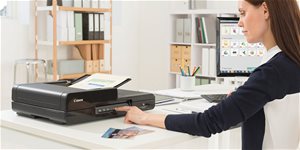
Scanner - A4, manual and sheet-fed scanner, with document feeder, duplex, ADF, resolution: 600 x 600 DPI, scanning speed up to: 8 PPM, scans text, portable, weight: 0,6kg - feeder for scanning ID cards, USB connection
Canon imageFORMULA P-208 II 2,990,- In stock > 5 pcs
Buy
Canon imageFORMULA P-208 II
The Canon FORMULA P-208 II is a compact sized, light weight and portable scanner that is easy to use in scanning not only in the A4 format but also ID cards including embossed payment cards. In addition to all the useful features of the previous model, an improved icon-based user interface have been added for more intuitive scanning. Additionally, it has also been expanded to include the selection of plug-ins for SugarSync service, OneDrive and Dropbox plug-ins along with Google Drive, Evernote, and SharePoint, making it easy for you to work with the most popular software tools.
Key features
10-sheet ADF Automatic Document Feeder Double-sided scanning a speed of 16 f/min Both A4 and embossed cards can be scanned Just connect and use it Compatibility with Mac and Windows
The scanner with its own software
The built-in CaptureOnTouch software will help users quickly turn on the scanner. This feature allows you to connect the scanner to any desktop or laptop without installing any software drivers or applications. In addition, the scanner also has a tool available to automatically detect the page size, aligning scanned documents and automatic recognition of text and colours. The built-in CaptureOnTouch software makes scanning easy for everyone and in the event of an emergency, it can be used on other people's computers without having to install the necessary drivers or applications.
It is fully mobile
Scanning with this compact helper is very simple and efficient, including a one-touch control for routine tasks such as scanning to email or scanning to the desktop. Another integrated BizCard Reader application allows the user to scan and import business cards directly into a contact file. It communicates with standard TWAIN and ISIS drivers, thereby, simplifying integration. The scanner supports the commonly-used USB 2.0 interface to provide both data and power transmission, making it fully mobile.
To scan anywhere, just connect the scanner with the optional WU10 WiFi unit and the battery unit. You can use the scanner for wireless document scanning directly into your smartphone, tablet, or desktop computer, or share the scanner to a group of users or devices through a network server or via your home router.
The number of pixels that the scanner can record from a given area. The most common measurement is DPI (Dots Per Inch), which is an indication of how many image points (pixels) can fit within the length of one inch.
Color depth refers to the number of bits of information that the scanner acquires for each pi×el. The higher the color depth, the greater the amount of detail and color shades that the scanner can capture and reproduce. This results in better quality and colour accuracy of scanned images.
The number of pixels that the scanner can record from a given area. The most common measurement is DPI (Dots Per Inch), which is an indication of how many image points (pixels) can fit within the length of one inch.
Color depth refers to the number of bits of information that the scanner acquires for each pi×el. The higher the color depth, the greater the amount of detail and color shades that the scanner can capture and reproduce. This results in better quality and colour accuracy of scanned images.
Number of A4 pages that can be scanned in one minute.
8 PPM
Connection
Connection
USB
Max. document size
Maximum document size
A4
Functions
Functions
ADF, Portable, With Feeder
Duplex (two-sided) scanning
Yes
Scan options
Scanning options
Text
Dimensions
Width
31.25 cm
Depth
5.65 cm
Height
4 cm
Weight
0.6 kg
More Specifications
Canon was founded in 1933. Its original title translated to "portable laboratory optics". The Japanese company has been headquartered in Tokyo since its inception. Canon is particularly associated with the production of digital cameras and accessories, where they remain the leading innovator and producer of imaging solutions. Aside from digital cameras, the company also operates in the production of office equipment, particularly copiers or printers.
Note:
If there is no "package contains" box in the product parameters and the data or USB cable is not specifically mentioned in there, the package does not contain it and must be purchased separately.
Specifications can be changed without notice. Images are for illustrative purposes only.
Prosim ,jake ma uloziste.Jemozno rozsirit pametovou kartou,nebo je nutne pripojeni k PC? Je mozno napajet powerbankou?Dekuji
Prosim ,jake ma uloziste.Jemozno rozsirit pametovou kartou,nebo je nutne pripojeni k PC? Je mozno napajet powerbankou?Dekuji
Dobrý den, chtěl bych naskenovat velký technický průkaz ale vždy těsně před dokončením se skener zastaví a hlásí zaseknutý papír. Dokument je o 148 mm delší než standartní A4. Lze skener nějak nstavit, aby takový dokument zvládl?
Dobrý den, chtěl bych naskenovat velký technický průkaz ale vždy těsně před dokončením se skener zastaví a hlásí zaseknutý papír. Dokument je o 148 mm delší než standartní A4. Lze skener nějak nstavit, aby takový dokument zvládl?
Dobrý deň, nebolo by možné krátke video ako funguje sken pokladničných bločkov? Mne totiž tie pokladničné bločky skener skenuje krivo, pokrčí ich, sken sa ani nedokončí, keďže sa bloček celý pokrčí. Myslím, že som neprišla na správny spôsob skenovania. Vopred ďakujem
Dobrý deň, nebolo by možné krátke video ako funguje sken pokladničných bločkov? Mne totiž tie pokladničné bločky skener skenuje krivo, pokrčí ich, sken sa ani nedokončí, keďže sa bloček celý pokrčí. Myslím, že som neprišla na správny spôsob skenovania. Vopred ďakujem
Dobrý den, je tento skener funkční pod win 11 ? Jeho kolega Canon imageFORMULA P-215 pod win 11 nemá drivery a nevím který z nich je novější (a podle čísla spíše 215)
Dobrý den, je tento skener funkční pod win 11 ? Jeho kolega Canon imageFORMULA P-215 pod win 11 nemá drivery a nevím který z nich je novější (a podle čísla spíše 215)
Dobrý den, váš skener se standardně připojí k pc, když však spustím skenování, napíše mi, že skener nebyl nalezen. Neraďte mi, prosím, že mám zkusit jiný USB port, ty jsem zkusil všechny. Nemám čas řešit s podporou výrobce půl roku, v čem je problém. Jde o vánoční dárek, tekže buď poraďte, nebo vám skener vrátím jako reklamaci a budu požadovat zpět PLNOU cenu.
Dobrý den, váš skener se standardně připojí k pc, když však spustím skenování, napíše mi, že skener nebyl nalezen. Neraďte mi, prosím, že mám zkusit jiný USB port, ty jsem zkusil všechny. Nemám čas řešit s podporou výrobce půl roku, v čem je problém. Jde o vánoční dárek, tekže buď poraďte, nebo vám skener vrátím jako reklamaci a budu požadovat zpět PLNOU cenu.
Try our cookiesAlza.cz a. s., Company identification number 27082440, use cookies and other data to ensure the proper functioning of the website and, with your consent, also, among other things, to personalize advertising and the content of our websites. By clicking on the “I understand“ button, you agree to the use of cookies and the transfer of data regarding the behavior on the website for displaying targeted advertising on social networks and advertising networks on other websites.
We use 8 categories of cookies on our website:
Technical cookies
These are strictly necessary for the functioning of the website and the features you choose to use. Without them, our website would not work; you wouldn't be able to log in to your user account, for example.
Functionality cookies
These cookies allow us to remember your basic choices and improve the user experience. These include remembering your preferred language or allowing you to stay logged in permanently.
Social media cookies
These cookies allow us to easily link you to your social media profile and, for example, allow you to share products and services with your friends and family.
Content personalisation
These cookies allow us to show you content and ads according to the information we have about you to best meet your needs. This includes what content you have viewed, or on what device you are accessing our website.
Non-personalised advertising
These cookies allow us to show you general ads for products and services.
Personalised advertising
Thanks to these cookies, we and our partners can offer you relevant products and services based on your purchases, your shopping behaviour and your preferences.
Audience metrics
These cookies allow us to optimise our site for your convenience based on how you use it. The aim is to remember or anticipate your choices. This includes, for example, the use of features, their location, or the behaviour on the page.
By giving your consent to the processing of cookies, functionality and analytical cookies will be installed on the device you use to browse the website (click on the "I understand" button for both categories, or you can select only one of the categories by clicking on the "Settings" button). We always install technical cookies on your device, even without your explicit consent, because without them our website would simply not work.
You can revoke your consent to the processing of cookies. In connection with our company's cookie processing, you also have the following rights: the right to access cookies, delete, modify, supplement and correct them, restrict processing and the right to lodge a complaint with the Office for Personal Data Protection. Read more about your rights.