


Dobrý den, mám dotaz k zapojení chlazení Endorfy Navis F280. Při zapojení dvoužilového konektoru konektoru pumpy do konektoru desky CPU_OPT (dle návodu od chlazení - do desky Aorus Elite X870E), se v Biosu v sekci ventilátorů v položce CPU_OPT zobrazuje 0 otáček, očekával jsem, že se zde budou zobrazovat otáčky pumpy. Pumpa ale dle mého (sic naprosto neslyšně) musí běžet, neboť teplota CPU je nízká. Napájení pumpy je řešeno přes konektor SATA, přímo ze zdroje, ten mám samozřejmě také zapojený. Ventilátory chlazení jdou do CPU_FAN a jejich otáčky v Biosu vidím a mohu je ovládat. Na desce je ještě vedle těchto dvou konektorů volná pozice FAN4_PUMP, nevím, jestli bych dvoužílu od pumpy neměl připojit tam, ale nerad bych experimentoval, bez rady zkušenějších stavitelů, abych něco neodpálil... Děkuji moc!
Endorphs Navis F280
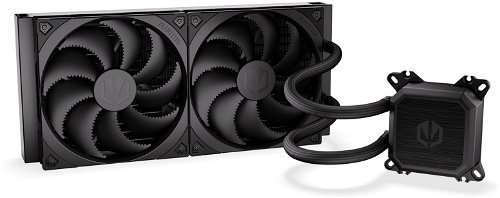

Endorphs Navis F280
The Endorfy Navis F280 is a complete, closed-loop liquid cooling set designed to dissipate heat from high-performance processors. As an AIO CPU cooler, it has a pre-filled circuit that simplifies installation and requires no subsequent maintenance. Its core consists of a ceramic-bearing pump connected to an aluminium radiator, which comes with two pre-installed Fluctus 140 PWM fans. This solution focuses purely on cooling performance and quiet operation, which is why it has no RGB backlighting. It supports a wide range of processor sockets from both Intel and AMD.

Key features of the Endorfy Navis F280 liquid cooler
- Large radiator surface efficiently dissipates heat
- Two Fluctus 140 PWM fans with a speed range of 250 to 1800rpm
- Ceramic-bearing pump operates between 1600 and 2600rpm
- Pump and fan control via PWM signal
- Sufficiently long hoses for easy installation in larger cases
- Includes Pactum PT-3 thermal paste

Quiet operation and speed control
At the heart of the cooler is a ceramic-bearing pump, whose speed can be controlled via a PWM signal in the range of 1600 to 2600rpm. It is complemented by two Endorfy Fluctus fans with an optimised blade design, which operate in a wide range of 250 to 1800rpm. The combination of these components delivers a low noise level even under heavy load.

Cooling performance
The large surface area of the aluminium radiator efficiently dissipates heat from the coolant. The high static pressure of the Fluctus fans then promotes strong airflow through the radiator's dense fins. For optimal heat transfer between the processor and the copper cooling block, the included Pactum PT-3 thermal paste is easy to apply.

Simple installation
The mounting system and pre-installed fans on the radiator speed up the entire assembly process. The flexible hoses provide plenty of freedom for installation in various computer cases. The cooler supports a wide range of modern and older sockets, including AMD AM4, AM5 and Intel 1150, 1151, 1155, 1156, 1200, 1700, 2011, 2011-3, 2066, 1851.
Radiator size:
280mm
Number of fans:
2× 140mm
Fan speed:
250–1800rpm
Pump speed:
1600–2600rpm
Hose length:
380mm
AMD socket:
AM4, AM5
Intel socket:
1150, 1151, 1155, 1156, 1200, 1700, 2011, 2011-3, 2066, 1851
Pump bearing:
Ceramic
Radiator material:
Aluminium
Cooling block material:
Copper
Thermal paste:
Pactum PT-3
Specifications
Backlight
Fan speed
Technical specification
Socket
Radiator dimensions
Pump speed
Packaging

COOLING sp. z o.o, úl. Sokolovská 24, 05-806 Sokołów [email protected]
This product is not an independently functional unit and may require professional installation.
Specifications can be changed without notice. Images are for illustrative purposes only.
