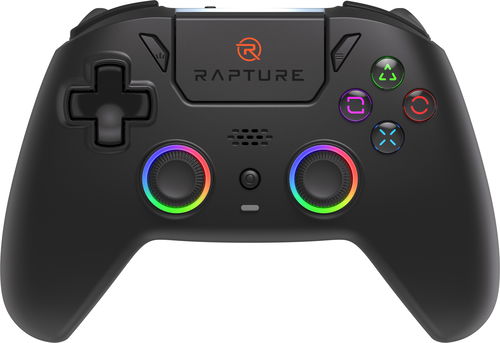
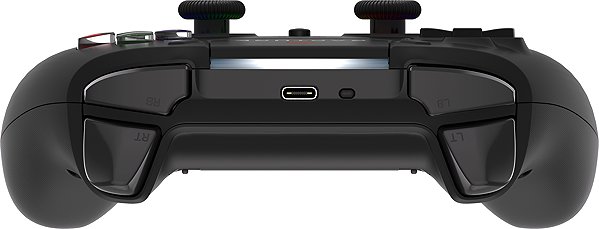
Gamepad - for PC, PS4, nintendo Switch, PS3, mobile phone and tablet, compatible with Android, iOS, Windows XP//7//10, wireless connection, USB-C (on controller), integrated batteries, vibration, backlighting, analogue stick, custom button mapping, black colour
Are you tired of playing your PC games with the typical K&M combo? In that case, we've got a solution just for you. The Rapture ZENITH, black Gamepad is a perfect pal for comfortable gaming on the PC, PS4, Nintendo Switch, PS3, Mobile phone and Tablet. 22 buttons guarantees firm control over your gaming adventures. The controller also includes vibration, backlighting, analogue stick and custom button mapping to make the whole thing even better. The sticks help to provide smooth control in FPS games or racing sims. The Black colour scheme of the gamepad and its stylish design coupled with durable triggers will satisfy every hardcore video game player.
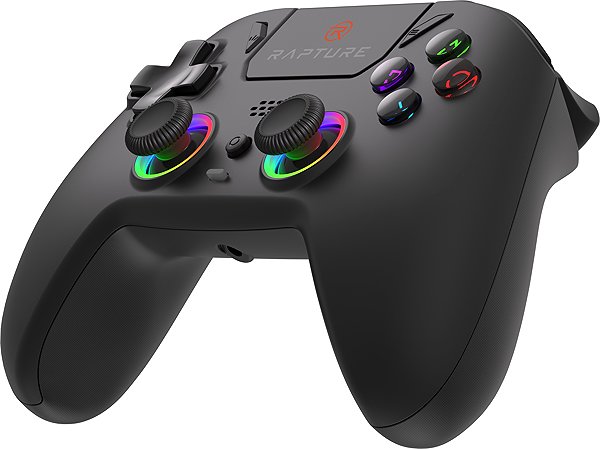
Rapture ZENITH, black Gamepad Key Features
1 m long cable for USB connection with gaming devices
The controller is wireless, which means you can sit as far away from the console as you want
Accessories include: vibration, backlighting, analogue stick and custom button mapping
Weighs 289 g
Playing with a controller ensures you can enjoy your games for longer and easier than ever. Master the gameplay in a whole new way!
A 36-month / 3-year or 48-month / 4-year warranty refers to the total duration of the warranty from the date of receiving the goods. Compared to standard statutory rights, this gives you an additional 12 months / 1 year or 24 months / 2 years, respectively, to file a claim.
Note:
Specifications can be changed without notice. Images are for illustrative purposes only.

Dobrý den, nejedná se úplně o dotaz spíše o radu pro ostatní, komu se nedaří dle manuálu připojit ovladač k PC. Pro připojení je potřeba postupovat podle návodu pro přípojení k zařízení s OS Android, čili držet tlačítka Home a Share zároveň dokud nedojde k rychlému rozblikání bílé LED, poté se ovladač bezproblému připojí pomocí BT.
Dobrý den,
skrze usb kabel lze ovladač připojit a využívat normálně, ačkoliv ho správce zařízení kategorizuje jako zvukový výstup. Při pokusu o připojení skrze BT adaptér (od vás zakoupený TP-Link UB500) zařízení nelze nalézt, přičemž ostatní jiná zařízení se přes adaptér připojí.
Dobrý den,
skrze usb kabel lze ovladač připojit a využívat normálně, ačkoliv ho správce zařízení kategorizuje jako zvukový výstup. Při pokusu o připojení skrze BT adaptér (od vás zakoupený TP-Link UB500) zařízení nelze nalézt, přičemž ostatní jiná zařízení se přes adaptér připojí.
Dobrý den, dnes jsem si vyzvedl ovladač, bez problému připojil k PC a i Iphonu, ale problém nastal když jsem chtěl hrát hry. Zkoušel jsem 3 různé hry na PC a ani na jedné hře mi nefungoval, a na mobilu jsem zkoušel jen jednu hra a taky nic. Hry to byly Delta Force, Need for Speed, a na gameloopu Call of duty. Na mobilu jsem zkoušel taky Delta Force.
Můžete mi poradit co s tím a nebo mi poslat seznam které hry jsou kompatibilní? Děkuji. S pozdravem pěkného dne David Heimrath
Dobrý den, dnes jsem si vyzvedl ovladač, bez problému připojil k PC a i Iphonu, ale problém nastal když jsem chtěl hrát hry. Zkoušel jsem 3 různé hry na PC a ani na jedné hře mi nefungoval, a na mobilu jsem zkoušel jen jednu hra a taky nic. Hry to byly Delta Force, Need for Speed, a na gameloopu Call of duty. Na mobilu jsem zkoušel taky Delta Force.
Můžete mi poradit co s tím a nebo mi poslat seznam které hry jsou kompatibilní? Děkuji. S pozdravem pěkného dne David Heimrath
Dobrý den, koupil jsem si herní ovladač Rapture Zenith (černý) a když ho připojím k notebooku přes bluetooth, začne vibrovat, ale na nic nereaguje, když je připojený přes kabel, vše funguje. Můžete mi s tím prosím poradit? Děkuji.
Zdravím, dá se říci, zda bude pracovat se Steam Deckem? Obecně podporuje XBOX, PS4, PS5, i další ovladače pro PC takže logicky předpokládám že ano, ale reději mít jistitu i když je cena dobrá....
Dobrý den, výdrž 18 hodin je teoretická např. bez osvětlení? Přes bluetooth s pc mi vydrží sotva 3-4 hodiny. Mám ho sotva týden, jinak je fajn a když člověk používá trochu hlavu a má zkušenost, dá se připojit bez problému.
Magyarországra történő kiszállításért tekintse meg ezt a termékoldalt: Rapture ZENITH, fekete
Try our cookiesAlza.cz a. s., Company identification number 27082440, use cookies and other data to ensure the proper functioning of the website and, with your consent, also, among other things, to personalize advertising and the content of our websites. By clicking on the “I understand“ button, you agree to the use of cookies and the transfer of data regarding the behavior on the website for displaying targeted advertising on social networks and advertising networks on other websites.
We use 8 categories of cookies on our website:
Technical cookies
These are strictly necessary for the functioning of the website and the features you choose to use. Without them, our website would not work; you wouldn't be able to log in to your user account, for example.
Functionality cookies
These cookies allow us to remember your basic choices and improve the user experience. These include remembering your preferred language or allowing you to stay logged in permanently.
Social media cookies
These cookies allow us to easily link you to your social media profile and, for example, allow you to share products and services with your friends and family.
Content personalisation
These cookies allow us to show you content and ads according to the information we have about you to best meet your needs. This includes what content you have viewed, or on what device you are accessing our website.
Non-personalised advertising
These cookies allow us to show you general ads for products and services.
Personalised advertising
Thanks to these cookies, we and our partners can offer you relevant products and services based on your purchases, your shopping behaviour and your preferences.
Audience metrics
These cookies allow us to optimise our site for your convenience based on how you use it. The aim is to remember or anticipate your choices. This includes, for example, the use of features, their location, or the behaviour on the page.
By giving your consent to the processing of cookies, functionality and analytical cookies will be installed on the device you use to browse the website (click on the "I understand" button for both categories, or you can select only one of the categories by clicking on the "Settings" button). We always install technical cookies on your device, even without your explicit consent, because without them our website would simply not work.
You can revoke your consent to the processing of cookies. In connection with our company's cookie processing, you also have the following rights: the right to access cookies, delete, modify, supplement and correct them, restrict processing and the right to lodge a complaint with the Office for Personal Data Protection. Read more about your rights.