


dobry den. ako je napajany subwofer a prepojenie subwofera so soundbarom. dakujem za vysvetlenie
Gogen TAS 940 WSB
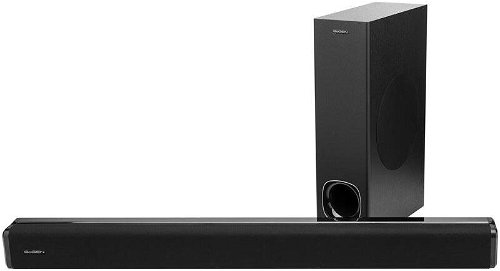
Sound Bar - 2.1 channel with power of 100W, active subwoofer, HDMI (1× input, 1× out), optical digital audio (1× input), 3,5mm jack (1× input), AUX, Bluetooth, USB, ARC, USB flash playback, remote control
Show full description
Code:
WG978s1a
Producer's Website:
Don't like the alternatives? Choose from the full product list
- Reviews 2
- Help and manuals 1
- Specifications
- Photos & Videos 8
- Alternatives 8
- Accessories and suggested products

Gogen TAS 940 WSB
Discontinued
Gogen TAS 940 WSB
Select a brand

JVC

Hyundai

GoGEN
GoGEN TAS 940 WSB soundbar

100 W
power
2.1
channel sound
Under the TV or on the wall
Location

GoGEN soundbar with perfect performance
Don't just rely on your TV's integrated speakers. Expand your options with the precision-crafted GoGEN TAS 940 WSB soundbar with an external subwoofer with a total of 100 W of power. It takes your favourite movies and TV shows to a whole new level with three speakers and preset equalizers that let you change the treble and bass to suit your needs.

Simple operation of the GoGEN TAS 940 WSB soundbar
With the GoGEN Soundbar you are not limited to the sound from your TV, it also has a USB port for playing songs in MP3 format and a LINE-IN with 3.5mm jack input. You're guaranteed to enjoy Bluetooth technology for wireless audio transmission from another device. For TVs, there is an HDMI input - with ARC (CEC) function, and also a digital optical audio input. The GoGEN TAS 940 WSB comes with a handy remote control. You don't have to get up from the couch to adjust the volume, switch the song being played (via USB playback) or select a different audio source.

Omnidirectional bass propagation
All playback information is clearly displayed on the LED display, whose backlight can be dimmed or switched off as required. Because the bass from the subwoofer is omnidirectional, you won't be limited by its position in the room. The TAS 940 WSB soundbar will sit perfectly under your TV, but wall mounting accessories are also included.
Connectors
HDMI ARC (CEC) input
Digital optical audio input
USB input
LINE IN - 3,5mm JACK
Technical parameters
Power 100 W
Bluetooth technology
MP3 format support
Preset equalizers
LED display
2 65 mm speakers
Subwoofer with 13 cm diameter speaker
Frequency range 55 Hz - 20 kHz
Specifications
Colour
Connection type
Wireless features
Colour
Colour
System type
Connections
Connection type
Wireless features
USB
Characteristics
Features and functions
ARC
Control
Subwoofer
Soundbar dimensions
Width
Depth
Height
Subwoofer dimensions
Width
Depth
Height
Weight
Total weight
Inputs
HDMI
Optical digital audio
3.5 mm jack
Outputs
HDMI
More Specifications

ETA a. s., nám. Práce 2523, 760 01 Zlín, [email protected]
Note:
.
Specifications can be changed without notice. Images are for illustrative purposes only.
