


Tento USB hub mi funguje (modrá dioda na hubu se rozsvítí) i bez použití dodávaného síťového adapteru, USB hub lze napájet pouze přes dodávaný USB kabel. Ale jakmile vyměním dodávaný USB kabel za jiný, modrá kontrolka na hubu se nerozsvítí. Bohužel dodávaný USB kabel mi nevyhovuje a potřebuju použít kabel delší a s USB-C konektorem. Poraďte mi, jaký USB kabel o délce 1,2m-1,6m s USB-C konektorem mám použít, aby USB hub fungoval.
I-TEC USB 3.0 Metal Charging HUB 4 Port
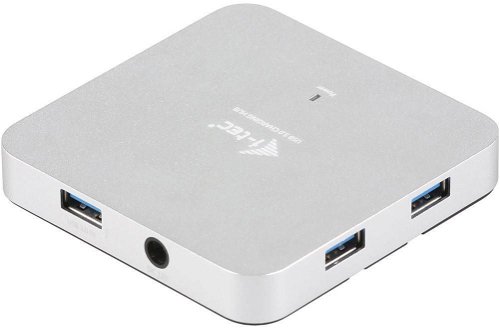
USB Hub - connection using USB-A USB 3,2 Gen 1 (USB 3,0), other connectors: 5 piece(s) USB-A USB 3,2 Gen 1, 1 piece(s) Banana pin plug
Show full description
Variants

Metal Charging HUB 4 Port
Discontinued

HUB 4 Port Passive
from 313,-
In stock

Metal HUB 4 Port
549,-
In stock
Code:
JP910i
Producer's Website:
Don't like the alternatives? Choose from the full product list
- Reviews 7
- Help and manuals 5
- Specifications
- Photos & Videos 8
- Alternatives 8
- Accessories and suggested products

I-TEC USB 3.0 Metal Charging HUB 4 Port
Discontinued
I-TEC USB 3.0 Metal Charging HUB 4 Port
Do you have a shortage of USB 3.0 ports? Reach for the affordable I-TEC USB 3.0 Metal Charging HUB 4 Port that adds four additional connectors. You will appreciate it especially alongside a laptop or ultrabook where there is not much space for connectors. With the USB hub, you'll have room to connect a full range of accessories that will be fast enough for massive data transfers thanks to USB 3.0. One advantage of the USB hub is the supplied power adapter that also feeds energy-consuming devices, such as external hard drives.
Key features
- Stylish extension with 4 USB 3.0 ports
- High-speed data transfer (5 Gbps)
- Surge and current protection
- Detachable USB 3.0 cable for connecting a HUB to a laptop, tablet, or PC
- Adapter for connection en. demanding devices
Additional information:
Properties:
USB charging detection mechanism for mobile devices
Plug & Play features
LED diode
Surge and current protection
Backward compatible with USB 2.0
Compatible OS:
Windows XP, Vista, 7 32 / 64bit, 8 32 / 64bit, 8.1 32 / 64bit, 10 32 / 64bit, Mac OS X 10.x or higher
Dimensions:
86 × 86 × 14 mm
Weight:
85 g
Specifications
Width
Height
Depth
Weight
Power supply (cable)
Dimensions and weight
Width
Height
Depth
Weight
Laptop power port
Power supply (cable)
Standard male connector
Features
Colour
Cable length
Packaging
Package contents
Compatibility
Type
More Specifications
Note:
Product lines:
I-TEC USB hub
Specifications can be changed without notice. Images are for illustrative purposes only.
