


Dobry den, Je mozne naraz pouzivat zigbee2mqtt a thread? Ako sa da toto zariadenie pripojit k homeassistant
SONOFF Dongle Max Zigbee/Thread PoE Dongle-M
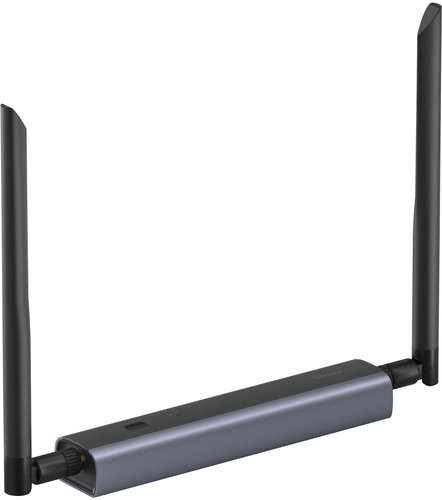
Central Unit - used as home control, connect using WiFi 2,4 GHz and Ethernet, communication via Manufacturer app, compatible with Windows and iOS, USB and PoE power supply
Show full description
Buy with code
ALZADNY10
989,-
1,099,-
Price Guarantee
Shop faster with pickup at AlzaBox or in-store.
Warranty 24 months
Code:
SNFa114
Producer's Website:
- Reviews 1
- Help and manuals 1
- Specifications
- Photos & Videos 6
- Alternatives 8
- Accessories and suggested products

SONOFF Dongle Max Zigbee/Thread PoE Dongle-M
1,099,-
In stock > 5 pcs
Buy
SONOFF Dongle Max Zigbee/Thread PoE Dongle-M
SONOFF Dongle Max - powerful Zigbee/Thread central unit with PoE
The SONOFF Dongle Max acts as a central unit that connects all your Zigbee and Thread devices into one system. The combination of powerful chipsets ensures fast and stable operation with the possibility of future expansion. The SONOFF Dongle Max supports Ethernet with PoE, Wi-Fi and USB connectivity, making it easy to place it wherever it suits you best - from the living room to the basement. Through a clear web interface, you can check status, set parameters or update firmware conveniently without complicated setup. SONOFF Dongle Max is fully compatible with Home Assistant, Zigbee2MQTT and MQTT protocol, allowing you to easily integrate your smart lighting, sensors or switches into one platform. Two adjustable 5dBi antennas with 360° coverage ensure a strong and stable signal, while the durable, corrosion-tested aluminium body guarantees a long service life. There's also the option of remote access via VPN, automatic backups and handy 3D printed brackets for easy installation.

Key features of the SONOFF Dongle Max central unit
- SONOFF Dongle Max connects the entire smart home into one platform
- Powerful EFR32MG24 + ESP32D0WDR2 chipset ensures readiness for future expansion
- SONOFF Dongle Max supports PoE/Wi-Fi and USB connectivity
- The unit can be managed easily via a clear web interface
- Two adjustable 5dBi antennas provide stable 360° signal coverage even in larger spaces
- SONOFF Dongle Max enables remote access via VPN
- Durable corrosion-tested aluminium body guarantees a long service life
- SONOFF Dongle Max is fully compatible with Home Assistant/Zigbee2MQTT/MQTT protocol
Compatible smart home platforms
Compatible with the Google Home platform
Through the Google Home app, you'll be able to control smart bulbs, thermostats, cameras or speakers, all from one place, by touch or voice. Set up everything you need by following the on-screen instructions in the app installed on your smartphone. Google Home supports thousands of devices from different manufacturers.
Compatible with the Apple Home platform
Apple Home is an app that has become a key tool for smart home users in the Apple ecosystem. From lights and thermostats to locks and cameras, you can easily manage all your smart devices in one place. If you're already using an Apple device, like iPhones, iPad, Mac or Apple Watch, Apple Home is the ideal way to, how to connect technologies and create a household, that adapts to your needs.

Compatible with the manufacturer's app
To use the product's smart features, you need to add the device to the manufacturer's app. For more information about the application (name, supported OS, supported languages) and how to add a device to the application, please refer to the product manual.
The SONOFF Dongle Max central unit offers flexible connection options
With the SONOFF Dongle Max, there are more ways to plug it into your smart home. It supports Ethernet with PoE, making it easy to connect via RJ45 connector and get a stable connection without unnecessary cabling. If you require a more free location, just use the Wi-Fi connection that allows you to place the hub anywhere in the house. For quick and easy use, a USB connection is also available, allowing the SONOFF Dongle Max to function as a classic plug-and-play dongle via the included USB-C cable.


Powerful chipset for stable operation
The SONOFF Dongle Max is built on a combination of EFR32MG24 and ESP32 chips to ensure maximum performance and reliability. The EFR32MG24 chip provides powerful Zigbee operation with 1536 KB Flash and 256 KB RAM, enabling faster automation processing and instant control of connected devices. The integrated ESP32 provides full Wi-Fi support and efficient data communication management, while its wide adoption and proven reliability provides a stable foundation for smart grid applications.

Local web console for easy smart home management
The SONOFF Dongle Max central unit gives you full control over the management of your smart home with a local web console that you can connect to directly from a browser on your network. You can instantly see device status, operational information or connection history without having to install any additional software. The clear interface allows you to easily change settings, monitor alerts or update firmware in a few clicks.

Easy integration with Home Assistant via MQTT
Thanks to the integration of SONOFF Dongle Max with Home Assistant, you can have all your Zigbee and Thread devices clearly under control in one panel. MQTT support allows you to monitor status, trigger modes, identify devices or use features such as VPN access or eWeLink Remote. All controls are available in real time, so your smart home works seamlessly and without unnecessary restrictions.
Advanced features for maximum flexibility and control
The SONOFF Dongle Max also offers advanced features that give you more flexibility in use. You can set up automated webhooks for regular backups and instant notifications if the device becomes disconnected. With WireGuard VPN support, you get secure remote access to the web interface from anywhere, even outside your home network. If you use multiple units, you can easily switch between them and set them up individually via the web console. In addition, you can customize the LED indicator according to your needs.


Specifications
Supported OS
Compatible app
Power supply
Application language
Connection
Connectivity
Supported OS
Compatible app
Power supply
Application language
Connection
Connection
Protocol
Use
Expandability
Operation
Area of use
Usage
Usage
Features
Functions
Distribution
Colour
Dimensions and weight
Width
Height
Depth
More Specifications
Note:
Product lines:
Sonoff Dongle Series
Specifications can be changed without notice. Images are for illustrative purposes only.
