


Je možné dokúpiť nejaké ochranné plasty pre plochu? Velmi ľahko sa poškodzuje.
XP-PEN Deco Pro M
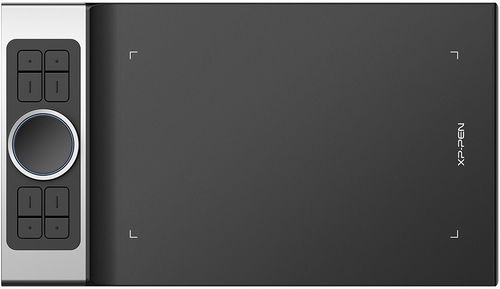
Graphics Tablet -, active area: 157 × 279mm, 8192 pen pressure sensitivity, resolution of 5080 lpi, weight: 812g
Show full description
3,190,-
Warranty 24 months
Code:
XPP2f1
Producer's Website:

XP-PEN Deco Pro M
3,190,-
In stock 4 pcs at the supplier's
Buy
XP-PEN Deco Pro M
Discover new creative worlds with XPPen Deco Pro graphics tablets. The professional XPPen Deco Pro M graphics tablet immediately impresses with its 7mm thin aluminium casing and elegantly rounded black and silver design, which won the prestigious Red Dot Design Award in 2019 and the Good Design Award in 2018. For maximum comfort while drawing, the tablet is equipped with a sensitive stylus with 8,192 levels of pressure sensitivity, an intuitive roller wheel, and 8 express keys.

Key Features of the XPPen Deco Pro M Graphics Tablet
- Thin and lightweight body
- Active area of 157 × 279mm
- The XPPen Deco Pro M has a sensitive stylus with 8,192 levels of pressure sensitivity
- Sensing layer resolution of 5080lpi
- Double roller wheel for intuitive control
- 8 programmable buttons
- Modern USB-C interface
- The graphics tablet is compatible with Windows, macOS and Android devices
- 8× replacement nibs, pen stand, USB drive, USB-C cable
The XPPen Deco Pro M Works with Almost Any Device
The XPPen Deco Pro M supports a wide range of professional software, such as Photoshop, Illustrator, GIMP, Blender, ZBrush, Maya, ArtRage and many more. Thanks to its modern USB-C interface, you can connect the tablet directly to iMac and MacBook Pro computers, or to Windows PCs that support USB-C input. It also supports mobile devices running Android 6.0 and higher.


The XPPen Deco Pro M Provides a Natural Drawing Experience
The battery-free PA1 stylus of the XPPen Deco Pro M tablet allows for a tilt of up to 60 degrees and responds sensitively to hand movements. Without any complicated setup, you can add shading simply by tilting it. The stylus recognises 8,192 levels of pressure sensitivity and is an excellent tool for drawing precise lines and sketches. The elegant, 13.3g lightweight stylus in a black and silver design has a switch to select between pen or eraser mode.

Intuitive Control with the Double Mechanical Wheel
The XPPen Deco Pro M is equipped with a unique double wheel with smooth control for more efficient and precise work with the tablet. The outer mechanical wheel is used to zoom in or out of the drawing area, adjust the brush size, etc., while the inner virtual wheel can be used in trackpad mode to control the cursor or scroll. Furthermore, the XPPen Deco Pro M graphics tablet has 8 express keys that can be linked to keyboard shortcuts for faster control of your favourite functions in your graphics program.

Works with Smartphones and Tablets
The XPPen Deco Pro M can be connected to a tablet or smartphone running Android using the supplied cable. The tablet works with most software tools, such as XP-Pen Deco Draw, ibis Paint X, FlipaClip, Medibang, Autodesk Sketchbook, Zenbrush, Artrage and others. With the XPPen Deco Pro M tablet, you can easily and quickly insert handwritten notes into Microsoft Office documents, such as Word, PowerPoint, OneNote and more. Edits and annotations in documents can be made in real time during streaming, bringing your web conferences or distance learning to life.
Package contents:
Graphics tablet, passive pen, USB-A to USB-C cable, pen stand, 8x replacement nibs, drawing glove, Micro USB adapter, USB-C adapter
Compatibility:
Windows 7 or later, Mac OS X 10.10 or later, Android 6.0 or later
Specifications
Type
Active surface width
Active surface height
5080 lpi
Pressure levels
Display/Scanning surface
Type
Active surface width
Active surface height
5080 lpi
Pressure levels
Connection and battery life
Connection
Connectivity
Package contents
Package contents
Dimensions and weight
Depth
Width
Height
Weight
Brand/models
Tablet brand
Tablet model
More Specifications

HANVON UGEE FRANCE, Zella Zhang, 6 rue d’Armaillé, 75017 Paris, France, [email protected]
Note:
Specifications can be changed without notice. Images are for illustrative purposes only.
