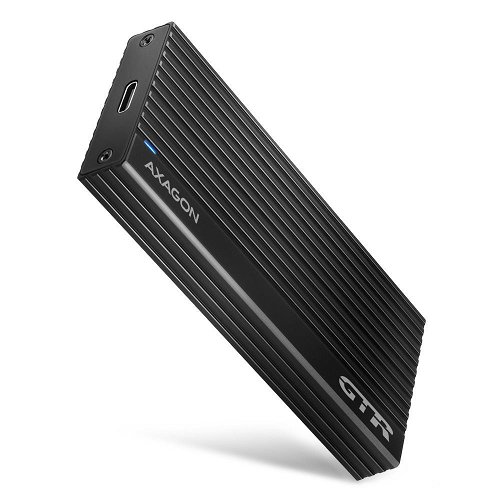
The high-speed AXAGON EEM2-GTR THIN RIB external enclosure with a USB 3.2 Gen 2 interface is designed for NVMe (PCI-Express) M.2 SSDs. Connection to a computer is provided via the reversible USB-C connector on the enclosure, together with the supplied USB-C to USB-C cable. The ribbed design of the enclosure and the heat-conductive pads ensure effective cooling of the inserted M.2 SSD. This extends its lifespan and prevents the drive’s speed from being reduced due to ‘thermal throttling’. The robust enclosure also provides additional protection for the drive. The SuperSpeed USB 10 Gbit/s interface ensures the high speeds of modern M.2 SSDs. Thanks to the high-speed USB 3.2 Gen 2 interface, transfer speeds reach up to 10 Gb/s. NVMe M.2 SSDs measuring up to 22 × 80 mm can be used in the external enclosure. The enclosure has no capacity restrictions for SSDs. M.2 cards can be single-sided or double-sided. By inserting an M.2 SSD into the enclosure, you can easily create a fast and compact external drive. The enclosure can be used with computers and laptops as well as with mobile phones and tablets.
Key features of the AXAGON EEM2-GTR external enclosure, M.2 NVMe THIN RIB box, SuperSpeed USB-C 10 Gbps, black
Compatible with USB 3.2 Gen 2, backwards compatible with USB 3.1 Gen 1 / USB 3.0 and USB 2.0
Support for data transfer rates of 10,000 / 5,000 / 480 Mbit/s (SuperSpeed+ / SuperSpeed / HighSpeed)
Support for M-key or B+M-key NVMe (PCI-Express) M.2 SSDs with no maximum capacity limit
Support for M.2 drives in the following sizes: 2230, 2242, 2260 and 2280 mm
Support for single-sided and double-sided M.2 SSDs
Complies with the PCI Express Base Specification Revision 3.1a
Complies with the NVM Express 1.3 specification
Complies with the USB Mass Storage Class specification
The total throughput / transfer rate of the box is determined by the USB 3.2 Gen 2 interface used (theoretically up to 10 Gbit/s)
The actual throughput / transfer rate of the box, at around 1,000 MB/s (1 GB/s), is determined by the limitations of the USB 3.2 Gen 2 interface
Support for UASP (USB Attached SCSI) for faster data transfer in Windows 8 and later versions
Support for the TRIM function to limit the gradual degradation of SSD performance over time
Support for booting from an SSD in an external enclosure
The ability to connect devices whilst the system is running, thanks to Hot Plug support
Full Plug and Play support
Support for power-saving mode — the hard drive goes to sleep after 5 minutes of inactivity
Power supplied via the USB bus at up to 900 mA from a single USB port is entirely sufficient in all cases
A blue LED indicating connection to a computer’s USB port (steady light) and data transfer (flashing)
The aluminium finned heatsink and heat-conductive pads help to improve the cooling of the M.2 SSD
A higher surface temperature of the enclosure is not a fault—thanks to the aluminium casing, the heat generated by the drive’s operation is better dissipated and transferred to the surroundings
Connection via a USB 3.2 Gen 2 Type-C female connector
A 20 cm USB Type-C male to USB Type-C male cable is included in the pack
Supported operating systems
The AXAGON EEM2-GTR external box supports MS Windows 7/8/8.1/10 and later, Windows Server 2008/2012/2016 and later (all 32- and 64-bit versions of Windows are supported), Mac OS X 10.x and later, Linux with kernel 2.6.x and later, and Android (OS and device support required). When using Windows 7, you must check with the manufacturer of the M.2 SSD to confirm support for this OS and the availability of a driver.
Package contents: USB-C 3.2 Gen 2 external enclosure for NVMe M.2 SSDs, 20 cm USB-C to USB-C cable, thermal pads, mounting hardware and a screwdriver, multilingual manual
Input: USB 3.2 Gen 2 / SuperSpeed+ USB with speeds of up to 10 Gbit/s. Connection via reversible USB Type-C female connector Device support: NVMe (PCI-Express) M.2 SSDs, designed for M-key or B+M-key format cards, NGFF 75-pin M-key slot for NVMe M.2 drives.
Specifications can be changed without notice. Images are for illustrative purposes only.

Dobrý den,
V balení je pouze USB-C na USB-C konektor, což jsem nepředpokládal, takže jsem si toho nevšiml. Je možné použít klasický USB na USB-C kabel pro tento disk? Já v PC totiž nemám USB-C a když jsem toto zkoušel, tak se mi disk v počítači vůbec nezobrazil. Když jsem to zkousil přes USB-C na USB-C, které bylo součástí balení, tak disk fungoval úplně normálně. Můžete mi, prosím, nějak pomoc? Moc děkuji a přeji hezký zbytek dne!
Dobrý den,
V balení je pouze USB-C na USB-C konektor, což jsem nepředpokládal, takže jsem si toho nevšiml. Je možné použít klasický USB na USB-C kabel pro tento disk? Já v PC totiž nemám USB-C a když jsem toto zkoušel, tak se mi disk v počítači vůbec nezobrazil. Když jsem to zkousil přes USB-C na USB-C, které bylo součástí balení, tak disk fungoval úplně normálně. Můžete mi, prosím, nějak pomoc? Moc děkuji a přeji hezký zbytek dne!
Dobrý den, nečekal jsem, že najít kompatibilní ssd bude taková loterie. Nefunguje mi uvnitř MICRON MTFDDAV256TBN. Rád bych si ale zakoupenou redukci ponechal. Existuje nějaké opravdu ověřené 100% funkční ssd s velikostí cca 256-500GB ? Děkuji
Dobrý den, nedaří se mi zjistit S.M.A.R.T. stav disku (Lexar NM790) v tomto boxu. Příkaz smarctl píše, že toto zařízení nepodporuje S.M.A.R.T. Je k tomu nutný nějaký ovladač?
Dobrý den, potřeboval bych poradit - pod Win funguje dobře, ale MacBook Pro ho vůbec nedetekuje (různé porty USB, atd).
Jako SSD je vložen Kingston KC3000 2TB. Děkuji
Dobrý den, potřeboval bych poradit - pod Win funguje dobře, ale MacBook Pro ho vůbec nedetekuje (různé porty USB, atd).
Jako SSD je vložen Kingston KC3000 2TB. Děkuji
Samsung pro 990 4TB kompatibilita - s tímto diskem mám rychlost zápisu cca 400MB/s - čtení se pohybovalo kolem 850MB. V jiném rámečku byl zápis daleko vyšší - znamená to že disk není kompatibilní ? měl by být 10Gbps - tohle je rychlost spíš 5 ...
Dobry den, vcera jsem si koupil od vas tento ssd box Axagon, a osadil jej ssd Kingston A2000 500gb. Vse funguje az do doby, kdy se chci na ssd podivat v programu Acronis Disk Director. Program stale aktualizuje HDD ale neukaze nic. Pokud ssd Kingston A2000 vlozim do jineho boxu, tak v programu Acronis se ukaze ihned. Takze vidim problem ve vasem Axagon GTR boxu. Muzete mi poradit, kde muze byt proble?
Dobrý den, ve spojení s Kingston KC3000 PCIe 4.0 NVMe M.2 2TB SSD nefunguje. Zkoušeno na 2x NTB Dell Latitude a na PC levovo. Disk má snahu se přihlásit zvukovým tónem Windows, ve správci disků se na mžik objeví a poté mrtvola... Zkoušeno mnohokrát a nejde. Disk v PC šlape v pohodě.
Dobry den, potrebujem zachranit data z SSD Samsung PM981 PCIe NVMe. Je tento externy box vhodny alebo treba mat SSD naformatovane pred pouzitim? Dakujem
Dobrý den.
Chtěl bych se zeptat zdali disk zapojený v tomto boxu půjde propojit s mobilem. Chápu že to je trochu zbytečné řešení ale doma mám nevyužitý M2 nwme SSD typ přesněji WD Blue SN570 500GB. Chtěl bych ho propojit s mobilem MI 4C který je bez SD slotu a používal bych to max na filmy nebo úložiště na videa.
Dobrý den.
Chtěl bych se zeptat zdali disk zapojený v tomto boxu půjde propojit s mobilem. Chápu že to je trochu zbytečné řešení ale doma mám nevyužitý M2 nwme SSD typ přesněji WD Blue SN570 500GB. Chtěl bych ho propojit s mobilem MI 4C který je bez SD slotu a používal bych to max na filmy nebo úložiště na videa.
Try our cookiesAlza.cz a. s., Company identification number 27082440, use cookies and other data to ensure the proper functioning of the website and, with your consent, also, among other things, to personalize advertising and the content of our websites. By clicking on the “I understand“ button, you agree to the use of cookies and the transfer of data regarding the behavior on the website for displaying targeted advertising on social networks and advertising networks on other websites.
We use 8 categories of cookies on our website:
Technical cookies
These are strictly necessary for the functioning of the website and the features you choose to use. Without them, our website would not work; you wouldn't be able to log in to your user account, for example.
Functionality cookies
These cookies allow us to remember your basic choices and improve the user experience. These include remembering your preferred language or allowing you to stay logged in permanently.
Social media cookies
These cookies allow us to easily link you to your social media profile and, for example, allow you to share products and services with your friends and family.
Content personalisation
These cookies allow us to show you content and ads according to the information we have about you to best meet your needs. This includes what content you have viewed, or on what device you are accessing our website.
Non-personalised advertising
These cookies allow us to show you general ads for products and services.
Personalised advertising
Thanks to these cookies, we and our partners can offer you relevant products and services based on your purchases, your shopping behaviour and your preferences.
Audience metrics
These cookies allow us to optimise our site for your convenience based on how you use it. The aim is to remember or anticipate your choices. This includes, for example, the use of features, their location, or the behaviour on the page.
By giving your consent to the processing of cookies, functionality and analytical cookies will be installed on the device you use to browse the website (click on the "I understand" button for both categories, or you can select only one of the categories by clicking on the "Settings" button). We always install technical cookies on your device, even without your explicit consent, because without them our website would simply not work.
You can revoke your consent to the processing of cookies. In connection with our company's cookie processing, you also have the following rights: the right to access cookies, delete, modify, supplement and correct them, restrict processing and the right to lodge a complaint with the Office for Personal Data Protection. Read more about your rights.