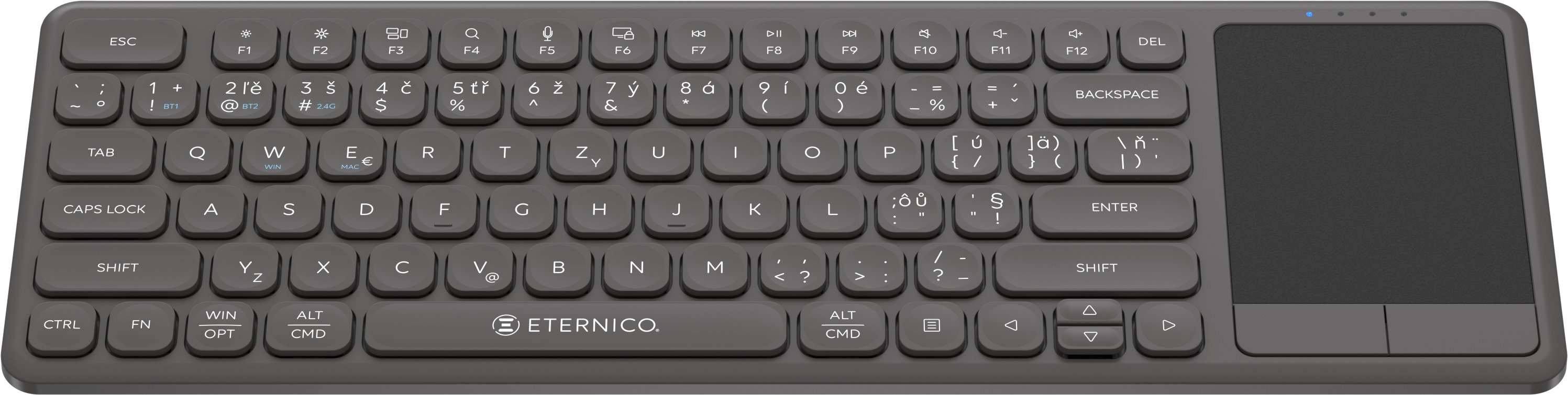
Do you have Smart TV at home? But you need proper user comfort and convenience if you want to use everything it offers. The Eternico Wireless Keyboard Touchpad KSB5250 - CZ/SK keyboard is designed precisely for this purpose, since the built-in touchpad gives you full-fledged mouse functionality.
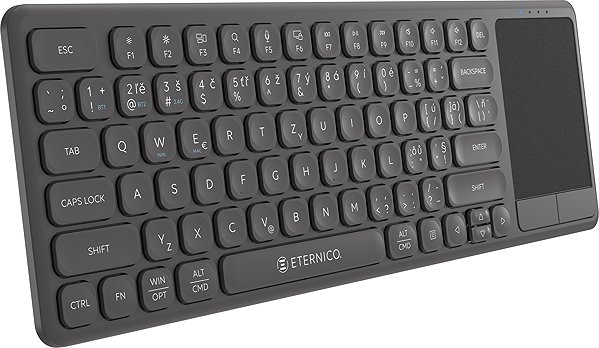
Eternico Wireless Keyboard Touchpad KSB5250 - CZ/SK Keyboard Key Features
Multimedia keys for comfortable rewinding or pausing videos or music content.
A built-in touchpad serves as a full-fledged replacement for a classic PC mouse .
One-slotted Enter key.
Bluetooth and 2,4GHz radio frequency connection interface for connecting the keyboard to other devices.
Specifies the field of use of the keyboard. Normal office keyboard, for example, offers a classic key layout, while the game models are equipped with a backlit, color-coded keys or have a modern...
A 36-month / 3-year or 48-month / 4-year warranty refers to the total duration of the warranty from the date of receiving the goods. Compared to standard statutory rights, this gives you an additional 12 months / 1 year or 24 months / 2 years, respectively, to file a claim.
Note:
Unless otherwise indicated, keyboards are equipped with CZ keys.
Specifications can be changed without notice. Images are for illustrative purposes only.

Dobrý deň,
je táto klávesnica kompatibilná s STRONG LEAP-S3?
Je možné použiť ju na vyhľadávnie filmov napr. na netflixe?
Ďakujem za odpoveď
Dobrý deň,
je táto klávesnica kompatibilná s STRONG LEAP-S3?
Je možné použiť ju na vyhľadávnie filmov napr. na netflixe?
Ďakujem za odpoveď
Ahoj,
Mam jen dotaz k této klávesnici. Pro me je super i k Macu. Jen me zajímá nabíjení a vypnuti. V manuálu to neni. Píšou alespoň jednou za tři měsíce. Jen klávesnice vydrží nabitá tak cca měsíc a něco. Jde me o to jeslti se ma pokaždé vypnout například přes noc. Co vím tak se píše v popisu o úsporném modu po cca 20 minutách by mela byt v low power mode a stiskem klávesy se probudí. Tak nevim jeslti ji mam pres noc nebo delší čas vypnout uplne nebo to neni potřeba.
Diky
Martin
Ahoj,
Mam jen dotaz k této klávesnici. Pro me je super i k Macu. Jen me zajímá nabíjení a vypnuti. V manuálu to neni. Píšou alespoň jednou za tři měsíce. Jen klávesnice vydrží nabitá tak cca měsíc a něco. Jde me o to jeslti se ma pokaždé vypnout například přes noc. Co vím tak se píše v popisu o úsporném modu po cca 20 minutách by mela byt v low power mode a stiskem klávesy se probudí. Tak nevim jeslti ji mam pres noc nebo delší čas vypnout uplne nebo to neni potřeba.
Diky
Martin
Ahoj,
Bude fungovat s macOS ? Ctu ze je podporovan. Vidim, ze gesta nebudou fungovat to chapu. Ani basic dva prsty na scrolling ? Jinak s MacBookem by mela slapat v pohode ?
Diky
Martin
Ahoj,
Bude fungovat s macOS ? Ctu ze je podporovan. Vidim, ze gesta nebudou fungovat to chapu. Ani basic dva prsty na scrolling ? Jinak s MacBookem by mela slapat v pohode ?
Diky
Martin
Existuje nějaká kombinace kláves, která zapíná/vypíná trvalé svícení kontrolky pro způsob připojení? V návodu je, že po spárování kontrolka zůstane svítit. Ale ve skutečnosti kontrolka po spárování zhasne a pak nevím, ke kterému zařízení (BT1, BT2, 2.4GHz) jsem připojen.
Dobrý deň, kliknutie funguje len vo vybraných aplikáciách v Android TV. Napr. v YouTube aplikácii normálne funguje aj pravý aj ľavý klik, ale napr. V Netflix a HBO nefunguje to. Už sme skúsili párovať klávesnicu cez USB a bluetooth, zatiaľ neúspešne. Aké riešenie odporúčate? Máme model TV TCL 55C69K. Vopred ďakujem za odpoveď
Nefunguje mi pravý SHIFT, chová se jako bych stiskl kombinaci kláves SHIFT+CTRL. Takže např. když chci napsat velké A přes pravý SHIFT, otevře se okno pro vyhledávání jako při kombinaci kláves SHIFT+CTRL+A. (používám Windows 10). Co s tím?
Try our cookiesAlza.cz a. s., Company identification number 27082440, use cookies and other data to ensure the proper functioning of the website and, with your consent, also, among other things, to personalize advertising and the content of our websites. By clicking on the “I understand“ button, you agree to the use of cookies and the transfer of data regarding the behavior on the website for displaying targeted advertising on social networks and advertising networks on other websites.
We use 8 categories of cookies on our website:
Technical cookies
These are strictly necessary for the functioning of the website and the features you choose to use. Without them, our website would not work; you wouldn't be able to log in to your user account, for example.
Functionality cookies
These cookies allow us to remember your basic choices and improve the user experience. These include remembering your preferred language or allowing you to stay logged in permanently.
Social media cookies
These cookies allow us to easily link you to your social media profile and, for example, allow you to share products and services with your friends and family.
Content personalisation
These cookies allow us to show you content and ads according to the information we have about you to best meet your needs. This includes what content you have viewed, or on what device you are accessing our website.
Non-personalised advertising
These cookies allow us to show you general ads for products and services.
Personalised advertising
Thanks to these cookies, we and our partners can offer you relevant products and services based on your purchases, your shopping behaviour and your preferences.
Audience metrics
These cookies allow us to optimise our site for your convenience based on how you use it. The aim is to remember or anticipate your choices. This includes, for example, the use of features, their location, or the behaviour on the page.
By giving your consent to the processing of cookies, functionality and analytical cookies will be installed on the device you use to browse the website (click on the "I understand" button for both categories, or you can select only one of the categories by clicking on the "Settings" button). We always install technical cookies on your device, even without your explicit consent, because without them our website would simply not work.
You can revoke your consent to the processing of cookies. In connection with our company's cookie processing, you also have the following rights: the right to access cookies, delete, modify, supplement and correct them, restrict processing and the right to lodge a complaint with the Office for Personal Data Protection. Read more about your rights.