

HP LaserJet Pro MFP M28a

4.8 37 ratings
Laser Printer - multifunctional, black and white, A4, copier and scanner, black-and-white print speed of 18 pages/min., print resolution: 600 x 600 DPI, USB (W2G54A)
Code:  PA400a3 Producer's Website:

Don't like the alternatives? Choose from the full product list

HP LaserJet Pro MFP M28a

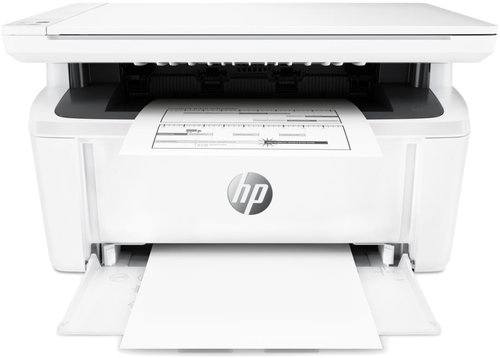
A laser printer is the perfect accessory to have at home. Thanks to this laser printer, you can print documents in high-quality. This model can print in black and white colours. This HP LaserJet Pro MFP M28a reaches a resolution of 600 x 600 DPI. It features a print speed of 18 pages/min. and it can work with A4 formats. You are able to connect to devices through the USB interface. Laser printers are generally cost-effective, so you can print more quantities of black-and-white papers at a lower cost when compared to inkjet printers. The HP laser printer is a multifunctional model that can copy and scan.

HP LaserJet Pro MFP M28a Laser Printer Key Features

  • Printing speed can reach up to 18 pages/min.
  • Maximum print resolution 600 x 600 DPI
  • Printing format A4
  • HP LaserJet Pro MFP M28a fits up to 150 sheets in its input tray
  • Connects through USB interface
  • This black-and-white laser printer is ideal to use at home

HP LaserJet Pro MFP M28a Laser Printer Scanning and Copy Features

Since this HP laser printer is a very useful, multifunctional device, it can replace a scanner and copy machine. This saves you plenty of space and money, since you have everything in one device. It can scan documents at a resolution of 600 x 600 DPI. You can quickly send documents by e-mail.

  • Printers are usually supplied with a starter toner and/or cartridges with an approximate 60% capacity of regular cartridges which are available to purchase separately.

Specifications

Type

Print colour
Black and white
Print technology
Laser
Usage
For home

Connection

Connection
USB

Supported Paper Sizes

Standard Paper Sizes
A4

Scanning

Scanner features
Scan to Email
Flatbed scanner resolution
600 x 600 DPI

Printing parameters

Print resolution
600 x 600 DPI
Print speed in black and white - maximum
18 PPM
Input trays
150 sheets
Maximum monthly usage
8,000 pages/month
Output trays
100 sheets

Dimensions

Height
197 mm
Depth
264 mm
Width
360 mm
Weight
5.4 kg

Equipment

Display
Without Display

Colour

Colour
Grey
More Specifications

HP Inc Czech Republic s.r.o Za Brumlovkou 5/1559 140 00 Praha 4 VAT ID: CZ 03208427 Radek Mattas, [email protected]"


GO Europe GmbH, Zum Kraftwerk 1, Hattingen 45527, Germany, +49232468010, [email protected]

Hewlett-Packard was founded in the difficult times of the Great Depression. The founders were a pair of friends whose name the company still proudly bears. They started their business in an unobtrusive garage near the city of Palo Alto. It is now a national monument. HP’s success lay not in copying existing products, but in the ability and courage to come up with something new.

The first commercial triumph was an oscillator that surpassed all competition in quality, yet sold at a quarter of the price. In 1968, HP released their first desktop computer - a desktop calculator. The company currently manufactures products primarily related to computer technology - computers and laptops, printers, scanners, digital cameras, servers, and last but not least, calculators.

Note:

If there is no "package contains" box in the product parameters and the data or USB cable is not specifically mentioned in there, the package does not contain it and must be purchased separately.

Specifications can be changed without notice. Images are for illustrative purposes only.

Dobrý den, prosím ,skutečně usb kabel není součástí? Dále bych se ráda zeptala, zda je u Vás možné dokoupit toner kompatibilní s touto tiskárnou a o jaký přesně typ se jedná. Děkuji moc
Dobry den, je nutne k tejto tlaciarni dokupit aj potrebne kable na pripojenie alebo je to v baleni? dakujem

Dobrý den, asi rok jsem skener nepoužívala a ted mi to píše, že HP Smart nelze spojit se skenerem. V minulosti fungoval bez problémů. Děkuji

Dobrý den, lze tisknout přes wifi?

Dobrý den,tiskárna tiskne šedý podklad papíru,co s tím?

Dobrý den, prosím Vás dnes jsem koupila novou HP Laser Jet tiskárnu a ukazuje se mi, že tam je prázdný toner. Nevím jak je to možné. Pouze jak jsem vytahovala tu pásku od toneru tak jsem ji vytáhla navíc o 2 cm, myslíte, že je to tím? Děkuji

Dobrý den, vlastním tiskárnu HP LaserJet 1018. Mám dotaz zda mohu zakoupit tiskárnu HP Laser Jet Pro MFP M28a. Jedná se mi o to zda má stejné připojení k PC. Děkuji. Neumannová Alena

Ako nastavím rozlíšenie skenovania 1200x1200 dpi? lebo pomocou drivera mi to skenuje maximalne na 600x600dpi. Ďakujem.

Dobrý den, lze skenovat na této tiskárně více stránkový dokument do jednoho souboru? Nepodařilo se mi skener takto nastavit.

Dobrý den. Chápu dobře že MFP M28a neumožňuje při kopírování měnit měřítko ani tmavý/světlý. Nemá na to tlačítka na panelu.

123...
Questions and answers: HP LaserJet Pro MFP M28a
Accessories for HP LaserJet Pro MFP M28a

Related categories

Chcete doručiť tovar na Slovensko? Prezrite si HP LaserJet Pro MFP M28a
Für Versand nach Deutschland, besuchen Sie bitte HP LaserJet Pro MFP M28a
Für Versand nach Österreich, besuchen Sie bitte HP LaserJet Pro MFP M28a
Magyarországra történő kiszállításért tekintse meg ezt a termékoldalt: HP LaserJet Pro MFP M28a

