Try our cookies Alza.cz a. s., Company identification number 27082440, use cookies and other data to ensure the proper functioning of the website and, with your consent, also, among other things, to personalize advertising and the content of our websites. By clicking on the “I understand“ button, you agree to the use of cookies and the transfer of data regarding the behavior on the website for displaying targeted advertising on social networks and advertising networks on other websites.
Alzak icon
Catalogue
Price
-
Availability
Order status
Brands
(1)
Type
(1)
(2)
Cable length
0.1 m
1.8 m
-
Colour
(3)
(2)

Video Cables

Video cables transfer the video signal to the playback device. They are divided primarily into analog and digital. While old analog technology is slowly going the way of the dinosaurs, advanced digital video cables (e.g. HDMI and DisplayPort) can now transmit audio and other information along with the image. If you want to learn how to make sense of all the video cables, read on.

Continue

How to Choose a Video Cable

When it comes to video cables, your device usually offers several options.

  1. Monitor cable - a lot depends on the maximum image resolution you want to have, but a digital DVI or DisplayPort cable should usually suffice. Older monitors may require an analog VGA cable.
  2. TV cable - generally speaking, you want a cable that supports the highest transmission quality, capable of transmitting audio tracks as well. This is what HDMI cables are for, or SCART if you are dealing with an older TV.
  3. Projector cable - here the cables used may vary greatly. The oldest projectors still use the analog VGA standard, but modern home theatre projectors also require modern digital connectors such as HDMI or DisplayPort.

i

The cable affects not only the image quality but also the refresh rate.

HDMI

The HDMI cable is capable of transmitting uncompressed video and audio in digital format. The latest versions support Ethernet, 8K video transmission, and 3D.

HDMI Connectors

  • HDMI 1.4 - 3D video transmission and 4K resolution at 24Hz, in addition to audio and internet
  • HDMI 2.0 - higher throughput, capable of outputting 4K resolution at up to 60Hz plus 32 audio channels
  • HDMI 2.1 - 3x faster than 2.0 with 8K support at 60Hz, capable of dynamic HDR
  • Uncompressed image transmission
  • Up to 32 audio channels
  • One cable for video, audio and internet
  • No bidirectional data transmission
  • Higher purchase price compared to other cables

VGA/D-Sub

VGA is the oldest and still actively used video cable. It is especially useful for devices that do not require the transmission of large amounts of data or audio, like old monitors or projection devices.

  • Support for up to FullHD resolution
  • Low price
  • Analog signal
  • Limited support for new devices

DisplayPort

A digital interface widely popular with computer component manufacturers. DisplayPort is primarily designed to transmit images, but can also transmit sound and other data. Due to its design it can also work as a DVI or HDMI cable with a passive adapter. It is primarily designed to replace obsolete DVI and VGA connectors for computer monitors and graphics cards.

DisplayPort Connectors

  • DisplayPort 1.0 and 1.1 - the first version of the interface
  • DisplayPort 1.2 - 3D image support and better audio transfer, 1 microsecond audio/video synchronisation, Apple Mini DisplayPort compatibility
  • DisplayPort 1.3 - 4K resolution at 120Hz and 8K at 30Hz.
  • Support from the largest electronics manufacturers
  • Great image quality
  • Excellent backward compatibility
  • Designed for PCs
  • Higher purchase price compared to other cables

DVI

A cable with interface capable of communicating in both digital and analog signals. Due to its design, it is widely compatible with most interfaces. Some DVI connectors have a second data link (dual-link) for high-definition transmission.

DVI Connectors

  • DVI-D (digital only) - transmits only digital signal
  • DVI-A (analog only) - transmits only analog signal
  • DVI-I (digital & analog) - transmits both digital and analog signals
  • Digital and analog signal transmission
  • Great compatibility and widespread support
  • Sufficient image quality for most users
  • Most used in personal computers 
  • Gradually becoming obsolete

SCART

An interface for connecting audio/video equipment that used to be rather common in Europe. It is gradually being abandoned in favour of HDMI.

  • Audio and video in one cable
  • Multi-signal RGB
  • Also transmits composite video
  • Old technology that is being replaced by HDMI

Reducers and Adapters

These are cables that convert one connector into another. When converting analog signal to analog or digital to digital, a cheap passive reduction is enough. But if you are converting analog to digital and vice versa, you have to get an active powered adapter, which will actively convert the signal. In this case, the image quality is often reduced.

Extenders and Splitters

Cables that extend the length of your existing cable or split its signal into multiple terminals at the same time.

Hide description
Was this information useful?
This form is used only for evaluating the information in the description above.
If you have any question about our products, services, transport or any other request, please contact our customer support.
What should be improved? Is anything missing here? Is anything wrong? Share it with us.
3 items
5.0 20×
Watch Price/Availability
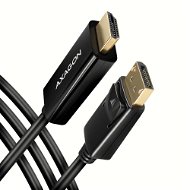
AXAGON RVD-HI14C2, DisplayPort -> HDMI 1.4 cable 1.8m, 4K/30Hz
Video Cable 1,8m - interconnection, male connectors: 1× DisplayPort (Displayport 1.2) with a transfer rate of 21.6 Gbit/s + 1× HDMI (HDMI 1.4) with a transfer rate of up to 4K (3840×2160) at 30Hz, 8 audio stops, 8 audio channels and 10.2 Gbit/s, with gold-plated connectors, straight ending
Buy with code ALZADNY10 The discount code gives the option of applying a discount on a given product when entering the code in the shopping cart. Získejte slevu 10 % s kódem ALZADNY10. Klikněte a kód se uplatní automaticky. 224,-
  249,-
Buy
In stock > 10 pcs at the supplier's
Order Code: AG200d28
4.6 37×
Watch Price/Availability
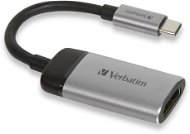
VERBATIM USB-C TO HDMI 4K ADAPTER - USB 3.1 GEN 1/ HDMI, 10cm
Adapter - 0,1m, male connectors: 1× USB-C (USB 3.2 Gen 1), 1× HDMI, metal Body, rotating connector ends
Buy with code ALZADNY20 The discount code gives the option of applying a discount on a given product when entering the code in the shopping cart. Získejte slevu 20 % s kódem ALZADNY20. Klikněte a kód se uplatní automaticky. 359,-
  449,-
Buy
In stock 5 pcs
Order by midnight, get it at the AlzaBox in the morning.
Info
Order Code: DY501a1
4.5 13×
Watch Price/Availability
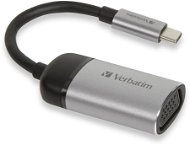
VERBATIM USB-C TO VGA ADAPTER - USB 3.1 GEN 1/ VGA, 10cm
Adapter - 0,15m, male connectors: 1× USB-C (USB 3.2 Gen 1), female connectors 1× D-Sub DE-15 (VGA. RS-232), metal Body, straight connector ends
Buy with code ALZADNY20 The discount code gives the option of applying a discount on a given product when entering the code in the shopping cart. Získejte slevu 20 % s kódem ALZADNY20. Klikněte a kód se uplatní automaticky. 359,-
  449,-
Buy
In stock 4 pcs
Order by midnight, get it at the AlzaBox in the morning.
Info
Order Code: DY501a3

Video Cables - articles
ArticleJak propojit notebook s TV nebo monitorem (NÁVOD) Bádáte, jak připojit notebook k televizi či monitoru? Připravili jsme pro vás článek, který celý postup přehledně shrnuje, a navíc poskytuje informace o drátovém i bezdrátovém přenosu obrazu. Jak nastavit druhou obrazovku ve Windows, jaký propojovací kabel vybrat nebo...
USB, HDMI, Thunderbolt, VGA, ... Jde vám hlava kolem z nepřeberného množství kabelů a portů? V tomto článku si ujasníme rozdíl mezi zaměnitelným USB-C a Thunderboltem 3. Vizuálně stejné, v některých ohledech jsou ale odlišné.
Chaos v kabelech na radosti nepřidá. V našem článku poradíme, jak zamotané kabely zkrotit. Nabídneme tipy, jak je schovat, ale i jak se s nimi kreativně pochlubit.
ArticleCo je HDMI, DVI, VGA a proč jedno nahradit druhým? Jestliže si stále nejste jisti, co je HDMI, DisplayPort, DVI, VGA, je tento článek právě pro vás. Polopatě vás seznámíme s tím, jak tyto konektory fungují, co je analogový, co digitální signál a jak to udělat, když má monitor či televize jiný konektor než počítač.

Víte, jaké máte konektory na svém monitoru? Náš článek vám poskytne stručný návod k tomu, jak se v nich vyznat. A přidáme i rady, na které konektory se soustředit při výběru nového monitoru.
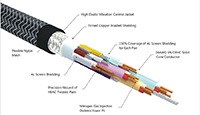
Stínění kabelu slouží jako „filtr“ nežádoucího šumu. Šum se může projevovat zhoršenou kvalitou obrazového, zvukového nebo datového výstupu. Proti rušení je vybavena i celá řada napájecích kabelů (zpravidla ferritový váleček u konektoru), u kterých jde však...
All articles
P-DC1-WEB26