


Dobry den je dock Lenovo ThinkPad Hybrid USB-C with USB-A Dock – 135 W EU kompatibilny s notebookom Lenovo IdeaPad Pro 5 14AHP9, funguje power button na docku a je k docku pribaleny aj USB-C napajaci kabel na prepojenie docku s notebookom a utiahne nabijanie notebooku? Dakujem
Lenovo ThinkPad Hybrid USB-C with USB-A Dock - 135W EU
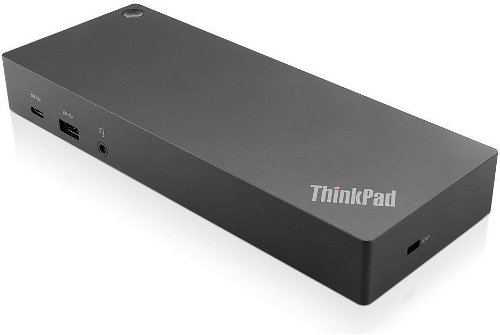

Docking Station - 1x USB-C 3.1 Gen 1, 3x USB 3.1 Gen 2, 2x USB 2.0, 2x DisplayPort 1.2, 2x HDMI, 3.5mm jack, RJ45, USB-C cable with USB-A dongle, including 135W power adapter
Show full description
-5 % off new
6,599,-
New 6,999,-
 Installment calculator
4,9%
interest
from 152,- monthly
Installment calculator
4,9%
interest
from 152,- monthly
Shop faster with pickup at AlzaBox or in-store.
Warranty 36 months
Code:
NT438g3g2
Producer's Website:

Lenovo ThinkPad Hybrid USB-C with USB-A Dock - 135W EU
6,599,-
Unsealed - in stock 1 pcs
Buy
Lenovo ThinkPad Hybrid USB-C with USB-A Dock - 135W EU

Lenovo ThinkPad Hybrid USB-C with USB-A Dock - 135W EU is an almost new item, in perfect condition, and comes with a full warranty. However, someone opened the original packaging before you. Why? It could have been an unwanted gift. For detailed information, click here.
The Lenovo ThinkPad Hybrid USB-C with USB-A docking station offers a wide range of ports, a stylish design, simple single-cable connection, the ability to turn on your laptop with the button on the docking station, and it can even charge your laptop. Connect your laptop to the docking station using the USB-C cable with a USB-A adapter. Your laptop will automatically charge from the docking station, it provides additional ports, and allows you to turn on the laptop with a button directly on the docking station. It's a small black box with an elegant design that doesn't take up much space, but still performs incredible feats. The package includes a 135W charger, and the docking station is capable of charging a laptop with up to 90W.

Key Features of the Lenovo ThinkPad Hybrid USB-C with USB-A Dock - 135W EU
- It also allows you to connect up to 2 monitors, two of which can be in up to 4K resolution
- Connecting your laptop to the docking station is easy, just one cable is all you need
- A wide range of ports to connect all your peripherals without constantly plugging in individual cables
- Minimalist design
- The Lenovo ThinkPad Hybrid USB-C with USB-A Dock has an elegant and discreet design
- Ability to connect monitors
- If you need more workspace, the docking station allows you to connect multiple monitors with high resolution for easier work
The Lenovo ThinkPad Hybrid USB-C with USB-A Dock offers the following connectors:
2× HDMI 2.0, 2× DisplayPort 1.2, 3× USB 3.2 Gen 2, 2× USB 2.0, USB-C, 3.5mm audio jack, Gigabit Ethernet, Kensington security lock slot
ThinkPad Compatibility:
E series: ThinkPad E14 Gen 2, ThinkPad E14 Gen 3 (AMD), ThinkPad E14 Gen 4, ThinkPad E14 Gen 4 (AMD), ThinkPad E14 Gen 5, ThinkPad E14 Gen 5 (AMD), ThinkPad E15 Gen 2, ThinkPad E15 Gen 3 (AMD), ThinkPad E15 Gen 4, ThinkPad E15 Gen 4 (AMD), ThinkPad E16 Gen 1, ThinkPad E16 Gen 1 (AMD)
L series: ThinkPad L13 Gen 2, ThinkPad L13 Gen 3, ThinkPad L13 Gen 4, ThinkPad L13 Gen 2 (AMD), ThinkPad L13 Gen 3 (AMD), ThinkPad L13 Gen 4 (AMD), ThinkPad L13 Yoga Gen 2, ThinkPad L13 Yoga Gen 3, ThinkPad L13 Yoga Gen 4, ThinkPad L13 Yoga Gen 2 (AMD), ThinkPad L13 Yoga Gen 3 (AMD), ThinkPad L13 Yoga Gen 4 (AMD), ThinkPad L14 Gen 2, ThinkPad L14 Gen 3, ThinkPad L14 Gen 4, ThinkPad L14 Gen 2 (AMD), ThinkPad L14 Gen 3 (AMD), ThinkPad L14 Gen 4 (AMD), ThinkPad L15 Gen 2, ThinkPad L15 Gen 3, ThinkPad L15 Gen 4, ThinkPad L15 Gen 2 (AMD), ThinkPad L15 Gen 3 (AMD), ThinkPad L15 Gen 4 (AMD)
T series: ThinkPad T14 Gen 2, ThinkPad T14 Gen 2 (AMD), ThinkPad T14 Gen 3, ThinkPad T14 Gen 3 (AMD), ThinkPad T14 Gen 4, ThinkPad T14 Gen 4 (AMD), ThinkPad T14s Gen 2, ThinkPad T14s Gen 2 (AMD), ThinkPad T14s Gen 3, ThinkPad T14s Gen 3 (AMD), ThinkPad T14s Gen 4, ThinkPad T14s Gen 4 (AMD), ThinkPad T15 Gen 2, ThinkPad T15p Gen 2, ThinkPad T15p Gen 3, ThinkPad T16 Gen 1, ThinkPad T16 Gen 1 (AMD), ThinkPad T16 Gen 2, ThinkPad T16 Gen 2 (AMD)
X series: ThinkPad X1 Carbon Gen 9, ThinkPad X1 Carbon Gen 10, ThinkPad X1 Carbon Gen 11, ThinkPad X1 Yoga Gen 6, ThinkPad X1 Yoga Gen 7, ThinkPad X1 Yoga Gen 8, ThinkPad X1 Nano Gen 1, ThinkPad X1 Nano Gen 2, ThinkPad X1 Nano Gen 3, ThinkPad X1 Extreme Gen 5, ThinkPad X1 Fold 16 Gen 1, ThinkPad X1 Titanium Yoga Gen 1, ThinkPad X12 Detachable Gen 1, ThinkPad X13 Gen 2, ThinkPad X13 Gen 2 (AMD), ThinkPad X13 Gen 3, ThinkPad X13 Gen 3 (AMD), ThinkPad X13 Gen 4, ThinkPad X13 Gen 4 (AMD), ThinkPad X13 Yoga Gen 2, ThinkPad X13 Yoga Gen 3, ThinkPad X13 Yoga Gen 4, ThinkPad X13s Gen 1
P series: ThinkPad P1 Gen 4, ThinkPad P1 Gen 5, ThinkPad P1 Gen 6, ThinkPad P14s Gen 2, ThinkPad P14s Gen 2 (AMD), ThinkPad P14s Gen 3, ThinkPad P14s Gen 4, ThinkPad P14s Gen 4 (AMD), ThinkPad P15s Gen 2, ThinkPad P15v Gen 2, ThinkPad P15v Gen 3, ThinkPad P15v Gen 3 (AMD), ThinkPad P16, ThinkPad P16 Gen 2, ThinkPad P16s Gen 1, ThinkPad P16s Gen 1 (AMD), ThinkPad P16s Gen 2, ThinkPad P16s Gen 2 (AMD), ThinkPad P16v Gen 1, ThinkPad P16v Gen 1 (AMD)
Z series: ThinkPad Z13 Gen 1, ThinkPad Z13 Gen 2 (AMD), ThinkPad Z16 Gen 1, ThinkPad Z16 Gen 2 (AMD)
ThinkBook Compatibility:
13": ThinkBook 13s Gen 2, ThinkBook 13s Gen 3, ThinkBook 13s Gen 4, ThinkBook 13s Gen 5, ThinkBook 13x Gen 2
14": ThinkBook 14 Gen 2, ThinkBook 14 Gen 3, ThinkBook 14 Gen 4, ThinkBook 14 Gen 4+, ThinkBook 14 Gen 6, ThinkBook 14s Gen 2, ThinkBook 14s Yoga Gen 2, ThinkBook 14s Yoga Gen 3, ThinkBook 14p Gen 2, ThinkBook 14p Gen 3
15–16": ThinkBook 15 Gen 2, ThinkBook 15 Gen 3, ThinkBook 15 Gen 4, ThinkBook 15p Gen 2, ThinkBook 16 Gen 4+, ThinkBook 16 Gen 6, ThinkBook 16p Gen 2, ThinkBook 16p Gen 3, ThinkBook 16p Gen 4, ThinkBook 16p NX
Special: ThinkBook Plus Gen 2, ThinkBook Plus Gen 3, ThinkBook Plus Gen 4
Lenovo V Series Compatibility:
V14 Lenovo V14 G1, Lenovo V14 Gen 2, Lenovo V14 Gen 4, Lenovo V14 (ALC / ITL)
V15 Lenovo V15 G1, Lenovo V15 Gen 2, Lenovo V15 Gen 4, Lenovo V15 (ALC / ITL / IGL)
V17 Lenovo V17 Gen 2
Dimensions:
3.25 × 17.1 × 8cm (H × W × D)
Weight:
0.29kg
Specifications
Power supply (cable)
Laptop power port
USB-C power supply (PD)
USB-A 3.2 Gen 2 (3.1)
USB-A 2.0
Laptop power port
Power supply (cable)
Laptop power port
Most common ports
Common data ports
Common graphics ports
Data ports - Number and standards
USB-A standards
USB-C standards
USB-C power supply (PD)
USB-A 3.2 Gen 2 (3.1)
USB-A 2.0
Power ports for electrical devices
USB-A
USB-C
Graphics ports - Number and standards
DisplayPort standards
DisplayPort 1.4
Audio ports
Audio ports
Features
Colour
Compatibility
Type
Compatible models
Dimensions and weight
Width
Height
Depth
Weight
More Specifications

Lenovo Technology B.V. organizační složka, Classic 7, Jankovcova 1603/47a, 17000 Praha 7, [email protected], https://www.lenovo.com/cz/cs/contact/; Lenovo (Slovakia) s.r.o., Landererova 12, 811 09 Bratislava, [email protected]
Lenovo Technology B.V. Classic 7, Jankovcova 1603/47a, 17000 Praha 7, [email protected], https://www.lenovo.com/cz/cs/contact/; Lenovo (Slovakia) s.r.o., Landererova 12, 811 09 Bratislava, [email protected], https://www.lenovo.com/
Lenovo is the world's largest computer maker, founded in 1984. Its original name was Legend. Later it was renamed to Legend Novo ("New Legend"), abbreviated Lenovo. In 2005 it took over IBM's computer division, which was among the largest computer makers in the world. It is similarly ambitious in the field of mobile phones, where it would like to surpass Apple and Samsung. As far as this goal goes, they acquired Motorola’s mobile division in January 2014 and have been ramping up production since.
The company also produces tablets, monitors, televisions, and storage solutions. Overall, they are known for delivering quality products at reasonable prices.
Note:
Specifications can be changed without notice. Images are for illustrative purposes only.
