


dobry den. na akej frekvenci pracuju jednotlive anteny 1- 5Ghz a dve na 2,5 ??
ASUS RT-AC53
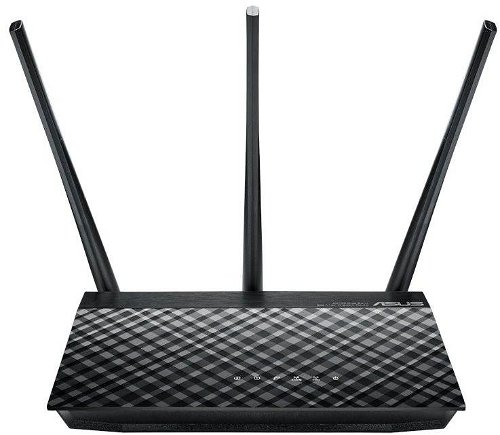
WiFi Router 802.11a/b/g/n/ ac up to 733MB/sec, Dual Band (300 + 433MB/sec), DLNA, 1x GWAN, 2x GLAN, AiCloud service, 3 antennas for stronger signals and higher speeds at greater distances, gigabit Ethernet for minimal response and maximum speed, simple set up and installation in 3 steps, VPN server support and stand-alone guest network, Simultaneous WiFi connection utilising two separate bands data tranfer rate 733MB/sec
Show full description
Code:
NM145o5
Producer's Website:
Don't like the alternatives? Choose from the full product list
- Help and manuals 15
- Specifications
- Photos & Videos 4
- Alternatives 8
- Accessories and suggested products

ASUS RT-AC53
Discontinued
ASUS RT-AC53
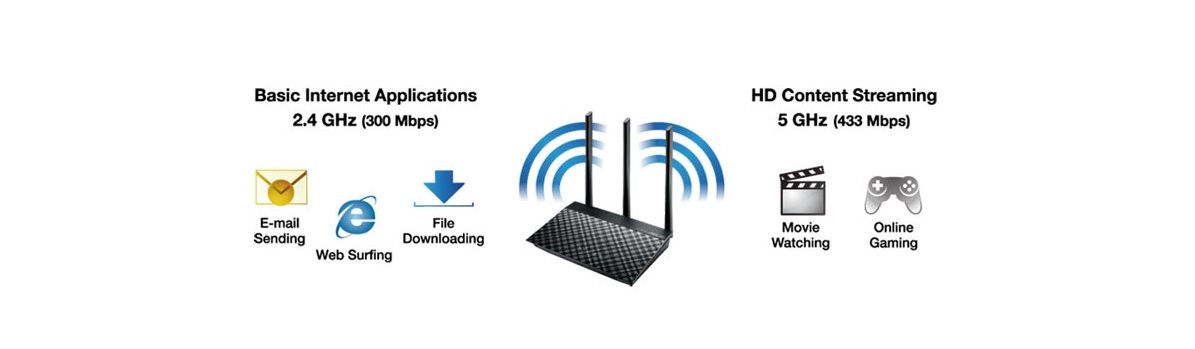
The ASUS RT-AC53 WiFi router allows you to connect to the internet providing blazingly fast high-speed wireless data transfer rates leaving older connection devices in the dust. The ASUS's modern router runs simultaneously on a standard 2.4 GHz band and on an even less-occupied 5GHz band. With both bands this router can attain data transfer, at a total combined speed of up to 733MB/sec! In addition to these incredible technical achievements, the router has 3 antennas to make the WiFi signal reach even more distant areas at blazingly fast speeds.

Key Features of the ASUS RT-AC53 WiFi router
- Simultaneous WiFi connection utilising two separate bands
- Data transfer rate up to 733MB/sec (300MB/sec for 2.4GHz + 433MB/sec for 5GHz)
- 3 antennas for stronger signals and higher speeds at greater distances
- Gigabit Ethernet for minimal response and maximum speed
- Simple set up and installation in 3 steps
- VPN server support and stand-alone guest network
Quickly to action
Utilising the user-friendly ASUSWRT interface, you can find all you need to get started and maintain operation including, configuration modes, monitoring overview, and managing your network, all on a single dedicated router portal! Just connect cables to the router, open a web browser, and follow the simple instructions given by the installation wizard. The installation wizard effortlessly guides you through the process in 3 steps to access the Internet within a few moments. You can be online for the first time in a mere 30 seconds!

Not filled Alternative text to the photo!
Elegant router with simultaneous operation of a standard 2.4GHz network and high-speed 5GHz connection for modern devices where there is no problem playing or streaming HD content.
Specifications
Standards and frequency
Functions
Features
Speed
WiFi transmission speed
Security
Antenna features
Advanced parameters
Advanced functions
Service quality
Dimensions and weight
Width
Height
Depth
Weight
More Specifications

ASUSTek COMPUTER INC. 1F.,No.15, Lide Rd., Beitou Dist., Taipei City 112 Tel: +886-2-2894-3447 Tel: +886-2-2890-7798 https://gr.asus.com/ProductSafety ASUS COMPUTER GmbH Harkortstrasse 21-23 40880 Ratingen Germany, Europe Email: [email protected]
ASUS COMPUTER GmbH, Harkortstrasse 21-23, 40880 Ratingen, Germany, Europe, [email protected]
ASUS is a symbol of the growth of Taiwan's economy. The firm's beginnings date back to April 2, 1989, when as a small manufacturer of motherboards began his work with a few employees. Today, Asus employs more than 12,500 employees worldwide.
ASUS products can be found in almost every category of the information technology marketplace. ASUS is focused on desktops, laptops, phones, optical drives and components. In the manufacture of motherboards, the company is now the dominant player with a staggering 40% market share.
Note:
Specifications can be changed without notice. Images are for illustrative purposes only.
