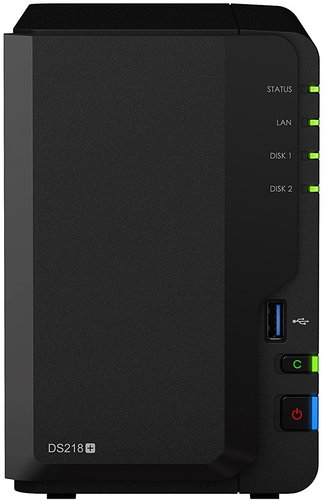
Powerful, efficient NAS scaling software and hardware deliver a complete range of business services for the safe storage of data and access them from any device connected to the Internet.
This NAS with professional features satisfies all the productivity and efficiency requirements for small and medium-sized businesses. And it is offered at just a fraction of the price when compared to larger servers. With this NAS, you don't have to spend funds on acquisition, operation, and software. From Synology, you get everything you need at once and with easy, modest management. Modern hardware allows for the Synology DiskStation DS218+ data storage device to handle recoding 4K H.264/H.265 via Video Station, so you can watch videos on computers, smartphones, and other players.
Key Features of the Synology DiskStation DS218+ data storage device
Dual-channel recoding of 4K H.264/H.265 for remote playback
Cloud Station set for synchronisation and data availability across all devices
New Generation Data Protection and Integrity (Btrfs)
Special server system with an intuitive interface and the possibility of replenishment
Most compatible sharing (FTP, SMB2, AFP, NFS, WebDAV, Windows AD and LDAP)
2-core processor and 2GB of DDR3L RAM for smooth operation and AES-NI hardware encryption
Data Protection and Integrity with Btrfs
The next generation Btrfs file system has tools to prevent data corruption in the Synology DiskStation DS218+ data storage. The Btrfs volume stores two copies of the metadata and enables you to recover data in the event of damage to the hard drive or the occurrence of bad sectors. With an ordinary filesystem volume, error detection occurs from working with special tools. But Btrfs creates checksums during each read operation, so that an error will be revealed immediately and a remedy is issued automatically. Snapshot features allow you to make a copy of the entire shared folder or system. This way, in case of loss or database corruption due to operator error, you can quickly restore the data back to the time when the snapshot was taken.
Services at Hand with the Synology Data Storage Device
The Synology DiskStation DS218+ data storage device has an elegant DiskStation Manager (DSM) browser operating system. Its intuitive, organised environment can handle all service settings and it can even complement a variety of packages in order to adjust it exactly to your needs. To protect important data and other assets, DSM provides new management tools and security, so that Synology NAS can serve as a center networking strategy. With the introduction of Snapshot Replication service, DSM offers businesses nearly continuous data protection and replication to multiple sites for comprehensive protection. The Synology Hyper Backup can now perform backups in multiple versions to all kinds of destinations.
Data From All Sides of the Cloud
Is it important for you to have your files at hand, regardless of which device you use? With Cloud Station, synchronising files between different devices and creating your own private cloud is easier than ever before. Business security is covered by two-step verification, group authorisation (local and VPN), and encryption. In case you are worried about accidentally deleting or changing files, you can also store up to 32 older versions of each file. In addition, Cloud Sync offers more accurate synchronisation control and backup of files from your Synology DiskStation DS218+ to an external cloud service host.
Manufacturer's recommended use - corporate deployments require high transmission speed or a higher number of disks, for home, use just a simpler model.
Defines which maximum capacity of the installed hard disks NAS supports. This value can often be increased by installing the latest version of the device firmware.
Manufacturer's recommended use - corporate deployments require high transmission speed or a higher number of disks, for home, use just a simpler model.
Defines which maximum capacity of the installed hard disks NAS supports. This value can often be increased by installing the latest version of the device firmware.
The system RAM of external data storage devices determines the speed and efficiency of data processing. Higher RAM capacity means better multitasking and faster response times for demanding operations such as streaming media or working with large databases.
Indicates the number of USB 3.0 connectors, which are used to extend the capacity of the device using a flash drive or external drive. USB interface can also be used to connect a printer, which will...
Dobrý den, prosím Vás u popisu zařízení se uvádí, že umí překódovat video. Nicméně když dám na úložiště video mkv a chci přehrát v televizi zapojenou v síti, soubor nelze přehrát. V aplikaci mediální server mám překódování mkv souborů povoleno.
Dobrý den, prosím Vás u popisu zařízení se uvádí, že umí překódovat video. Nicméně když dám na úložiště video mkv a chci přehrát v televizi zapojenou v síti, soubor nelze přehrát. V aplikaci mediální server mám překódování mkv souborů povoleno.
Dobrý den, Prosím jak je to s hlučností? Mám WD MyChloudEx2Ultra a pokud něco kopíruji nebo přehrávám média z Nas, tak se rozjede ventilátor a je dost hlučný. Jak je to u této Nas?
Dobrý den, Prosím jak je to s hlučností? Mám WD MyChloudEx2Ultra a pokud něco kopíruji nebo přehrávám média z Nas, tak se rozjede ventilátor a je dost hlučný. Jak je to u této Nas?
Dobry den, lze pouzit NAS bez pripojeni internich disku? Mam 1TB WD Passport a 1.5TB WD Elements a chtel bych je vyuzivat s timto NAS, nez si casem poridim "poradny" disk.
Vyuziti planuju k zalohovani pres SSH a sdileni pres Sambu, takze pokud lze k masine pristupovat pres ssh a disky by OS "videl" hadam ze by to melo jit...? (Pokud se dostanu pres ssh na roota tak si vicemene poradim sam, bez asistence web UI.)
(Mam to takhle momentalne na Raspberry PI 3B+ a slape to jen je problem ze "kolacek" udrzi jen jeden disk, a ani s napajenym USB hubem to zatim nevypada lip..)
Dobry den, lze pouzit NAS bez pripojeni internich disku? Mam 1TB WD Passport a 1.5TB WD Elements a chtel bych je vyuzivat s timto NAS, nez si casem poridim "poradny" disk.
Vyuziti planuju k zalohovani pres SSH a sdileni pres Sambu, takze pokud lze k masine pristupovat pres ssh a disky by OS "videl" hadam ze by to melo jit...? (Pokud se dostanu pres ssh na roota tak si vicemene poradim sam, bez asistence web UI.)
(Mam to takhle momentalne na Raspberry PI 3B+ a slape to jen je problem ze "kolacek" udrzi jen jeden disk, a ani s napajenym USB hubem to zatim nevypada lip..)
Dobrý den,
Lze použit každý disk od jiného výrobce stejné velikosti pro RAID 1? Různé výrobce chci pro zvýšení bezpečnosti, aby nebyly ze stejné série či typu.
Dobrý den,
Lze použit každý disk od jiného výrobce stejné velikosti pro RAID 1? Různé výrobce chci pro zvýšení bezpečnosti, aby nebyly ze stejné série či typu.
Try our cookiesAlza.cz a. s., Company identification number 27082440, use cookies and other data to ensure the proper functioning of the website and, with your consent, also, among other things, to personalize advertising and the content of our websites. By clicking on the “I understand“ button, you agree to the use of cookies and the transfer of data regarding the behavior on the website for displaying targeted advertising on social networks and advertising networks on other websites.
We use 8 categories of cookies on our website:
Technical cookies
These are strictly necessary for the functioning of the website and the features you choose to use. Without them, our website would not work; you wouldn't be able to log in to your user account, for example.
Functionality cookies
These cookies allow us to remember your basic choices and improve the user experience. These include remembering your preferred language or allowing you to stay logged in permanently.
Social media cookies
These cookies allow us to easily link you to your social media profile and, for example, allow you to share products and services with your friends and family.
Content personalisation
These cookies allow us to show you content and ads according to the information we have about you to best meet your needs. This includes what content you have viewed, or on what device you are accessing our website.
Non-personalised advertising
These cookies allow us to show you general ads for products and services.
Personalised advertising
Thanks to these cookies, we and our partners can offer you relevant products and services based on your purchases, your shopping behaviour and your preferences.
Audience metrics
These cookies allow us to optimise our site for your convenience based on how you use it. The aim is to remember or anticipate your choices. This includes, for example, the use of features, their location, or the behaviour on the page.
By giving your consent to the processing of cookies, functionality and analytical cookies will be installed on the device you use to browse the website (click on the "I understand" button for both categories, or you can select only one of the categories by clicking on the "Settings" button). We always install technical cookies on your device, even without your explicit consent, because without them our website would simply not work.
You can revoke your consent to the processing of cookies. In connection with our company's cookie processing, you also have the following rights: the right to access cookies, delete, modify, supplement and correct them, restrict processing and the right to lodge a complaint with the Office for Personal Data Protection. Read more about your rights.