



Před pár dny jsem zakoupil tento wifi router. Od poskytovatele internetu mám garantovanou rychlost kabelem 50Mbps. Původní levnější router TP Link 841 (ten mi bohužel vypověděl službu a byl neopravitelný) přijímal a odesílal data přes wifi cca. 3m od notebooku rychlostí mezi 40-50Mpbs. Tento nový mi první den po instalaci značně neustále kolísá v rychlosti a to od 1 do 50Mbps, což určitě není normální. Je to důvod k reklamaci?
TP-LINK TL-MR3620
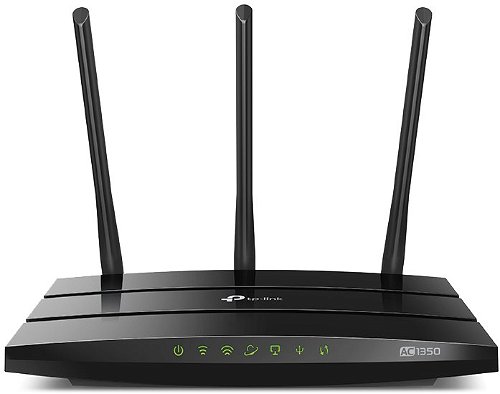
WiFi Router - 802.11a/b/g/n/ac up to 1350Mbps, Dual Band (2.4GHz 450Mbps, 5GHz 867Mbps) 3 removable antennas, 1x USB 2.0 for 3G/4G modem, 1x WAN 4x LAN
Show full description
Code:
TP642a2
Producer's Website:
Don't like the alternatives? Choose from the full product list
- Help and manuals 7
- Specifications
- Photos & Videos 5
- Alternatives 8
- Accessories and suggested products

TP-LINK TL-MR3620
Discontinued
TP-LINK TL-MR3620
Aside from the wired connection, the TP-LINK TL-MR3620 WiFi router also supports 3G/4G modems with a USB connection and the new generation WiFi-802.11ac standard, providing a boost in speed compared to the n band. Now you can finally take full advantage of your home network speeds, have a stable Internet connection, and make sure your neighbours’ devices won’t cause any signal interference in your home network. The router operates on the 2.4GHz and 5GHz bands at the same time, which ensures the amazing performance of the wireless network. Simultaneous two-way transmission gives you two flexible dedicated networks with multiple bandwidths for all your needs.
Key features of the TP-LINK TL-MR3620 WiFi router
- Wireless 3G/4G connection sharing (USB modem required)
- Operates on two bands simultaneously (1.35Gbps in total)
- Stable signal due to three antennas
- Wired LAN connection
- A special guest network
- Parental controls to restrict access to children or employees
- Connect to a private network through secure OpenVPN and PPTP VPN connections
- Includes a special app for easier installation and administration
1317Mbps dual WiFi connection for work and fun without lag
The 5GHz network is dedicated for more demanding operations, including large file downloads, HD video streaming, or playing multiplayer games. The weaker 2.4GHz band is sufficient for comfortable web browsing, social networking, or sending e-mails. The router’s stable omnidirectional signal is propagated using three antennas. The TP-LINK TL-MR3620 WiFi router is powerful enough to cover your entire house.
Controls via TP-LINK Tether app
TP-LINK Tether for iOS and Android devices provides easier access to your TP-LINK TL-MR3620 router and simplifies its management. Tether app provides a simple and intuitive user interface for the initial installation procedure and parental controls. It provides information about the router status, currently connected users, and what access rights they have.
Specifications
Features
WiFi transmission speed
Functions
Features
Speed
WiFi transmission speed
Antenna features
Antenna gain
Advanced parameters
Advanced functions
USB functions
DHCP functions
Dimensions and weight
Width
Height
Depth
More Specifications

TP-LINK Czech s.r.o., Pekařská 10a, 15500 Praha 5, Česko, [email protected], www.tp-link.com
TP-LINK Czech, s. r. o., Pekařská 695/10, Jinonice, 155 00 Praha 5, CZ +420 212 812 622 / SK +421 233 006 532, [email protected]
Note:
Specifications can be changed without notice. Images are for illustrative purposes only.
