


Dobry den, je mozne zapojit tento monitor k MacBook Pro M1 pomocou USB-C s nabijanim ?
40" Dell Ultrasharp U4025QW
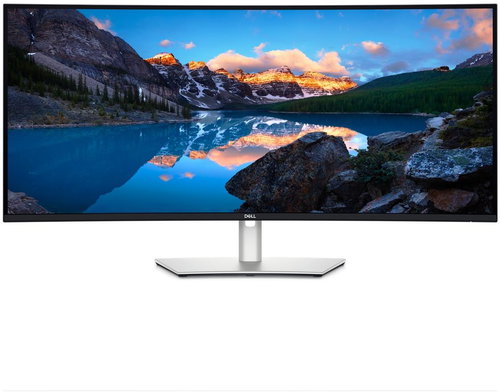

Monitor - IPS, curved, 5K Ultra HD 5120 × 2160 (21:9), 120 Hz, Anti-Glare display, 8 bit, 5 ms, adjustable height, Power Delivery max. 140 W, automatic brightness adjustment, speakers, HDMI, USB-C and DisplayPort, RJ-45 (LAN) data interface, VESA
Show full description
41,390,-
Price Guarantee
 Installment calculator
4,9%
interest
from 952,- monthly
Installment calculator
4,9%
interest
from 952,- monthly
Shop faster with pickup at AlzaBox or in-store.
Warranty 36 months
Code:
ADL34u34
Product Fiche
Producer's Website:

40" Dell Ultrasharp U4025QW
41,390,-
In stock > 5 pcs
Buy
40" Dell Ultrasharp U4025QW
The Dell Ultrasharp U4025QW monitor redefines the standards of professional workstations. With an impressive 5120×2160 resolution and a wide 21:9 aspect ratio, it provides a massive workspace. It allows you to effectively manage multiple applications at once and view every detail of your projects without compromise. As a curved monitor, it combines an immersive visual experience thanks to its 2500R curvature with exceptional image smoothness, which you'll appreciate not only when editing video, but also in your daily work. At the heart of the device is an innovative IPS Black panel, which offers a contrast ratio of 2,000:1 for truly deep blacks and colours. The monitor also functions as a comprehensive docking station that transfers video, high-speed data, and powers your laptop with up to 90W of power through a single cable, greatly simplifying your workspace organisation.

39.7"
screen size
5120 × 2160 (5K)
Resolution (Resolution Type)
IPS
Display Type
120Hz
Refresh Rate
5ms (GtG)
Response Time
Key Features of the 40" Dell Ultrasharp U4025QW Monitor
- The IPS Black panel provides twice the contrast of standard IPS panels, resulting in deeper blacks and more vibrant colours
- A high 120Hz refresh rate ensures a smooth and responsive picture, suitable for video work and everyday use
- VESA DisplayHDR 600 certification ensures high brightness of up to 600cd/m² and excellent detail in both bright and dark scenes
- The Thunderbolt 4 docking station offers connectivity, data transfer, and laptop charging with up to 140W EPR via a single cable
- The integrated KVM switch allows you to control two connected computers with a single set of keyboard and mouse
- A fast LAN port provides a stable and high-speed network connection directly through the monitor
- The gentle curve expands the field of view and contributes to an immersive visual experience and working comfort
- Eye-care features such as Flicker-free, a blue light filter and automatic brightness control reduce eye strain during long periods of work
Visual Perfection with 5K and IPS Black
The 39.7" panel with 5K resolution (5120×2160) displays a high level of detail. IPS Black technology takes the visual experience to a new level with a 2,000:1 contrast ratio, double that of conventional IPS panels. The result is deep, inky blacks and exceptionally vibrant colours. VESA DisplayHDR 600 certification ensures high brightness of up to 600cd/m², enabling the display of high dynamic range content full of nuances in both bright and dark scenes. Professionals will appreciate the precise colour accuracy with 99% coverage of the DCI-P3 and Display P3 gamuts and 100% sRGB, making it suitable for graphic designers, photographers and video editors who demand absolute colour fidelity.

120Hz Smoothness and Comfort
Work and create with fluidity thanks to the 120Hz refresh rate. The gentle 2500R curve contributes to an immersive experience, expanding your field of view and reducing eye movement across the screen, increasing comfort during long periods of work. The monitor is also equipped with advanced eye-care technologies. An integrated ambient light sensor automatically adjusts brightness and colour temperature to the environment, while ComfortView Plus hardware technology reduces harmful blue light emissions without negatively impacting colour accuracy. Along with Flicker-free technology, which eliminates flickering, the monitor actively reduces eye strain.

Productivity Hub with Thunderbolt 4 and KVM
The Dell Ultrasharp U4025QW includes two Thunderbolt 4 ports, turning it into a powerful docking station. With a single cable, you can connect your laptop, transfer data, and power it with up to 140W EPR. The integrated KVM switch also allows you to control two different computers with a single keyboard and mouse, and switching between them is completely seamless. Thanks to the Picture in Picture (PiP) and Picture by Picture (PbP) functions, you can display content from both sources simultaneously and efficiently compare data or monitor multiple processes at once. In addition, the DisplayPort output supports the Daisy Chain (MST) function, which allows for easy daisy-chaining of another monitor and further simplification of cabling.

Ergonomics and Flexibility
The fully adjustable stand offers a generous range of height (150mm), tilt and swivel adjustments, so you can always adjust the monitor for ergonomic comfort at work. For even greater flexibility, it offers 100×100mm VESA mounting.

Wide Connectivity Options
The Dell Ultrasharp U4025QW acts as a fully-featured hub for all your devices. It offers a comprehensive range of connectors for flexibility. A key feature is the integrated LAN port, which provides a fast and stable network connection directly through the monitor, which is suitable for fast transfers of large files and a reliable connection in a corporate environment. In addition to Thunderbolt 4, you'll find modern HDMI 2.1 and DisplayPort 1.4. A range of USB ports, including several high-speed USB-A and USB-C ports at 10Gb/s, allows you to connect all your peripherals from external drives to webcams.
- 1× HDMI 2.1
- 1× DisplayPort 1.4
- 2× Thunderbolt 4
- 3× USB-C 3.2 Gen 2
- 5× USB-A 3.2 Gen 2
- 1× RJ-45 port
- 1× 3.5mm audio output

Monitor Technical Specifications
- screen size: 39.7"
- Display Type: IPS
- Backlight: LED
- Aspect Ratio: 21:9
- Maximum Brightness: 600cd/m²
- Contrast Ratio: 2,000:1
- Viewing Angles: 178°
- Response Time: 5ms (GtG)
- Refresh Rate: 120Hz
Package Contents
- 1× Power cable
- 1× DisplayPort 1.4 cable
- 1× HDMI cable
- 1× USB-C cable
- 1× USB-A cable

Colour Gamut
Determines how accurately the monitor can display colours. sRGB is ideal for web, movies, or games. DCI-P3/Adobe RGB is appreciated by graphic designers or professionals at work. The higher the stated value, the better the monitor displays colours. Maximum Brightness
The value, given in nits or cd/m², determines the brightness level of the monitor. Brightness above 400 nits is key for HDR content and readability in sunlight, while standard office monitors are fine with values above 250. Refresh Rate and Response Time
The refresh rate (Hz) determines the number of frames displayed per second, so the higher the value, the smoother the image and the less eye strain. A lower response time (ms) eliminates motion blur. 144Hz+ is ideal for gaming, while values around 75Hz are suitable for office monitors.Specifications
40" (101.6 cm)
5120 × 2160
Construction
Panel technology
Display diagonal and resolution
Construction
Construction
Panel and screen technology
Panel technology
Panel type
Refresh rate
Response time
Maximum brightness
Native contrast
Surface display
Aspect Ratio
Aspect Ratio Type
Aspect Ratio
Backlight and colour
Colour depth
Connection
DisplayPort, HDMI, USB-C
Graphical user interface (GUI) standards
Data interface
HDMI
DisplayPort
Thunderbolt / USB 4
USB-C
USB
Colour gamut
100 %
Features and functions
Features
Functions
Equipment
Maximum Power Delivery performance
Colour
Silver
Dimensions and weight
Width
Height
Depth
Weight
VESA mounting
Packaging
Cables included
Warranty
Extended warranty
Power outlet type
Country
Energy specifications
Energy efficiency class in SDR mode
Energy consumption in SDR mode
62 kWh/1000h
More Specifications

Dell Products, Raheen Business Park, Limerick, Ireland, [email protected], www.dell.com
This American multinational corporation based in Round Rock (Texas, USA) is a leading player in the field of information technology. The Dell brand carries the hallmark of quality and is known throughout the world. In 2010, it ranked fifth in the poll of most admired computer companies.
Dell's operations are incredibly broad - the company can be found not only in personal computers, servers, storage devices, switches, software and peripherals, but also HDTV, cameras, printers and MP3 players. The company, whose history began in 1984, now ranks among the giants in the field.
Note:
Specifications can be changed without notice. Images are for illustrative purposes only.
