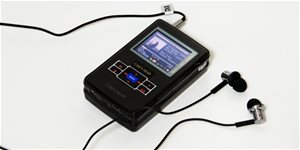
MP3 Player - storage capacity: 8GB, Micro SD memory card with a maximum memory of 64GB, 10 hr(s) playback time:, supports MP3, WAV and WMA, dictaphone, display, equalizer and FM Radio, Micro USB, headphones in package
The Energy System Clip Coral MP3 player lets you listen to your favorite music and radio stations anywhere and on any occasion.
Do you enjoy listening to music on the go? The MP3 Clip Coral from Energy Sistem features an LCD display and 8GB of built-in memory, which can be expanded by a further 64GB via microSD cards, so you can store a huge amount of music - and in several different file types (MP3/WMA/WAV). The smart songs directory ensures that you will be able to easily browse and find the song that you want. In addition, it has a built-in FM radio, so you can also listen to your favourite radio stations.
Important Advantages
MP3 player with LCD display and 8GB of memory
Expand memory by up to 64GB with microSD cards
Designed for several different file types (MP3/WMA/WAV)
Smart songs directory ensures easy navigation
Built-in FM radio for listening to your favourite stations
7 equalization modes
Practical clip to attach the player to your clothes while exercising or jogging
Record with built-in microphone and digital voice recorder
MP3 player with Excellent Features
This Energy Sistem MP3 player has a practical clip that allows you to attach it wherever you want. Listen to your music while practising sport, jogging, or doing any other activity. The device also features 7 sound equaliztion modes and comes with a pair of high-quality earphones. The built-in microphone and digital voice recorder are perfect if you need to record something. On top of all that, this MP3 player also has a MicroUSB port for charging the battery and connecting the device to a PC. What more could you want?
Specifications
Storage capacity
8 GB
Memory card interface
Micro SD
Maximum memory card capacity
64 GB
Connection
Micro USB
Supported audio formats
mp3, WAV, WMA
Memory
Storage capacity
8 GB
Memory card interface
Micro SD
Maximum memory card capacity
64 GB
Connection
Connection
Micro USB
Supported formats
Supported audio formats
mp3, WAV, WMA
Features and functions
Features and functions
Dictaphone, Display, Equalizer, FM Radio
Display
Display diagonal
0.8 "
Battery
Battery capacity
140 mAh
Playback time - music
10 h
Package contents
Package contents
Headphones
Colour
Colour
Red
More Specifications
Note:
Specifications can be changed without notice. Images are for illustrative purposes only.
Když budu chtít poslouchat v terénu FM rádio a budu mít přehrávač spárovaný přes bluetooth se sluchátky (bezdrátové "pecky"), budu muset mít ještě připojenou k přehrávači "jakousi anténu" nebo je tato již integrovaná v přehrávači? Ptám se proto, že v mobilu mám aplikaci FM radio a abych mohl rádia přijímat, musím mít fyzicky připojená drátová sluchátka, která fungují jako anténa, což je nepříjemné.
A druhá otázka - když si spáruju přehrávač s mobilem, budu mít pak ve sluchátkách nějaké upozornění na příchozí hovor při poslechu rádia nebo uložené hudby ?
Děkuju za informace.
Skladby s číslicí v názvu (skladby začínají 01 02 03 04 až 24) se řadí v pořádku pod větví "Všechny skladby". Pod větví "Alba" a "Interpreti" se řádi tyto skladby 10 20 01 11 21 02 12 22 03... Kde lze nastavit řazení skladeb? Album mám mnoho let a pouze jej kopíruji na různá zařízení (1 Blackberry, 3 Androidy, 2 různá mp3 přehrávače). Toto řazení vidím poprvé. Jak jej změnit, prosím?
Skladby s číslicí v názvu (skladby začínají 01 02 03 04 až 24) se řadí v pořádku pod větví "Všechny skladby". Pod větví "Alba" a "Interpreti" se řádi tyto skladby 10 20 01 11 21 02 12 22 03... Kde lze nastavit řazení skladeb? Album mám mnoho let a pouze jej kopíruji na různá zařízení (1 Blackberry, 3 Androidy, 2 různá mp3 přehrávače). Toto řazení vidím poprvé. Jak jej změnit, prosím?
Dobrý den,prosím jde spárovat energy Mp3 clip bluetooth 8GB s sluchátkami power beats?já teda ,vse koupila než bychd se dřív zeptala..a zatim me to nejde spárovat.:-(
Dobrý den,prosím jde spárovat energy Mp3 clip bluetooth 8GB s sluchátkami power beats?já teda ,vse koupila než bychd se dřív zeptala..a zatim me to nejde spárovat.:-(
Try our cookiesAlza.cz a. s., Company identification number 27082440, use cookies and other data to ensure the proper functioning of the website and, with your consent, also, among other things, to personalize advertising and the content of our websites. By clicking on the “I understand“ button, you agree to the use of cookies and the transfer of data regarding the behavior on the website for displaying targeted advertising on social networks and advertising networks on other websites.
We use 8 categories of cookies on our website:
Technical cookies
These are strictly necessary for the functioning of the website and the features you choose to use. Without them, our website would not work; you wouldn't be able to log in to your user account, for example.
Functionality cookies
These cookies allow us to remember your basic choices and improve the user experience. These include remembering your preferred language or allowing you to stay logged in permanently.
Social media cookies
These cookies allow us to easily link you to your social media profile and, for example, allow you to share products and services with your friends and family.
Content personalisation
These cookies allow us to show you content and ads according to the information we have about you to best meet your needs. This includes what content you have viewed, or on what device you are accessing our website.
Non-personalised advertising
These cookies allow us to show you general ads for products and services.
Personalised advertising
Thanks to these cookies, we and our partners can offer you relevant products and services based on your purchases, your shopping behaviour and your preferences.
Audience metrics
These cookies allow us to optimise our site for your convenience based on how you use it. The aim is to remember or anticipate your choices. This includes, for example, the use of features, their location, or the behaviour on the page.
By giving your consent to the processing of cookies, functionality and analytical cookies will be installed on the device you use to browse the website (click on the "I understand" button for both categories, or you can select only one of the categories by clicking on the "Settings" button). We always install technical cookies on your device, even without your explicit consent, because without them our website would simply not work.
You can revoke your consent to the processing of cookies. In connection with our company's cookie processing, you also have the following rights: the right to access cookies, delete, modify, supplement and correct them, restrict processing and the right to lodge a complaint with the Office for Personal Data Protection. Read more about your rights.