HP Deskjet 4535 Ink Advantage All-in-OneDiscontinued
HP Deskjet 4535 Ink Advantage All-in-One
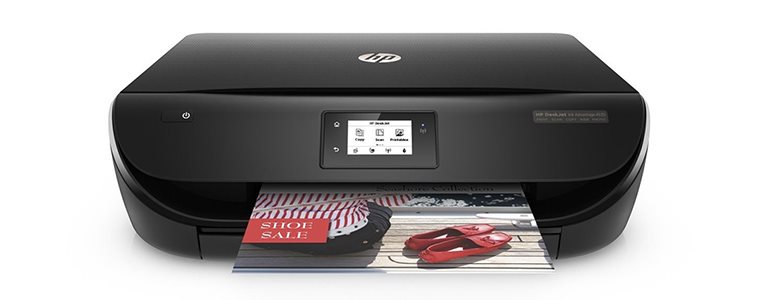
The HP Deskjet 4535 Inkjet Printer also serves as a scanner and copier. With high speed, it can print up to 16 color pages per minute.
Off
TheHP Deskjet 4535 inkjet printeroffers cost-effective printing without compromise and in high quality. The affordable ink in HP cartridges will print all your photos and documents in great sharpness and with optimal colours. In addition to classic printing, the printer is also equipped with a scanner and a copy function.
Off
More work, less space requirements
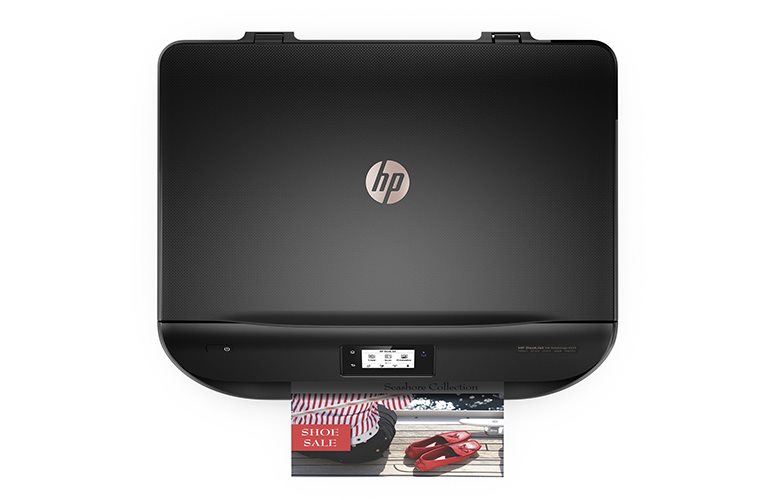
Using a clear 5.5cm LCD, you can quickly and easily set up printing, scanning or copying documents.Due to its elegant and compact design, the printer does not take up much space on the work desk, so you can place it almost anywhere and even take it with you if need be.
Easy printing from mobile devices
With a simple setup, you can connect your printer to your mobile device for easy printing control right from your smartphone or tablet. With the HP All-in-One Printer Remote, you get access to managing print jobs and scanning, which will prove especially useful when you're on the go.
Off
Off
Low cost and high-quality printing
With the HP Deskjet 4535, you can print high-quality borderless photos or laser-quality documents with superb sharpness. In addition to low operating costs, you will also save material. The printer has automatic duplex printing which means you can use up to 50% less paper.
Printing technology determines how data is transferred to paper, affecting quality, speed and cost, and varies by type of application - from home to professional.
Scan speed determines how fast the scanner can scan documents, measured in pages per minute (ppm), ideal for efficiently scanning large volumes of documents.
Printing technology determines how data is transferred to paper, affecting quality, speed and cost, and varies by type of application - from home to professional.
Scan speed determines how fast the scanner can scan documents, measured in pages per minute (ppm), ideal for efficiently scanning large volumes of documents.
Zobrazovací jednotka tiskárny sloužící k informaci o stavu či nastavení tiskárny. V případě dotykového displeje slouží i k přímému nastavení a ovládání tiskárny.
Touch
Colour
Colour
Black
More Specifications
HP Inc Czech Republic s.r.o
Za Brumlovkou 5/1559
140 00 Praha 4
VAT ID: CZ 03208427
Radek Mattas, [email protected]"
GO Europe GmbH, Zum Kraftwerk 1, Hattingen 45527, Germany, +49232468010, [email protected]
Hewlett-Packard was founded in the difficult times of the Great Depression. The founders were a pair of friends whose name the company still proudly bears. They started their business in an unobtrusive garage near the city of Palo Alto. It is now a national monument. HP’s success lay not in copying existing products, but in the ability and courage to come up with something new.
The first commercial triumph was an oscillator that surpassed all competition in quality, yet sold at a quarter of the price. In 1968, HP released their first desktop computer - a desktop calculator. The company currently manufactures products primarily related to computer technology - computers and laptops, printers, scanners, digital cameras, servers, and last but not least, calculators.
Note:
If there is no "package contains" box in the product parameters and the data or USB cable is not specifically mentioned in there, the package does not contain it and must be purchased separately.
Specifications can be changed without notice. Images are for illustrative purposes only.
Zakoupil jsem tiskárnu HP DeskJet 4535. Ovladač nainstaloval dle návodu z přiloženého CD. Po připojení k počítači s OS xP Home přes USB kabel netiskne. Tiskárna je v ovládacích panelech zobrazena jako výchozí. Po odeslání textu z editoru Word se požadavek nezobrazí v okně Tisk. Proč to nefunguje? Děkuji za radu!
Zakoupil jsem tiskárnu HP DeskJet 4535. Ovladač nainstaloval dle návodu z přiloženého CD. Po připojení k počítači s OS xP Home přes USB kabel netiskne. Tiskárna je v ovládacích panelech zobrazena jako výchozí. Po odeslání textu z editoru Word se požadavek nezobrazí v okně Tisk. Proč to nefunguje? Děkuji za radu!
Prosím o radu, kdykoli si pošlu do tiskárny tisk, otevře se mi okno One - note a nevím co dát, aby tisklo. Když kliknu na poznámkový blok, zavře se to a netiskne.
Prosím o radu, kdykoli si pošlu do tiskárny tisk, otevře se mi okno One - note a nevím co dát, aby tisklo. Když kliknu na poznámkový blok, zavře se to a netiskne.
Dobry den chtel jsem pripojit notebook
Ale hlasilo mi to ze ta tiskarna jez bez internetu
Nevite co tedy dal
Mam notebook Dell Inspiron 13 Series
Zadal jsem do tiskarny heslo nazvu svoji site
Dekuji za odpoved
Dobry den chtel jsem pripojit notebook
Ale hlasilo mi to ze ta tiskarna jez bez internetu
Nevite co tedy dal
Mam notebook Dell Inspiron 13 Series
Zadal jsem do tiskarny heslo nazvu svoji site
Dekuji za odpoved
dobrý den koupil jsem si tiskárnu a nemužu s ni tisknout
protože to chce po mně pin kod ze směrovače
co mam teda delat
když ho nevím a nemuzu ho ani najit
dobrý den koupil jsem si tiskárnu a nemužu s ni tisknout
protože to chce po mně pin kod ze směrovače
co mam teda delat
když ho nevím a nemuzu ho ani najit
Try our cookiesAlza.cz a. s., Company identification number 27082440, use cookies and other data to ensure the proper functioning of the website and, with your consent, also, among other things, to personalize advertising and the content of our websites. By clicking on the “I understand“ button, you agree to the use of cookies and the transfer of data regarding the behavior on the website for displaying targeted advertising on social networks and advertising networks on other websites.
We use 8 categories of cookies on our website:
Technical cookies
These are strictly necessary for the functioning of the website and the features you choose to use. Without them, our website would not work; you wouldn't be able to log in to your user account, for example.
Functionality cookies
These cookies allow us to remember your basic choices and improve the user experience. These include remembering your preferred language or allowing you to stay logged in permanently.
Social media cookies
These cookies allow us to easily link you to your social media profile and, for example, allow you to share products and services with your friends and family.
Content personalisation
These cookies allow us to show you content and ads according to the information we have about you to best meet your needs. This includes what content you have viewed, or on what device you are accessing our website.
Non-personalised advertising
These cookies allow us to show you general ads for products and services.
Personalised advertising
Thanks to these cookies, we and our partners can offer you relevant products and services based on your purchases, your shopping behaviour and your preferences.
Audience metrics
These cookies allow us to optimise our site for your convenience based on how you use it. The aim is to remember or anticipate your choices. This includes, for example, the use of features, their location, or the behaviour on the page.
By giving your consent to the processing of cookies, functionality and analytical cookies will be installed on the device you use to browse the website (click on the "I understand" button for both categories, or you can select only one of the categories by clicking on the "Settings" button). We always install technical cookies on your device, even without your explicit consent, because without them our website would simply not work.
You can revoke your consent to the processing of cookies. In connection with our company's cookie processing, you also have the following rights: the right to access cookies, delete, modify, supplement and correct them, restrict processing and the right to lodge a complaint with the Office for Personal Data Protection. Read more about your rights.