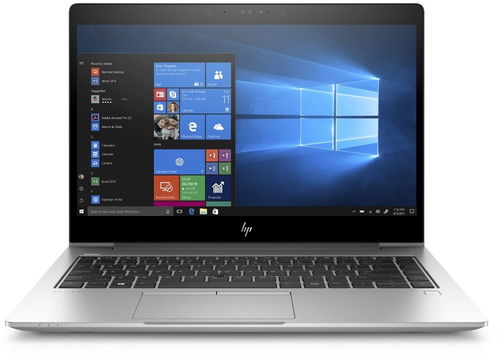
Versatile working computer with features for the professional sphere. Powerful, reliable and elegant.
The HP EliteBook 840 G5 is a proud representative of the popular EliteBook series. It is designed to handle even the most demanding tasks with streamlined efficiency with enterprise-class performance, comprehensive security, and a refined collaborative experience. Its slim, elegantsilver design makes it an impressive addition to any office desk or important meeting. Other great features include hardware and software data protection, excellent connectivity options and an improved battery life.
Key Features of the HP EliteBook 840 G5 Laptop
Slim and elegant silver construction
Great emphasis on data security
Comfortable, backlit keyboard
Top-of-the-line display
Fast disk for fast work
Economical and powerful processor
Fingerprint reader and LTE module
Windows 10 Professional
Fast and Strong
Computing performance is handled by theIntel Core i7 8550U Kaby Lake Refresh processor. In this model, the processor works with 16GB of DDR4 memory, and storage is provided by a 512GB SDD, which offers fast access with no moving parts for excellent reliability. Working with your files and with the operating system will be smooth and efficient.
Ready for Everything
The laptop has a 14" Full HD display with anti-glare technology that eliminates light reflections and makes it easy to read. A generous number of connectors are available to connect a wide variety external devices, including DisplayPort and VGA graphics outputs as well as USB ports. There are two fast USB 3.1 ports on the side of the laptop and a USB Type-C port. The laptop can be docked, and connects to the Internet via a WiFi or Ethernet connection.
Comfort and Safety
A full-featured keypad with a pleasant button response ensures unmatched comfort while you work. It is also backlit, so you can continue to work at night. The fingerprint reader lets you secure your data and the integrated smart card reader is useful at work. On long journeys without electricity access, you will appreciate the long battery life.
Useful Software Suite
EliteBook features a number of programs for optimal performance. The original HP software focuses on both security and easy data management. Software tools include HP Image Assistant, a handy business management tool, and HP Sure Start Gen3, which monitors in-memory BIOS, recovers the platform without intervention and restores the BIOS to a custom state. There are also several security programs and password managers.
The size of RAM is one of the most important factors affecting overall computer performance. RAM serves as temporary storage for the data that the computer processes. The more RAM a computer has, the more tasks it can process simultaneously without slowing down. 8 GB of RAM is often considered the minimum for most tasks, while demanding applications such as games and professional graphic design or video editing software may require 16 GB of RAM or more.
Processor frequency, often referred to as clock speed, is a key indicator of processor performance. It is measured in gigahertz (GHz) and represents how many operations a processor can perform per second. Higher frequency generally means higher performance, but it can also lead to higher power consumption. It is important to find the right balance between performance and efficiency for your specific needs.
The type of storage in a laptop can have a significant impact on its performance and price. The two most common types are Hard Disk Drive (HDD) and Solid State Drive (SSD). HDD is an older technology with moving parts and provides a large amount of storage space at a low cost. SSDs are faster, quieter and more reliable, but generally more expensive.
Generally, the higher the number, the more powerful the processor. For an office PC, a basic processor series will be more than sufficient, but for more challenging work and gaming you will require a more advanced processor.
Počet jader v procesoru ovlivňuje výkon vašeho stolního počítače. Více jader znamená větší možnosti pro multitasking, rychlejší zpracování náročných aplikací a celkově vyšší výkonnost. Jak ale zjistit, kolik jader potřebujete? V tomto článku se podíváme na to, co znamená počet jader, jak ovlivňuje výkon vašeho desktopu, a poradíme, podle čeho se při výběru orientovat.
Processor frequency, often referred to as clock speed, is a key indicator of processor performance. It is measured in gigahertz (GHz) and represents how many operations a processor can perform per second. Higher frequency generally means higher performance, but it can also lead to higher power consumption. It is important to find the right balance between performance and efficiency for your specific needs.
The size of RAM is one of the most important factors affecting overall computer performance. RAM serves as temporary storage for the data that the computer processes. The more RAM a computer has, the more tasks it can process simultaneously without slowing down. 8 GB of RAM is often considered the minimum for most tasks, while demanding applications such as games and professional graphic design or video editing software may require 16 GB of RAM or more.
Dedicated graphics cards have their own integrated memory and are offered by established manufacturers such as NVIDIA and AMD. Integrated cards have lower power consumption and are particularly...
The type of storage in a laptop can have a significant impact on its performance and price. The two most common types are Hard Disk Drive (HDD) and Solid State Drive (SSD). HDD is an older technology with moving parts and provides a large amount of storage space at a low cost. SSDs are faster, quieter and more reliable, but generally more expensive.
Determines the way in which the hard drive is connected to the computer, namely the type of connector through which the drive connects to the device. Each type of connection is...
The graphic outputs on the notebook refer to the types of ports the notebook has for connecting external displays. This can include HDMI, DisplayPort, VGA and more. The type and number of graphic outputs can affect what type and how many monitors can be connected to the laptop.
Network interfaces allow laptops to communicate with other devices and the Internet. The basic types of network interfaces include Ethernet (LAN), Wi-Fi and mobile networks (3G, 4G, 5G). Ethernet is ideal for stable and fast connections, but requires a cable. Wi-Fi is wireless and widespread, but speed and stability can vary depending on signal quality.
Determines the language localisation of the keyboard. For example, Czech keyboards feature Czech characters – ř, ů, ě, and so on.
CZ, SK
Product series
Laptop Series
HP EliteBook
Warranty
Extended warranty
Extended Warranty
More Specifications
HP Inc Czech Republic s.r.o
Za Brumlovkou 5/1559
140 00 Praha 4
VAT ID: CZ 03208427
Radek Mattas, [email protected]"
GO Europe GmbH, Zum Kraftwerk 1, Hattingen 45527, Germany, +49232468010, [email protected]
Hewlett-Packard was founded in the difficult times of the Great Depression. The founders were a pair of friends whose name the company still proudly bears. They started their business in an unobtrusive garage near the city of Palo Alto. It is now a national monument. HP’s success lay not in copying existing products, but in the ability and courage to come up with something new.
The first commercial triumph was an oscillator that surpassed all competition in quality, yet sold at a quarter of the price. In 1968, HP released their first desktop computer - a desktop calculator. The company currently manufactures products primarily related to computer technology - computers and laptops, printers, scanners, digital cameras, servers, and last but not least, calculators.
Note:
Specifications can be changed without notice. Images are for illustrative purposes only.

1.) Lze zařízení plnohodnotně používat přes dockovací stanici? Kterou by jste mi, prosím, doporučili?
2.) Při použití přes dockovací stanici vyžaduji výstup na dva externí monitory a to v režimu tzv. rozdělená obrazovka. Je to možné a jsou nějaké omezení na maximální rozlišení, které lze mít na těchto externích monitorech
1.) Lze zařízení plnohodnotně používat přes dockovací stanici? Kterou by jste mi, prosím, doporučili?
2.) Při použití přes dockovací stanici vyžaduji výstup na dva externí monitory a to v režimu tzv. rozdělená obrazovka. Je to možné a jsou nějaké omezení na maximální rozlišení, které lze mít na těchto externích monitorech
Dobry den,
chci se zeptat, jaky je rozdil mezi radou notebooku EliteBook a Zbook, parametrame jsou velmi podobne, stejne jako vzhledove. Konkretne koukam na "HP ZBook 14u G5" a "HP EliteBook 840 G5" kde jsou dve verze s dedikovanou a integrovanou grafikou. Jaky je mezi temito dvemi radami rozdil, co se tyka vykonu apod.
Dekuji predem za odpoved.
Petr Vanek
Dobry den,
chci se zeptat, jaky je rozdil mezi radou notebooku EliteBook a Zbook, parametrame jsou velmi podobne, stejne jako vzhledove. Konkretne koukam na "HP ZBook 14u G5" a "HP EliteBook 840 G5" kde jsou dve verze s dedikovanou a integrovanou grafikou. Jaky je mezi temito dvemi radami rozdil, co se tyka vykonu apod.
Dekuji predem za odpoved.
Petr Vanek
Try our cookiesAlza.cz a. s., Company identification number 27082440, use cookies and other data to ensure the proper functioning of the website and, with your consent, also, among other things, to personalize advertising and the content of our websites. By clicking on the “I understand“ button, you agree to the use of cookies and the transfer of data regarding the behavior on the website for displaying targeted advertising on social networks and advertising networks on other websites.
We use 8 categories of cookies on our website:
Technical cookies
These are strictly necessary for the functioning of the website and the features you choose to use. Without them, our website would not work; you wouldn't be able to log in to your user account, for example.
Functionality cookies
These cookies allow us to remember your basic choices and improve the user experience. These include remembering your preferred language or allowing you to stay logged in permanently.
Social media cookies
These cookies allow us to easily link you to your social media profile and, for example, allow you to share products and services with your friends and family.
Content personalisation
These cookies allow us to show you content and ads according to the information we have about you to best meet your needs. This includes what content you have viewed, or on what device you are accessing our website.
Non-personalised advertising
These cookies allow us to show you general ads for products and services.
Personalised advertising
Thanks to these cookies, we and our partners can offer you relevant products and services based on your purchases, your shopping behaviour and your preferences.
Audience metrics
These cookies allow us to optimise our site for your convenience based on how you use it. The aim is to remember or anticipate your choices. This includes, for example, the use of features, their location, or the behaviour on the page.
By giving your consent to the processing of cookies, functionality and analytical cookies will be installed on the device you use to browse the website (click on the "I understand" button for both categories, or you can select only one of the categories by clicking on the "Settings" button). We always install technical cookies on your device, even without your explicit consent, because without them our website would simply not work.
You can revoke your consent to the processing of cookies. In connection with our company's cookie processing, you also have the following rights: the right to access cookies, delete, modify, supplement and correct them, restrict processing and the right to lodge a complaint with the Office for Personal Data Protection. Read more about your rights.