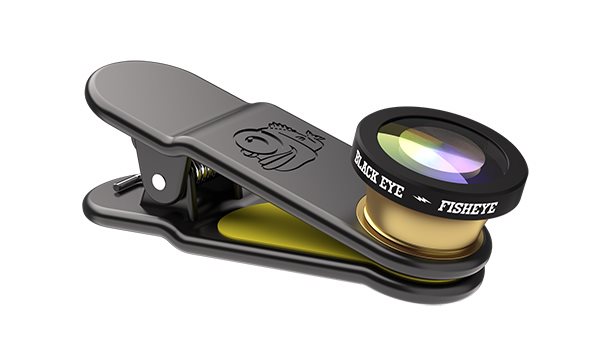
With the addition of the 3rd Eye Black Eye Eye, you can easily change your viewing angle to the world. Thanks to this lens, you can simply take great pictures anywhere.
Off
The Black Eye Fish Eye Lens 3rd Generation for mobile phones
The Black Eye Fish Eye Lens 3rd Generation with the Universal Clip attachment system is designed for use with most smartphones currently on the market. Discover a whole new dimension of photography. Get the best action shots at close range and the perfect selfies without the use of a stick. The premium Finnish brand Black Eye uses high-quality glass lenses with a layered coating.
Key features
Action shots from up close without cutting off the edges
180° angle of view
Easy to use and maintain
Lens and clip with the unique Black Eye design
Can be attached to the front and rear camera
Package contains:
Fish Eye lens
Lens cover
Clip
Microfibre bag
Microfiber cleaning cloth
Off
Off
Installing the lens
Remove the lens cap
Attach the camera lens to your device
Check that the lens is correctly positioned on the camera's display screen
Enjoy shooting photos and filming videos, discover new creative opportunities
Don't forget about the hashtags #blackeyefisheye #blackeyeczsk #blackeyelens
Remember that in order to achieve the best image quality, it's necessary to always keep the lens clean.
Tips and tricks
To prevent your lens from getting wet or defected, you should always carry it with the front cover attached and stored in the bag. Before attaching it you should also wipe both the lens and your phone clean with the microfibre cloth. The cleaner the glass, the better the shot.
Attach the lens directly onto the camera so that you can look through the glass and see the lens of your phone. Then when you turn on the camera you'll be able to see how the shot looks and you can adjust the lens accordingly. Precise attachment on the centre of the camera provides the best shots!
Off
Off
Technical details
180° angle of view. It corresponds to a 15mm lens in 35mm format.
High-quality double coated glass allows you to capture natural colours and prevents any unwanted reflection.
It's important to note that when shooting photos with Black Eye you shouldn't use the flash, because it covers part of the lens and the photos are not as good.
Image magnification ratio 0.33x Resolution (axis) 200LP/MM Resolution (corner) of 150LP/MM
Off
A premium brand from Finland
The exclusive Finnish brand Black Eye has been operating on the mobile phone market for several years. It was founded by Finnish photographer Arto Eekman and Finnish professional athletes Eero Eetala and Fred Sirviö. The idea was and still is - to enable all smartphone users to easily capture and shoot more pictures and videos with their phone. Black Eye delivers a wide range of high-quality lenses with a universal mounting system that can be used on most mobile phones.
Off
Note:
Specifications can be changed without notice. Images are for illustrative purposes only.
Dobrý den mohu se zeptat jestli toto zboží je vhodné na mobil Samsung Galaxy j5 2016
Dobrý den mohu se zeptat jestli toto zboží je vhodné na mobil Samsung Galaxy j5 2016
Magyarországra történő kiszállításért tekintse meg ezt a termékoldalt: Black Eye Fish Eye
Try our cookiesAlza.cz a. s., Company identification number 27082440, use cookies and other data to ensure the proper functioning of the website and, with your consent, also, among other things, to personalize advertising and the content of our websites. By clicking on the “I understand“ button, you agree to the use of cookies and the transfer of data regarding the behavior on the website for displaying targeted advertising on social networks and advertising networks on other websites.
We use 8 categories of cookies on our website:
Technical cookies
These are strictly necessary for the functioning of the website and the features you choose to use. Without them, our website would not work; you wouldn't be able to log in to your user account, for example.
Functionality cookies
These cookies allow us to remember your basic choices and improve the user experience. These include remembering your preferred language or allowing you to stay logged in permanently.
Social media cookies
These cookies allow us to easily link you to your social media profile and, for example, allow you to share products and services with your friends and family.
Content personalisation
These cookies allow us to show you content and ads according to the information we have about you to best meet your needs. This includes what content you have viewed, or on what device you are accessing our website.
Non-personalised advertising
These cookies allow us to show you general ads for products and services.
Personalised advertising
Thanks to these cookies, we and our partners can offer you relevant products and services based on your purchases, your shopping behaviour and your preferences.
Audience metrics
These cookies allow us to optimise our site for your convenience based on how you use it. The aim is to remember or anticipate your choices. This includes, for example, the use of features, their location, or the behaviour on the page.
By giving your consent to the processing of cookies, functionality and analytical cookies will be installed on the device you use to browse the website (click on the "I understand" button for both categories, or you can select only one of the categories by clicking on the "Settings" button). We always install technical cookies on your device, even without your explicit consent, because without them our website would simply not work.
You can revoke your consent to the processing of cookies. In connection with our company's cookie processing, you also have the following rights: the right to access cookies, delete, modify, supplement and correct them, restrict processing and the right to lodge a complaint with the Office for Personal Data Protection. Read more about your rights.