


Titan Overseas M plus, canyon bronze
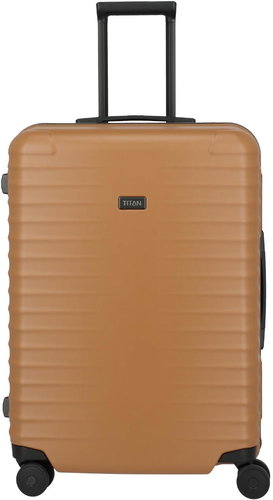


Titan Overseas M plus, canyon bronze
The Titan Overseas M+ travel suitcase. Its innovative frame construction can withstand heavy loads and the scratch-resistant surface provides optimal luggage protection. It can be easily opened and closed with one hand thanks to the large monolock. Thanks to the comfortable handles, it moves easily on quiet double wheels. Extendable handle with locking mechanism and ergonomic grip. Double-sided packing system and 2 zipped divider panels. Y-shaped compression straps. Internal mesh pockets for efficient use of space. Lining with high-quality jacquard fabric. Ergonomic top handle for easy handling. Shell with a matte, scratch-resistant texture made from robust 100% polycarbonate. Double-reinforced protective corners for greater durability.

84L
Capacity
M
Size
69 × 50 × 28cm
Dimensions
Hard-shell
Type
4.6kg
Weight
Key Features of the Titan Overseas M plus travel suitcase, canyon bronze
- 100% polycarbonate shell with a matte texture
- Dimensions suitable for carry-on luggage
- 4 large, quiet double wheels with 360° rotation
- Extendable telescopic handle with locking mechanism
- Frame construction
- Integrated TSA lock
- Double-reinforced protective corners
- Ergonomic top handle

Internal Layout and Practical Features
- Double-sided packing system with 2 zipped divider panels
- Y-shaped compression straps
- Internal mesh pockets
- Lining with high-quality jacquard fabric
- Double-reinforced protective corners
- Ergonomic top handle
- 4 quiet double wheels with 360° rotation
- Telescopic handle with locking mechanism
- Integrated TSA lock to securely lock the contents
- Double security zip

Instructions for setting the Titan suitcase's TSA lock
Luggage with a TSA lock can be opened and inspected by security authorities without damaging it. If your lock has been opened with a security key, remember to close the cylinder again. To do this, turn the cylinder to the position marked with a black dot. You can use any tool that fits into the cylinder.
How to set the lock:
1. Set the dials (A) to 0-0-0.
2. Using a suitable tool, press the reset button (B) until you hear a click.
3. Turn the dials (A) to set your desired numerical combination.
4. Slide the button (C) in the direction of the arrow. Once you hear a click again, the reset button (B) will return to its original position.

TSA lock
The primary purpose of the TSA lock system, marked with a red diamond symbol, is to allow luggage to be easily opened for inspection without being damaged. This can also speed up the inspection process. Security staff can use this type of lock to open and check the luggage without having to destroy the lock. All TSA locks are marked with a code from TSA001 to TSA007, which corresponds to the type of universal key designed to open this type of lock. Keys for TSA locks are not sold to the public and are only available to TSA staff. After inspecting the luggage, these staff members are required to place an inspection notice in your suitcase and the suitcase must be locked again. It is particularly recommended for travel to the USA, as the TSA is primarily an American organisation, but TSA standards are also used at airports outside the United States.Specifications
Colour
Weight
Volume
Dimensions
Size
Equipment
Material
Usage
Specifications can be changed without notice. Images are for illustrative purposes only.
