


nemáte ty rozměry v popisu blbě?
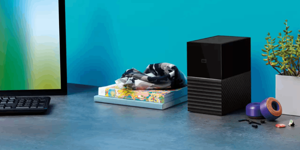


The WD My Book 16TB external drive centralises and archives large volumes of digital files. Inside is a 3.5" hard drive with a 16TB capacity, which you connect to your computer via the USB 3.2 Gen 1 interface, backwards compatible with USB 3.0. Operation is handled by the included power adapter. Use the drive to free up space on your computer's internal drives and neatly store large collections of photos, videos, music and work documents. With exFAT formatting, the drive is ready to use straight out of the box on both Windows and macOS systems. This simplifies initial setup and data transfer.


Stored data is protected by AES hardware encryption with a 256-bit key. After setting your own password in the included software, the drive's hardware automatically encrypts and decrypts all data directly at the hardware level, not in the computer. This process does not load system resources or affect computer performance. Without the correct password, the drive's contents remain completely inaccessible, even in the event of physical theft or unauthorised access.

The package includes Acronis True Image for Western Digital software, which is used for backup management. The application supports scheduling automatic backup tasks for the entire system, specific partitions or just selected files and folders. Integrated active protection monitors system processes in real time and prevents unauthorised file changes. This protects your data from ransomware.
The manufacturer formats the drive with the exFAT file system. This formatting is natively supported by Windows 10 and higher and macOS 11 and higher. This lets you start transferring files immediately after connecting to your computer, without any further adjustments or formatting. It connects to your computer via a USB 3.2 Gen 1 interface with a Micro USB-B connector.

Western Digital, PO Box Address: BP 80006, 92135 Issy les Moulineaux, France [email protected]
Specifications can be changed without notice. Images are for illustrative purposes only.
