Data Storage - 4 x 2.5"/3.5" SATA III HDD/SSD external hard drives, Intel Celeron J3455 2.3GHz quad-core, RAID (Basic/JBOD/0/1/5/6/10), 4GB of DDR3L RAM, 3.0, eSATA
The NAS' high performance is sufficient for most tasks performance. In this case, it is a 4-core 2.3 GHz CPU.
4K
The Synology DS918+ is ideal for all media content fans and includes support for 4K videos.
Speed
The reading and writing speeds are 225MB/sec for encrypted sequential reading, writing speeds are 221MB/sec.
Power Consumption
Despite its great performance, the NAS is optimised for long-term low power consumption. It uses approximately 12.6W in the sleep mode and 28.8W under full load.
The Scalable Synology DS918 + NAS
The NAS comes with professional features which will satisfy all of your productivity and efficiency requirements for small as well as medium-sized companies. At the same time, it costs only a fraction of the price compared to large servers. With this NAS, you will not have to worry about the cost of its acquisition, operation, and its software. Synology will provide you with everything at once and with a light, easy administration system. As a classic server, it is scalable and the device can be extended with the 5-disc DX517 expansion unit with up to 2 M.2 NVMe SSD drives. The Synology DS918 + DiskStation will also meet the growth in data services.
Data protection and integrity with Btrfs
The Synology DiskStation DS918 + contains the new generation Btrfs file system which has many tools to prevent data corruption. The Btrfs file system holds two copies of metadata on the volume, allowing you to recover data in the event of hard drive corruption or bad sectors. Common file volume, errors with files are detected automatically. However, Btrfs creates the checksums for each read operation so that the error is detected immediately and auto-correction occurs. The snapshot features allow you to make a copy of the entire shared folder or system. This way, in the event of a database loss or corruption, you can quickly recover data back to the moment the image was taken.
Services at the tip of your finger with the Synology NAS
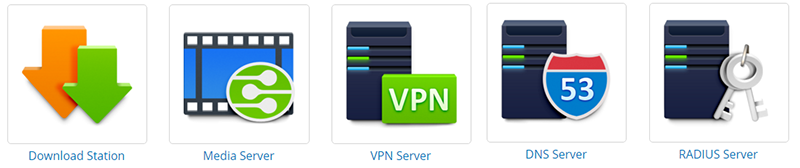
The Synology DiskStation DS918 + NAS has a sleek DiskStation Manager (DSM) browser operating system. With its clear, manageable environment, you can customise all of the services and even add different packages to it to customise it to your needs. To protect important data and other assets, DSM offers new management and security tools, so that the Synology NAS can serve as a strategic network centre. With Snapshot Replication, DSM offers almost continuous data protection and replication to multiple sites for a more comprehensive level of protection. In addition, Synology's Hyper Backup can now back up multiple versions to all of the types of target locations.
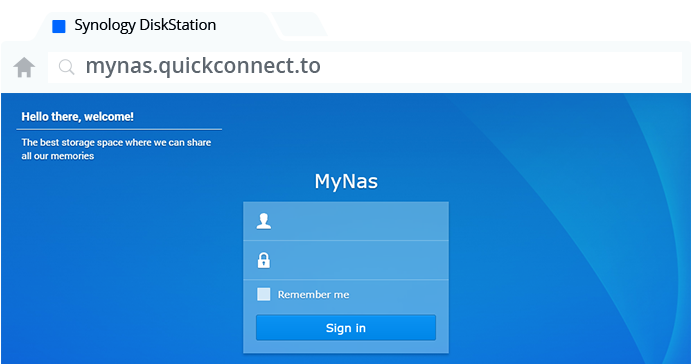
QuickConnect
Get easy file access over the Internet without bothering to set up port forwarding rules, DDNS, or other complicated network settings. QuickConnect lets you connect to your NAS securely from any device that is connected to the Internet.
Storage with a capacity of up to 48TB
The Synology DS918 + offers support for four 2.5" or 3.5" hard drives. With an additional unit, however, a capacity of up to 108TB is supported, which is sufficient for even data-intensive businesses.
Use your NAS as a secure business cloud
Is it important for you to keep your files at hand no matter what device you use? With Cloud Station, synchronising files between different devices and creating your own private cloud is easier than ever before. Business security is covered by two-step verification, group authorisation (local and VPN), and encryption. If you are worried about accidental deletions or file changes, it can also save up to 32 older versions of each file. In addition, Cloud Sync offers a more accurate level of synchronisation control and backup of your files from your Synology DiskStation DS918 + onto your external cloud service host.
Manufacturer's recommended use - corporate deployments require high transmission speed or a higher number of disks, for home, use just a simpler model.
Defines which maximum capacity of the installed hard disks NAS supports. This value can often be increased by installing the latest version of the device firmware.
Manufacturer's recommended use - corporate deployments require high transmission speed or a higher number of disks, for home, use just a simpler model.
Defines which maximum capacity of the installed hard disks NAS supports. This value can often be increased by installing the latest version of the device firmware.
The system RAM of external data storage devices determines the speed and efficiency of data processing. Higher RAM capacity means better multitasking and faster response times for demanding operations such as streaming media or working with large databases.
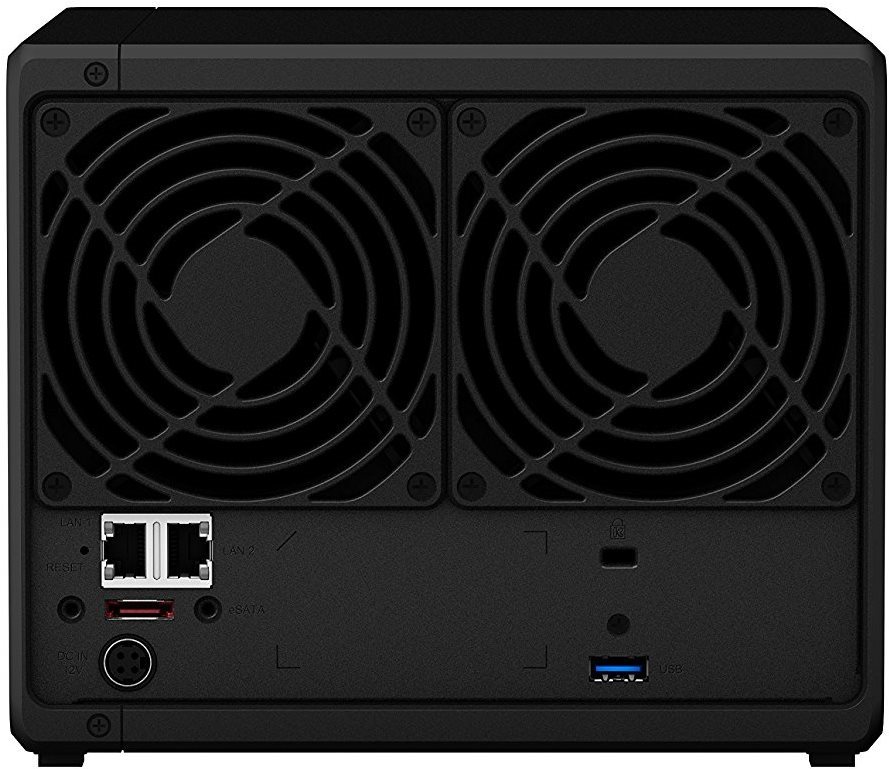
Indicates the number of USB 3.0 connectors, which are used to extend the capacity of the device using a flash drive or external drive. USB interface can also be used to connect a printer, which will...
Specifications can be changed without notice. Images are for illustrative purposes only.
Dobry den, otazky:
1. je ok ak kupim disk A a disk B obidva rovnaka kapacita ale iny vyrobca? Chcem aby sa disk A zrkadlil na disk B - konkretne Seagate IronWolf 4TB a WD Red 4TB
2. disky C a D by som dokupil a teda doinstaloval neskor. Chcem aby sa disk C zrkadlil na disk D a tieto dva disky by boli nezavisle od prvych dvoch, ukladal by som tam ine data. Je to mozne so Synology 420+ ? Ak ano ako mam pri setupe nastavit RAID?
Dakujem
Dobry den, otazky:
1. je ok ak kupim disk A a disk B obidva rovnaka kapacita ale iny vyrobca? Chcem aby sa disk A zrkadlil na disk B - konkretne Seagate IronWolf 4TB a WD Red 4TB
2. disky C a D by som dokupil a teda doinstaloval neskor. Chcem aby sa disk C zrkadlil na disk D a tieto dva disky by boli nezavisle od prvych dvoch, ukladal by som tam ine data. Je to mozne so Synology 420+ ? Ak ano ako mam pri setupe nastavit RAID?
Dakujem
Prosím informáciu o možnosti pozáručnej opravy zariadenia DS415+. Aj keď je to viac ako štyri roky od zakúpenia, jeho vstupná investícia 517.- € bez diskov sa mi zdá dosť vysoká, aby som ho hodil do koša.
Závada: zariadenie nie je schopné ani s diskami ani bez nich sa pripojiť resp. spustiť, ani resetovať. Stav lediek: status nesvieti, disky (aj bez diskov) 1-4 oranžová, power tlačidlo bliká. Indikácia sieťových portov LAN na konektoroch aj na switchy bez reakcie. Bol by som rád, ak by ste prispeli radou, či je skutočne lepšie hodiť do koša zariadenie, ktoré sa mi spočiatku javilo ako veľmi spoľahlivé. Výrobcom preferovaný servis Datacomp s.r.o. na môj mail vôbec nezareagoval. Je pravdou, že dáta z diskov budem dolovať komplikovane, pretože zápisy sú šifrované a stiahnuteľné iba na zariadeniach Synology?
Ďakuje Vojtech Moravčík
Prosím informáciu o možnosti pozáručnej opravy zariadenia DS415+. Aj keď je to viac ako štyri roky od zakúpenia, jeho vstupná investícia 517.- € bez diskov sa mi zdá dosť vysoká, aby som ho hodil do koša.
Závada: zariadenie nie je schopné ani s diskami ani bez nich sa pripojiť resp. spustiť, ani resetovať. Stav lediek: status nesvieti, disky (aj bez diskov) 1-4 oranžová, power tlačidlo bliká. Indikácia sieťových portov LAN na konektoroch aj na switchy bez reakcie. Bol by som rád, ak by ste prispeli radou, či je skutočne lepšie hodiť do koša zariadenie, ktoré sa mi spočiatku javilo ako veľmi spoľahlivé. Výrobcom preferovaný servis Datacomp s.r.o. na môj mail vôbec nezareagoval. Je pravdou, že dáta z diskov budem dolovať komplikovane, pretože zápisy sú šifrované a stiahnuteľné iba na zariadeniach Synology?
Ďakuje Vojtech Moravčík
kúpil som si u Vás tento NAS mám však problém, disky idú ako keby nonstop a ako keby na ne niekto stále pristupoval. Mám HDD Seagate a nemyslim si ze by s tym mal byt problem...v čom by mohol byť problém ? mám nastavené uspatie diskov aj vsetky funkcie čo to môze sposobovat ?
kúpil som si u Vás tento NAS mám však problém, disky idú ako keby nonstop a ako keby na ne niekto stále pristupoval. Mám HDD Seagate a nemyslim si ze by s tym mal byt problem...v čom by mohol byť problém ? mám nastavené uspatie diskov aj vsetky funkcie čo to môze sposobovat ?
Dobrý deň,
po založení 4 diskov sa mi NAS korektne nespustí a zároveň poškodí zväzky a oddiely na diskoch. Svieti kontrolka ON/OFF a kontrolka STATUS bliká oranžovo. Kontrolky diskov nesvietia. Keď odoberiem ktorýkoľvek disk tak NAS nabehne. Samozrejme musím odznovu všetko nastaviť - zväzky, oddiely. Diskami by to nemalo byť, testoval som ich a skúšal som rôzne kombinácie dvoch aj troch diskov. Disky sú WD Gold kompatibilné podľa Synology. Začína ma to frustrovať.
Nestretol sa niekto s týmto problémom.
Ďakujem za odpovede.
Dobrý deň,
po založení 4 diskov sa mi NAS korektne nespustí a zároveň poškodí zväzky a oddiely na diskoch. Svieti kontrolka ON/OFF a kontrolka STATUS bliká oranžovo. Kontrolky diskov nesvietia. Keď odoberiem ktorýkoľvek disk tak NAS nabehne. Samozrejme musím odznovu všetko nastaviť - zväzky, oddiely. Diskami by to nemalo byť, testoval som ich a skúšal som rôzne kombinácie dvoch aj troch diskov. Disky sú WD Gold kompatibilné podľa Synology. Začína ma to frustrovať.
Nestretol sa niekto s týmto problémom.
Ďakujem za odpovede.
Dobrý deň,
môžete mi poradiť, ktorý variant je z hľadiska rýchlosti čítania a zápisu výhodnejší:
1. Seagate Ironwolf + doplnenie o SSD M2 Cash
2 Seagate Ironwolf Pro bez SSD M2 Cash
resp. má význam doplniť SSD M2 Cash? Nebude ma brzdiť sieť 2× GLAN?
Ďakujem
Dobrý deň,
môžete mi poradiť, ktorý variant je z hľadiska rýchlosti čítania a zápisu výhodnejší:
1. Seagate Ironwolf + doplnenie o SSD M2 Cash
2 Seagate Ironwolf Pro bez SSD M2 Cash
resp. má význam doplniť SSD M2 Cash? Nebude ma brzdiť sieť 2× GLAN?
Ďakujem
Try our cookiesAlza.cz a. s., Company identification number 27082440, use cookies and other data to ensure the proper functioning of the website and, with your consent, also, among other things, to personalize advertising and the content of our websites. By clicking on the “I understand“ button, you agree to the use of cookies and the transfer of data regarding the behavior on the website for displaying targeted advertising on social networks and advertising networks on other websites.
We use 8 categories of cookies on our website:
Technical cookies
These are strictly necessary for the functioning of the website and the features you choose to use. Without them, our website would not work; you wouldn't be able to log in to your user account, for example.
Functionality cookies
These cookies allow us to remember your basic choices and improve the user experience. These include remembering your preferred language or allowing you to stay logged in permanently.
Social media cookies
These cookies allow us to easily link you to your social media profile and, for example, allow you to share products and services with your friends and family.
Content personalisation
These cookies allow us to show you content and ads according to the information we have about you to best meet your needs. This includes what content you have viewed, or on what device you are accessing our website.
Non-personalised advertising
These cookies allow us to show you general ads for products and services.
Personalised advertising
Thanks to these cookies, we and our partners can offer you relevant products and services based on your purchases, your shopping behaviour and your preferences.
Audience metrics
These cookies allow us to optimise our site for your convenience based on how you use it. The aim is to remember or anticipate your choices. This includes, for example, the use of features, their location, or the behaviour on the page.
By giving your consent to the processing of cookies, functionality and analytical cookies will be installed on the device you use to browse the website (click on the "I understand" button for both categories, or you can select only one of the categories by clicking on the "Settings" button). We always install technical cookies on your device, even without your explicit consent, because without them our website would simply not work.
You can revoke your consent to the processing of cookies. In connection with our company's cookie processing, you also have the following rights: the right to access cookies, delete, modify, supplement and correct them, restrict processing and the right to lodge a complaint with the Office for Personal Data Protection. Read more about your rights.