Try our cookies Alza.cz a. s., Company identification number 27082440, uses cookies to ensure the functionality of the website and with your consent also to personalisage the content of our website. By clicking on the “I understand“ button, you agree to the use of cookies and the transfer of data regarding the behavior on the website for displaying targeted advertising on social networks and advertising networks on other websites.
Alzak icon
Catalogue
Price
-
Availability
Order status
Brands
(1)
(5)

Monitors

A monitor is an essential part of every PC set. Although you can use the majority of computer monitors for multiple purposes, there are differences between them, especially in the quality and properties of the image. Below, you can find out what to focus on when choosing a new PC monitor and what type of device or screen is best for you.

Continue
A monitor suitable for gaming, everyday work or professional graphic tasks? You should make this choice when you start looking for for a new monitor. No reason to panic. We have a solution for you, whatever you choose.

Monitors for Office or Home Use

An office monitor should feature a sufficient diagonal to be able to display tables and calendars or to allow you to watch your favourite movie. That's why we'd recommend monitors with a 19″ diagonal. You'll also appreciate technologies that minimise eye fatigue, such as Flicker-free.

Gaming Monitors

Gaming monitors offer a high refresh rate and low response times. With these parameters, they can react quickly to changes in the image, providing smooth visuals even in action scenes. The refresh rate of a gaming monitor should be at least 120 Hz; 144Hz monitors are very popular among gamers. Their response times should then be within 4 ms.

i

The refresh rate indicates how many frames the monitor can render in one second. Response time then indicates how quickly the monitor responds to a change in the image.

Professional Monitors - Not Only for Graphic Designers

Professional monitors boast many uses. They are often used to create and edit multimedia. In this case, the greatest emphasis is placed on the image quality, flawless viewing angles and accurate colour rendering. Professional monitors also include large format models and touch screen monitors for PCs.

You can use your monitor not only in your PC set, but also as a second screen for your laptop. In this case, it is advisable to select the same resolution or at least the same aspect ratio.

Curved Monitors

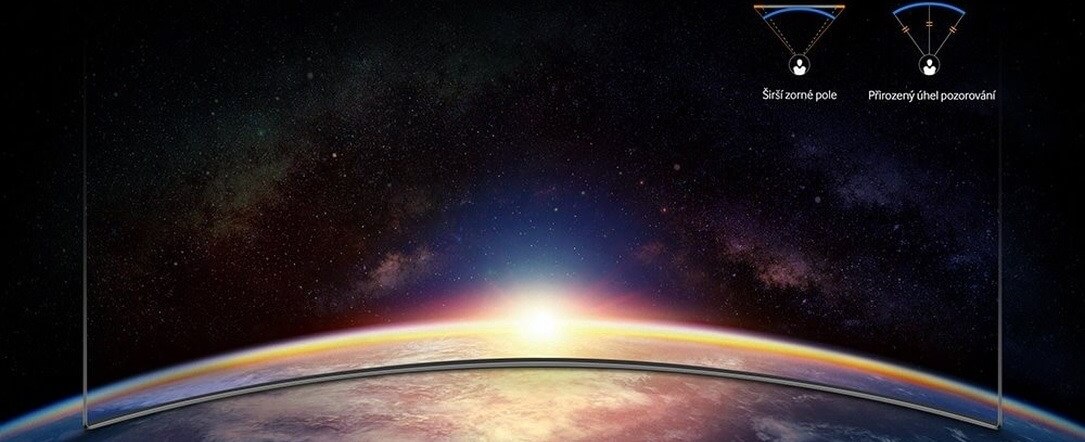
The screen of a curved monitor is at the same distance from your eyes from every angle. It means that you can see very well all the way to their edges, especially when it comes to larger models. Curved models are very popular in the gaming community, because their curved displays allow you to immerse yourself in the game more.

Curved display viewing angles
Difference between normal and curved computer screens

What else to focus on when choosing a monitor?

When choosing a suitable model, you need to focus on the size, resolution or surface of the screen. Also check for the necessary connectors and various useful features.

Diagonal - What Size to Choose

You can choose from a variety of computer monitor sizes. In general, bigger means better. However, you should think about whether a large PC monitor would fit on your desk.

i

Have a lot of room or want to place the monitor at a greater distance? Have a look at 33″ monitors and larger.

PC Monitor and Resolution – Which Is the Right One?

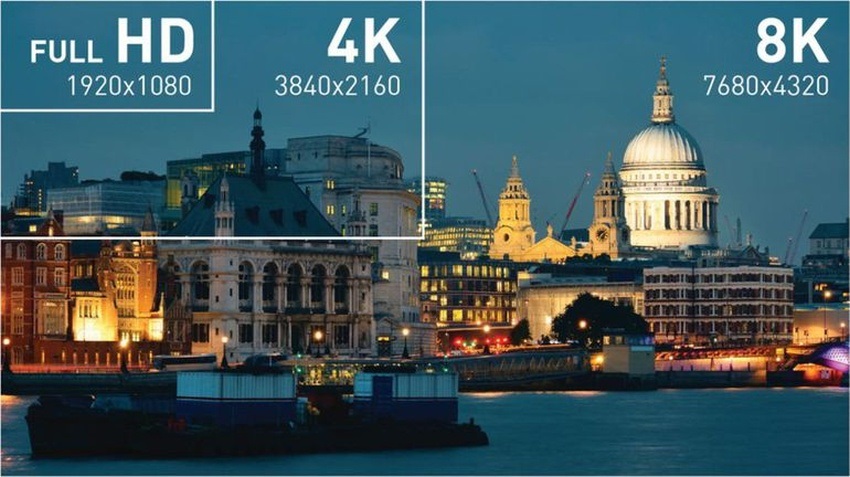
In general, the larger the PC monitor you choose, the higher its resolution should be. With a higher resolution, you get more pixels per inch, therefore more detailed visuals. At the same time, the workspace increases with the resolution. When to choose Full HD and when is a 4K monitor more suitable?

  • Full HD is 1,920 × 1,080 pixels. It is suitable for normal use.
  • 4K equals four times Full HD. It is 3,840 × 2,160 pixels and is perfect for professional and gaming monitors.
  • 8K is a great choice for a PC monitor dedicated to graphics. It is double the 4K resolution.
Difference between Full HD, 4K and 8K
While Full HD is sufficient for normal tasks, 8K perfectly renders even the smallest graphic details.

PC Monitor Panel Types

PC monitors feature several imaging technologies. IPS and S-IPS panels boast excellent colour rendering, low power consumption and wide viewing angles. TN panels are cheaper and usually have lower response times, but the image quality does not match IPS. The compromise between IPS and TN is MVA ⁄PVA monitors, while LED panels offer a better viewing experience and a longer service life.

Screen Surface

Choosing the right PC monitor surface is very important if you want to make working with your computer more comfortable. When choosing a panel type, keep in mind whether the monitor will be positioned by the window and how much light will fall on it.

  • Matte - reflects little ambient light; provides less-saturated colour reproduction.
  • Glossy - provides vibrant and realistic colours but reflects much more ambient light making the display hard to see in bright sunlight.
  • Anti-glare - a compromise between glossy and matte screens; they are easier to view in direct sunlight than glossy screens but offer lower quality colour reproduction.

Connectors

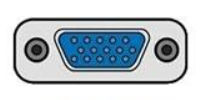
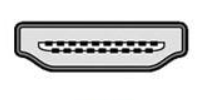
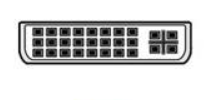
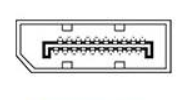
Before buying a monitor, make sure it has at least one port that is compatible with your computer. If not, you won't be able to connect the monitor.

D-SUB (VGA)
D-SUB (VGA)

HDMI
HDMI

DVI
DVI

DisplayPort
DisplayPort

Don't know where to get cheap monitors? Our used goods section may help.

Other Useful Functions and Features

Computer monitors can have a lot of useful features and technologies that make your work or gaming easier. Here is a summary of the most useful features.

  • Flicker-free and blue light filters prevent eye-strain and headaches.
  • With built-in speakers, you don't need to buy external ones. That saves space and money.
  • Pivot allows you to rotate the monitor to the portrait mode.
  • HDR is a technology that provides more comprehensive presentation of image details.
  • Automatic brightness control allows you to change the brightness of the computer screen based on current light conditions.
  • A monitor with a built-in webcam comes in handy if you plan to make online video calls.
  • Monitors with a TV tuner allow you to tune in to TV broadcasts just like on your TV.
  • USB Hub allows you to not only access data from portable drives but also connect a keyboard or a mouse.
  • A 3.5mm jack connector allows you to connect headphones directly to the monitor.

i

Still not sure which PC monitor to choose? A touch screen monitor, ultrawide monitor, portable monitor, dual monitor or vertical monitor? Read our article "How to Choose a Monitor".

PC and Monitor – Inseparable Team

Computers are an essential part of our lives nowadays. When choosing a new PC, you should consider several criteria - and we can help with that. If you are looking for not only a new computer monitor, but also a new computer, or you are thinking about buying a tailor-made set, check out our category focused on computers.

Made your choice? Don't forget to get the right accessories for your new PC monitor.

Hide description
Was this information useful?
This form is used only for evaluating the information in the description above.
If you have any question about our products, services, transport or any other request, please contact our customer support.
What should be improved? Is anything missing here? Is anything wrong? Share it with us.
6 Results
4.9 15×
WANBO Mozart 1 Pro (new)
Projector - LCD, LED, max. 1920 × 1080 Full HD, native 1920 × 1080, 16:9, 1200 ANSI lm luminance, projection distance from 1.35 to 3.3 m, screen size from 139.7 to 304.8 cm, contrast 3000:1, noise level 32 dB, Bluetooth and WiFi, HDMI, analog audio input, headphone output, USB 2.0 and audio input jack port, operating system: OS Android, auto focus, remote control, speakers and mirroring, without 3D support, NETFLIX, Disney+ and YouTube global apps, remote control, power adapter and power cable included, dimensions 20.9 × 22.3 × 17.6 cm (W×H×D), weight 3.3 kg
Buy with code AUDIOVIDEOTYDNY10 The discount code gives the option of applying a discount on a given product when entering the code in the shopping cart. 8,991,-
9,990,-
Buy
In stock > 5 pcs
Order by midnight, get it at the AlzaBox in the morning.
Info
Order Code: WAN007d
4.3 27×
WANBO T2 Ultra
Projector - LCD, LED, max. 1920 × 1080 Full HD, native 1920 × 1080, 16:9, 500 ANSI lm luminance, projection distance from 1.2 to 3.8 m, screen size from 114 to 356 cm, contrast 2500:1, refresh rate 60 Hz, noise level 30 dB, Bluetooth and WiFi, HDMI, USB 2.0 and AV jack 3.5 output port, operating system: OS Android, remote control, mirroring, without 3D support, NETFLIX, Disney+ and YouTube global apps, remote control, power adapter and power cable included, dimensions 14.5 × 14.2 × 21.9 cm (W×H×D), weight 1.2 kg
Buy with code AUDIOVIDEOTYDNY20 The discount code gives the option of applying a discount on a given product when entering the code in the shopping cart. 4,632,-
5,790,-
Buy
In stock > 5 pcs
Order by midnight, get it at the AlzaBox in the morning.
Info
Order Code: WAN0091
4.5 18×
WANBO X5 Pro (New Edition)
Projector - LCD, LED max. 1920 × 1080 Full HD,, 16:9, 1100 ANSI lm luminance, projection distance from 1.1 to 3.9 m, screen size from 76.2 to 254 cm, contrast 3000:1, noise level 26 dB, Bluetooth and WiFi, HDMI port, operating system: Google TV, voice and remote control, speakers, SMART and mirroring, remote control and power cable included, dimensions 25.2 × 11.5 × 24.6 cm (W×H×D), weight 2.6 kg
Buy with code AUDIOVIDEOTYDNY10 The discount code gives the option of applying a discount on a given product when entering the code in the shopping cart. 7,191,-
7,990,-
Buy
In stock > 5 pcs
Order by midnight, get it at the AlzaBox in the morning.
Info
Order Code: WAN0097
Hisense M2 PRO - Projector
Free delivery
Alzaboxes and stores
5.0
Hisense M2 PRO
Projector - DLP, laser, max. 3840 × 2160 4K UHD, native 3840 × 2160, 16:9, 1100 ANSI lm luminance, projection distance from 1.4 to 5.8 m, screen size from 165.1 to 508 cm, contrast 1000:1, refresh rate 60 Hz, noise level 30 dB, AirPlay 2, Bluetooth, Miracast, WiFi, DLNA and WLAN, HDMI, USB 3.2 and LAN port, operating system: Vidaa, automatic tilt correction, auto focus, short projection, zoom and HDR, voice and remote control, multimedia player, speakers, portable handle, SMART and mirroring 3D support, NETFLIX, Disney+, YouTube and Amazon Prime Video global apps, dimensions 19.3 × 23 × 21.8 cm (W×H×D), weight 3.9 kg
Buy with code AUDIOVIDEOTYDNY10 The discount code gives the option of applying a discount on a given product when entering the code in the shopping cart. 26,991,-
29,990,-
Buy
In stock > 5 pcs
Order by midnight, get it at the AlzaBox in the morning.
Info
Order Code: HIS022x94d
4.9 15×
WANBO Mozart 1 Pro (new)
Projector - LCD, LED, max. 1920 × 1080 Full HD, native 1920 × 1080, 16:9, 1200 ANSI lm luminance, projection distance from 1.35 to 3.3 m, screen size from 139.7 to 304.8 cm, contrast 3000:1, noise level 32 dB, Bluetooth and WiFi, HDMI, analog audio input, headphone output, USB 2.0 and audio input jack port, operating system: OS Android, auto focus, remote control, speakers and mirroring, without 3D support, NETFLIX, Disney+ and YouTube global apps, remote control, power adapter and power cable included, dimensions 20.9 × 22.3 × 17.6 cm (W×H×D), weight 3.3 kg
Buy with code AUDIOVIDEOTYDNY10 The discount code gives the option of applying a discount on a given product when entering the code in the shopping cart. 8,540,-
-5 % off new 9,489,- New 9,990,-
Buy
Unsealed - in stock 2 pcs
Order by midnight, get it at the AlzaBox in the morning.
Info
Order Code: WAN007d
4.3 27×
WANBO T2 Ultra
Projector - LCD, LED, max. 1920 × 1080 Full HD, native 1920 × 1080, 16:9, 500 ANSI lm luminance, projection distance from 1.2 to 3.8 m, screen size from 114 to 356 cm, contrast 2500:1, refresh rate 60 Hz, noise level 30 dB, Bluetooth and WiFi, HDMI, USB 2.0 and AV jack 3.5 output port, operating system: OS Android, remote control, mirroring, without 3D support, NETFLIX, Disney+ and YouTube global apps, remote control, power adapter and power cable included, dimensions 14.5 × 14.2 × 21.9 cm (W×H×D), weight 1.2 kg
Buy with code AUDIOVIDEOTYDNY20 The discount code gives the option of applying a discount on a given product when entering the code in the shopping cart. 4,399,-
-5 % off new 5,499,- New 5,790,-
Buy
Unsealed - in stock 4 pcs
Order by midnight, get it at the AlzaBox in the morning.
Info
Order Code: WAN0091

Monitors

CES 2026: Revoluce v monitorech CES 2026 přinesl do světa monitorů takovou revoluci, jakou jsme roky neviděli. Dell ukázal 52palcový 6K gigant, který nahradí tři běžné monitory najednou. Samsung odhalil první 3D monitor bez brýlí s 6K rozlišením a sledováním očí, plus model s rekordních 1040Hz...
ASUS přichází s akcí, která vám zlevní nákup hardwaru až o 13 385 Kč. Vyberte si spolehlivou základní desku, monitor, zdroj, WiFi a vodní chladič od společnosti ASUS.
Vývojářská konference WWDC 2025 započala úvodní keynote, na které Apple odhalil podobu svých nových systémů. Ať už je to iOS 26 pro telefony iPhone, macOS Tahoe 26 pro počítače nebo watchOS 26 pro hodinky Apple Watch. Sdílí spolu skleněný design Liquid Glass, ale i...
ASUSKupte si vybrané produkty ASUS a získejte ZDARMA Monster Hunter Wilds! Máte zálusk na herní pecku Monster Hunter Wilds? Můžete ji dostat zadarmo od společnosti ASUS jako poděkování za nákup vybraných produktů. O které jde? Co je potřeba udělat?
Herní monitory jsou klíčovou součástí každého seriózního gamingového setupu. Nejenže ovlivňují rychlost a plynulost herního zážitku, ale také zásadně přispívají k vizuálnímu dojmu, ostrosti detailů a celkové atmosféře hry. MSI přichází v roce 2025 s novou generací...
Společnost MSI právě teď odstartovala zajímavou akci, která potěší zejména nadšené hráče. K nákupu vybraných monitorů QD-OLED totiž získáte i herní pecku S.T.A.L.K.E.R. 2: Heart of Chornobyl a poukaz na službu Steam v hodnotě 30 USD zdarma! Jaká jsou pravidla?
All articles

Monitors

We spend a lot of time sitting at the computer, so choosing the right type of monitor is an important decision. Focus on what you require, whether it's a high resolution, large diagonal size, flexibility or plug-in equipment. Quality monitors make work and play more comfortable by recuding eye strain.

How to choose the right LCD Monitor

Do you need a widescreen monitor or one with a classic 4:3 aspect ratio? Widescreen monitors are ideal for watching movies, playing games, and browsing the internet, while classic 4:3 monitors with diagonals of 17"-19" are ideal for office work. As for the display surface, you can choose from matte or glossy. Glossy displays deliver enhanced colour contrasts and better readability while matte displays reduce screen reflection.

It's not only the number of pixels on the screen (display resolution) that determines the quality of a monitor, the size of a monitor's dot pitch is also important. Comparing monitors of two different sizes but of the same resolution, you'll find that the larger one produces a coarser image. This can be slightly reduced by font-smoothing functions, which are integrated in most operating systems. To get the most out of your monitor, you'll need to adjust the screen resolution, as the native resolution might differ from model to model.

Response time indicates how many milliseconds it takes for a pixel to change - the lower the response time, the smoother the change. Brightness determines the luminous intensity of an image and higher contrast ensures blacker blacks and whiter whites.
 

In addition to basic D-Sub analog inputs, modern monitors also feature digital DVI inputs. Some monitors offer multiple options together with HDMI inputs. Before you select a particular model, be sure to check whether it is compatible with your graphics card.

We recommend choosing a monitor with a larger diagonal size and higher resolution. Opt for a model with a lower response time, higher brightness and contrast, and check that the monitor features DVI/HDMI inputs.

Was this information useful?
This form is used only for evaluating the information in the description above.
If you have any question about our products, services, transport or any other request, please contact our customer support.

What should be improved? Is anything missing here? Is anything wrong? Share it with us.
P-DC1-WEB19