Monitors

A monitor is an essential part of every PC set. Although you can use the majority of computer monitors for multiple purposes, there are differences between them, especially in the quality and properties of the image. Below, you can find out what to focus on when choosing a new PC monitor and what type of device or screen is best for you.

Continue
A monitor suitable for gaming, everyday work or professional graphic tasks? You should make this choice when you start looking for for a new monitor. No reason to panic. We have a solution for you, whatever you choose.

Monitors for Office or Home Use

An office monitor should feature a sufficient diagonal to be able to display tables and calendars or to allow you to watch your favourite movie. That's why we'd recommend monitors with a 19″ diagonal. You'll also appreciate technologies that minimise eye fatigue, such as Flicker-free.

Gaming Monitors

Gaming monitors offer a high refresh rate and low response times. With these parameters, they can react quickly to changes in the image, providing smooth visuals even in action scenes. The refresh rate of a gaming monitor should be at least 120 Hz; 144Hz monitors are very popular among gamers. Their response times should then be within 4 ms.

i

The refresh rate indicates how many frames the monitor can render in one second. Response time then indicates how quickly the monitor responds to a change in the image.

Professional Monitors - Not Only for Graphic Designers

Professional monitors boast many uses. They are often used to create and edit multimedia. In this case, the greatest emphasis is placed on the image quality, flawless viewing angles and accurate colour rendering. Professional monitors also include large format models and touch screen monitors for PCs.

You can use your monitor not only in your PC set, but also as a second screen for your laptop. In this case, it is advisable to select the same resolution or at least the same aspect ratio.

Curved Monitors

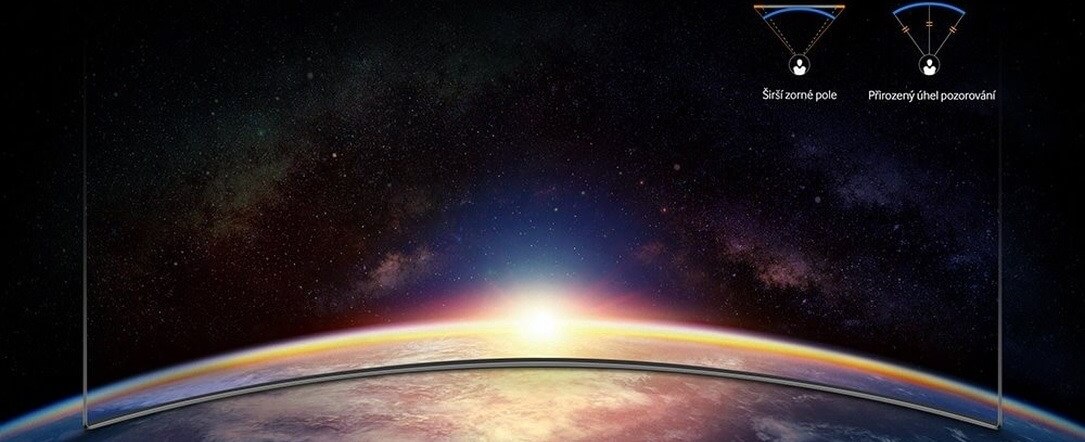
The screen of a curved monitor is at the same distance from your eyes from every angle. It means that you can see very well all the way to their edges, especially when it comes to larger models. Curved models are very popular in the gaming community, because their curved displays allow you to immerse yourself in the game more.

Curved display viewing angles
Difference between normal and curved computer screens

What else to focus on when choosing a monitor?

When choosing a suitable model, you need to focus on the size, resolution or surface of the screen. Also check for the necessary connectors and various useful features.

Diagonal - What Size to Choose

You can choose from a variety of computer monitor sizes. In general, bigger means better. However, you should think about whether a large PC monitor would fit on your desk.

i

Have a lot of room or want to place the monitor at a greater distance? Have a look at 33″ monitors and larger.

PC Monitor and Resolution – Which Is the Right One?

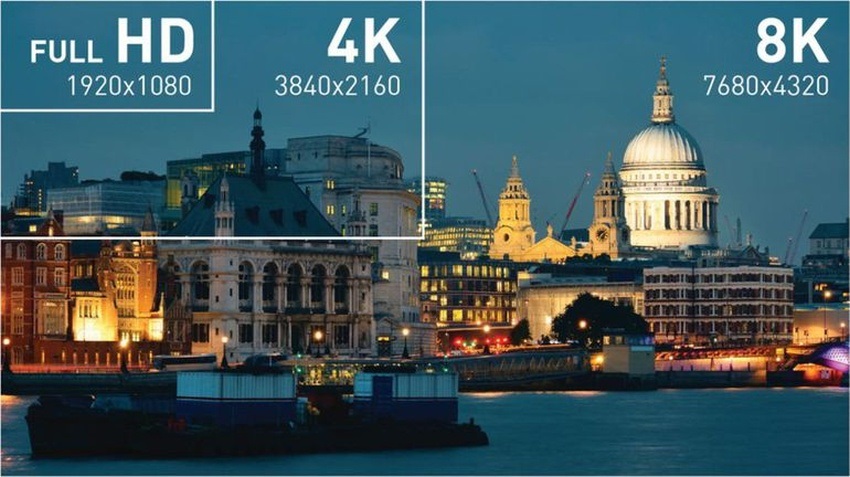
In general, the larger the PC monitor you choose, the higher its resolution should be. With a higher resolution, you get more pixels per inch, therefore more detailed visuals. At the same time, the workspace increases with the resolution. When to choose Full HD and when is a 4K monitor more suitable?

  • Full HD is 1,920 × 1,080 pixels. It is suitable for normal use.
  • 4K equals four times Full HD. It is 3,840 × 2,160 pixels and is perfect for professional and gaming monitors.
  • 8K is a great choice for a PC monitor dedicated to graphics. It is double the 4K resolution.
Difference between Full HD, 4K and 8K
While Full HD is sufficient for normal tasks, 8K perfectly renders even the smallest graphic details.

PC Monitor Panel Types

PC monitors feature several imaging technologies. IPS and S-IPS panels boast excellent colour rendering, low power consumption and wide viewing angles. TN panels are cheaper and usually have lower response times, but the image quality does not match IPS. The compromise between IPS and TN is MVA ⁄PVA monitors, while LED panels offer a better viewing experience and a longer service life.

Screen Surface

Choosing the right PC monitor surface is very important if you want to make working with your computer more comfortable. When choosing a panel type, keep in mind whether the monitor will be positioned by the window and how much light will fall on it.

  • Matte - reflects little ambient light; provides less-saturated colour reproduction.
  • Glossy - provides vibrant and realistic colours but reflects much more ambient light making the display hard to see in bright sunlight.
  • Anti-glare - a compromise between glossy and matte screens; they are easier to view in direct sunlight than glossy screens but offer lower quality colour reproduction.

Connectors

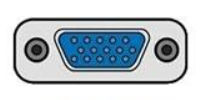
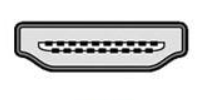
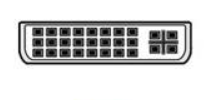
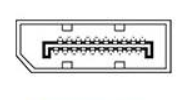
Before buying a monitor, make sure it has at least one port that is compatible with your computer. If not, you won't be able to connect the monitor.

D-SUB (VGA)
D-SUB (VGA)

HDMI
HDMI

DVI
DVI

DisplayPort
DisplayPort

Don't know where to get cheap monitors? Our used goods section may help.

Other Useful Functions and Features

Computer monitors can have a lot of useful features and technologies that make your work or gaming easier. Here is a summary of the most useful features.

  • Flicker-free and blue light filters prevent eye-strain and headaches.
  • With built-in speakers, you don't need to buy external ones. That saves space and money.
  • Pivot allows you to rotate the monitor to the portrait mode.
  • HDR is a technology that provides more comprehensive presentation of image details.
  • Automatic brightness control allows you to change the brightness of the computer screen based on current light conditions.
  • A monitor with a built-in webcam comes in handy if you plan to make online video calls.
  • Monitors with a TV tuner allow you to tune in to TV broadcasts just like on your TV.
  • USB Hub allows you to not only access data from portable drives but also connect a keyboard or a mouse.
  • A 3.5mm jack connector allows you to connect headphones directly to the monitor.

i

Still not sure which PC monitor to choose? A touch screen monitor, ultrawide monitor, portable monitor, dual monitor or vertical monitor? Read our article "How to Choose a Monitor".

PC and Monitor – Inseparable Team

Computers are an essential part of our lives nowadays. When choosing a new PC, you should consider several criteria - and we can help with that. If you are looking for not only a new computer monitor, but also a new computer, or you are thinking about buying a tailor-made set, check out our category focused on computers.

Made your choice? Don't forget to get the right accessories for your new PC monitor.

Hide description
Was this information useful?
This form is used only for evaluating the information in the description above.
If you have any question about our products, services, transport or any other request, please contact our customer support.

What should be improved? Is anything missing here? Is anything wrong? Share it with us.
2,017 Results
55" Sony FW-55EZ20L - Large-Format Display
Energy efficiency class
Free delivery
Alzaboxes and stores
Watch Price/Availability
55" Sony FW-55EZ20L
Large-Format Display 4K Ultra HD 3840 × 2160 4K, LCD, 16:9, 8 ms, 50Hz, 350 cd/m2, 1200:1 contrast, HDMI, LAN, pivot, VESA
  27,390,-
Buy
Ordered on request
Order Code: WS243
Add to PC configurator
Watch Price/Availability
31.5" Acer Vero B327QKB1bemiprcuzxv
Monitor - LCD, 4K Ultra HD 3840 × 2160 4K (16:9), 60 Hz, matte display, 8 bit, 1 ms, Adaptive-Sync, adjustable height, pivot, HDR, speakers, HDMI, USB-C and DisplayPort, USB-C and RJ-45 (LAN) data interface, VESA
  8,490,-
Buy
Ordered on request
Order Code: WO098c6i
Add to PC configurator
Watch Price/Availability
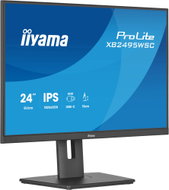
24" iiyama ProLite XB2495WSC-B1
Monitor - LCD, Full HD 1920 × 1200 Full HD+ (16:10), 100 Hz, matte display, 8 bit, 4 ms Without image synchronisation, adjustable height, pivot, Power Delivery max. 65 W, speakers, HDMI and USB-C, USB and USB-C data interface, VESA
New arrival 5,190,-
Buy
Ordered on request
Order Code: WA825f2
75" iiyama ProLite TE7515A-B2AG - Large-Format Display
Energy efficiency class
Dotyková obrazovka
Free delivery
to Alza branch
Watch Price/Availability
75" iiyama ProLite TE7515A-B2AG
Large-Format Display touch, 4K Ultra HD 3840 × 2160 4K, LCD, 16:9, 6.5 ms, 60Hz, Without image synchronisation, 10bit, 550 cd/m2, 5000:1 contrast, HDMI, USB-C and DisplayPort, USB, WiFi, headphone output, speakers, VESA, Power Delivery up to 100 W
  57,790,-
Buy
Ordered on request
Order Code: WA827q14a50
Add to PC configurator
Watch Price/Availability
27" iiyama ProLite XB2793QSU-B1
Monitor - LCD, Quad HD 2560 × 1440 Quad HD (16:9), 75 Hz, matte display, 8 bit, 1 ms Without image synchronisation, adjustable height, pivot, speakers, HDMI and DisplayPort, USB data interface, VESA
  4,190,-
Buy
Ordered on request
Order Code: WA827q14a29
64.5" iiyama ProLite TN6505A-B1AG - Large-Format Display
Energy efficiency class
Dotyková obrazovka
Free delivery
to Alza branch
Watch Price/Availability
64.5" iiyama ProLite TN6505A-B1AG
Large-Format Display touch, 4K Ultra HD 3840 × 2160 4K, LCD, 16:9, 5 ms, 60Hz, Without image synchronisation, 500 cd/m2, 1200:1 contrast, HDMI, USB-C and DisplayPort, LAN, speakers, VESA, Power Delivery
  34,990,-
Buy
Ordered on request
Order Code: WA827q14a53
Add to PC configurator
Watch Price/Availability
27" iiyama ProLite XB2797HSU-B1
Monitor - LCD, Full HD 1920 × 1080 Full HD (16:9), 120 Hz, matte display, 8 bit, 1 ms Without image synchronisation, adjustable height, pivot, speakers, HDMI and DisplayPort, USB and USB-C data interface, VESA
  3,690,-
Buy
Ordered on request
Order Code: WA827q14a17
Add to PC configurator
Watch Price/Availability
27" iiyama ProLite X2793HSU-B1
Monitor - LCD, Full HD 1920 × 1080 Full HD (16:9), 120 Hz, matte display, 8 bit, 1 ms Without image synchronisation, speakers, HDMI and DisplayPort, USB data interface, VESA
  3,090,-
Buy
Ordered on request
Order Code: WA827q14a12
Add to PC configurator
Watch Price/Availability
24.1" iiyama ProLite XB2495WSU-B1
Monitor - LCD, Full HD 1920 × 1200 Full HD+ (16:10), 100 Hz, matte display, 8 bit, 4 ms Without image synchronisation, adjustable height, pivot, speakers, HDMI and DisplayPort, USB-C data interface, VESA
  4,490,-
Buy
Ordered on request
Order Code: WA827q14a11
55" LG 55TR3DQ - Large-Format Display
Dotyková obrazovka
Free delivery
to Alza branch
Watch Price/Availability
55" LG 55TR3DQ
Large-Format Display touch, 4K Ultra HD 3840 × 2160 4K, LCD, 16:9, 6.5 ms, 60Hz, Without image synchronisation, 8bit, 400 cd/m2, 5000:1 contrast, HDMI, DisplayPort and VGA, USB, LAN, WiFi, headphone output, speakers, VESA, Power Delivery up to 65 W
  71,990,-
Buy
Ordered on request
Order Code: WH606q38
86" LG 86TR3DQ - Large-Format Display
Dotyková obrazovka
Free delivery
to Alza branch
Watch Price/Availability
86" LG 86TR3DQ
Large-Format Display touch, 4K Ultra HD 3840 × 2160 4K, LCD, 16:9, 8 ms, 60Hz, Without image synchronisation, 8bit, 400 cd/m2, 1200:1 contrast, HDMI, DisplayPort and VGA, USB, LAN, WiFi, headphone output, speakers, VESA, Power Delivery up to 65 W
  122,990,-
Buy
Ordered on request
Order Code: WH606q35
86" LG 86UL5Q - Large-Format Display Free delivery
to Alza branch
Watch Price/Availability
86" LG 86UL5Q
Large-Format Display 4K Ultra HD 3840 × 2160 4K, LCD, 16:9, 8 ms, 60Hz, Without image synchronisation, 10bit, 500 cd/m2, 1200:1 contrast, HDMI, USB, LAN, WiFi, headphone output, glossy display, speakers, VESA
  98,990,-
Buy
Ordered on request
Order Code: WH606q20
86" Hisense 86GM50D - Large-Format Display
Energy efficiency class
Free delivery
to Alza branch
Watch Price/Availability
86" Hisense 86GM50D
Large-Format Display 4K Ultra HD 3840 × 2160 4K, LCD, 16:9, 8 ms, 60Hz, 8bit, 500 cd/m2, 1200:1 contrast, HDMI and DisplayPort, WiFi, headphone output, speakers, VESA
  65,490,-
Buy
Ordered on request
Order Code: WA840t29a17
75" Hisense 75DM66D - Large-Format Display
Energy efficiency class
Free delivery
to Alza branch
Watch Price/Availability
75" Hisense 75DM66D
Large-Format Display 4K Ultra HD 3840 × 2160 4K, LCD, 16:9, 8 ms, 60Hz, 8bit, 500 cd/m2, 1200:1 contrast, HDMI and DisplayPort, WiFi, headphone output, speakers, VESA
  42,690,-
Buy
Ordered on request
Order Code: WA840t29a9
Watch Price/Availability
50" Hisense 50GM50D
Large-Format Display 4K Ultra HD 3840 × 2160 4K, LCD, 16:9, 8 ms, 60Hz, 8bit, 500 cd/m2, 1200:1 contrast, HDMI and DisplayPort, WiFi, headphone output, speakers, VESA, Power Delivery up to 150 W
  18,490,-
Buy
Ordered on request
Order Code: WA840t29a13
55" Hisense 55DM66D - Large-Format Display
Energy efficiency class
Free delivery
Alzaboxes and stores
Watch Price/Availability
55" Hisense 55DM66D
Large-Format Display 4K Ultra HD 3840 × 2160 4K, LCD, 16:9, 8 ms, 60Hz, 8bit, 500 cd/m2, 1200:1 contrast, HDMI and DisplayPort, WiFi, headphone output, speakers, VESA, Power Delivery up to 190 W
New arrival 23,390,-
Buy
Ordered on request
Order Code: WA840t29a7
65" Hisense 65DM66D - Large-Format Display
Energy efficiency class
Free delivery
to Alza branch
Watch Price/Availability
65" Hisense 65DM66D
Large-Format Display 4K Ultra HD 3840 × 2160 4K, LCD, 16:9, 8 ms, 60Hz, 8bit, 500 cd/m2, 1200:1 contrast, HDMI and DisplayPort, WiFi, headphone output, speakers, VESA
  30,490,-
Buy
Ordered on request
Order Code: WA840t29a8
Watch Price/Availability
50" Hisense 50DM66D
Large-Format Display 4K Ultra HD 3840 × 2160 4K, LCD, 16:9, 8 ms, 60Hz, 8bit, 500 cd/m2, 5000:1 contrast, HDMI and DisplayPort, WiFi, headphone output, speakers, VESA, Power Delivery up to 150 W
New arrival 19,990,-
Buy
Ordered on request
Order Code: WA840t29a6
65" iiyama ProLite LH6581UHSG-1AG - Large-Format Display
Energy efficiency class
Free delivery
to Alza branch
Watch Price/Availability
65" iiyama ProLite LH6581UHSG-1AG
Large-Format Display 4K Ultra HD 3840 × 2160 4K, LCD, 16:9, 6.5 ms, 60Hz, 30bit, 500 cd/m2, 5000:1 contrast, HDMI, USB, LAN, anti-glare display, speakers, VESA
  38,990,-
Buy
Ordered on request
Order Code: WA827s017n
75" iiyama ProLite TE7515A-B1AG - Large-Format Display
Energy efficiency class
Dotyková obrazovka
Free delivery
to Alza branch
Watch Price/Availability
75" iiyama ProLite TE7515A-B1AG
Large-Format Display touch, 4K Ultra HD 3840 × 2160 4K, LCD, 16:9, 8 ms, 60Hz, 30bit, 550 cd/m2, 1200:1 contrast, HDMI and DisplayPort, LAN, anti-glare display, speakers, VESA, Power Delivery up to 100 W
  58,490,-
Buy
Ordered on request
Order Code: WA827s017h
Add to PC configurator
Watch Price/Availability
24" NEC MultiSync EA242WU
Monitor - LCD, 1920 × 1200 Full HD+, 60 Hz, matte display, 8 bit, 6 ms, adjustable height, pivot, automatic brightness adjustment, speakers, HDMI, USB-C and DisplayPort, RJ-45 (LAN) data interface, VESA
  9,929,-
Buy
Ordered on request
Order Code: WNne233e
Add to PC configurator
Watch Price/Availability
23.8" iiyama ProLite X2497HSU-B1
Monitor - LCD, Full HD 1920 × 1080 Full HD (16:9), 120 Hz, matte display, 8 bit, 4 ms Without image synchronisation, speakers, HDMI and DisplayPort, USB and USB-C data interface, VESA
  2,990,-
Buy
Ordered on request
Order Code: WA827q14a4
Add to PC configurator
Watch Price/Availability
27" iiyama ProLite X2797HSU-B1
Monitor - LCD, Full HD 1920 × 1080 Full HD (16:9), 120 Hz, matte display, 8 bit, 4 ms Without image synchronisation, speakers, HDMI and DisplayPort, USB and USB-C data interface, VESA
  3,290,-
Buy
Ordered on request
Order Code: WA827q14a16
75" Sony FW-75EZ20L - Large-Format Display
Energy efficiency class
Free delivery
to Alza branch
Watch Price/Availability
75" Sony FW-75EZ20L
Large-Format Display 4K Ultra HD 3840 × 2160 4K, LCD, 16:9, 350 cd/m2, 1200:1 contrast, HDMI, LAN, speakers
  56,390,-
Buy
Ordered on request
Order Code: WS248

Monitors - additional info

We spend a lot of time sitting at the computer, so choosing the right type of monitor is an important decision. Focus on what you require, whether it's a high resolution, large diagonal size, flexibility or plug-in equipment. Quality monitors make work and play more comfortable by recuding eye strain.

How to choose the right LCD Monitor

Do you need a widescreen monitor or one with a classic 4:3 aspect ratio? Widescreen monitors are ideal for watching movies, playing games, and browsing the internet, while classic 4:3 monitors with diagonals of 17"-19" are ideal for office work. As for the display surface, you can choose from matte or glossy. Glossy displays deliver enhanced colour contrasts and better readability while matte displays reduce screen reflection.

It's not only the number of pixels on the screen (display resolution) that determines the quality of a monitor, the size of a monitor's dot pitch is also important. Comparing monitors of two different sizes but of the same resolution, you'll find that the larger one produces a coarser image. This can be slightly reduced by font-smoothing functions, which are integrated in most operating systems. To get the most out of your monitor, you'll need to adjust the screen resolution, as the native resolution might differ from model to model.

Response time indicates how many milliseconds it takes for a pixel to change - the lower the response time, the smoother the change. Brightness determines the luminous intensity of an image and higher contrast ensures blacker blacks and whiter whites.
 

In addition to basic D-Sub analog inputs, modern monitors also feature digital DVI inputs. Some monitors offer multiple options together with HDMI inputs. Before you select a particular model, be sure to check whether it is compatible with your graphics card.

We recommend choosing a monitor with a larger diagonal size and higher resolution. Opt for a model with a lower response time, higher brightness and contrast, and check that the monitor features DVI/HDMI inputs.

Was this information useful?
This form is used only for evaluating the information in the description above.
If you have any question about our products, services, transport or any other request, please contact our customer support.
What should be improved? Is anything missing here? Is anything wrong? Share it with us.
Check out products sorted by price starting with the lowest price in the category cheap monitors Find products sorted from the most expensive to the cheapest in the category most expensive monitors Check out products sorted by price starting with the highest price in the category best sellers, best monitors You’ll find products sorted by reviews starting from the highest ranked in monitors reviews