


Podporuje to recordbox diky za odpoved
Pioneer DDJ-REV1
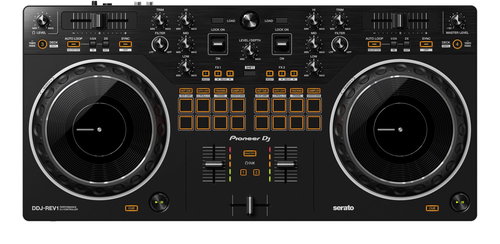
DJ Controller - compatible with Windows and macOS, microphone / AUX input Jack 6.3 mm, master out RCA, headphone output Jack 3.5 mm, other ports MIDI USB, power: PC (USB), software licence included, dimensions 526 × 59.2 × 255.5 mm (W×H×D), weight 2100 g
Show full description
Amazing Deal
7,799,-
Save 1,391,-
 Installment calculator
4,9%
interest
from 179,- monthly
Installment calculator
4,9%
interest
from 179,- monthly
Shop faster with pickup at AlzaBox or in-store.
Warranty 24 months
Code:
PIO960k
Producer's Website:

Pioneer DDJ-REV1
7,799,-
In stock 1 pcs
Buy
Pioneer DDJ-REV1
The DDJ-REV1 DJ controller is the perfect partner for Serato DJ Lite software, which you can download for free. Its intuitive design makes it easy for both experienced DJs and budding music mixing enthusiasts to perform. The two-channel controller emulates a professional DJM-S mixer, plus PLX turntables, including specialised features for open-format and scratch DJs. This is the interface format used by professional battle DJs. For example, the tempo faders are up to 60mm longer than on the DDJ-SR2 controller, offering finer control. They are also positioned horizontally above the jog wheels, while the performance pads are located in the mixer section. The result is maximum intuitiveness for using effects, samples and scratching.

Key Features of the Pioneer DDJ-REV1 DJ Controller
- Emulates a professional DJM-S mixer, plus PLX turntables
- The Pioneer DDJ-REV1 DJ controller is ideal equipment, and not just for battle DJs
- Maximum intuitiveness for using effects, samples and scratching
- Enlarged jog wheels for more comfortable scratching
- Tracking Scratch function for easier scratching
- Microphone input for hosting or vocals
- Supports Serato DJ Pro (sold separately)
Music Mixing Made as Simple as Possible
The jog wheels on the Pioneer DDJ-REV1 DJ controller are enlarged, making them better for scratching. Their size is comparable to the popular Pioneer DJ DDJ-SR2 controller, for example. You can also add texture to your mixed music using the Lever FX. Pull the lever down and hold it to trigger effects from Serato DJ Lite in short bursts. Or, if you push the lever up, you can lock on the effects and free up your hands for scratching or track browsing.

One Less Hand Movement When Scratching Thanks to the Tracking Scratch Function
The handy Tracking Scratch function silently returns your music to the cue point when you move the jog wheel backwards or lift your hand away. This saves you from having to close the fader and then find the right place in the track to start scratching from the correct point again. Just select the Tracking Scratch Pad mode, press a Performance Pad, and choose the Scratch Crossfader Cuts you want to use.

Specifications
Device type
Software
Compatible OS
Number of channels
Microphone / AUX input
Type
Device type
Compatibility
Software
Compatible OS
Equipment
Number of channels
Connection
Microphone / AUX input
Master out
Headphone output
Other ports
Packaging
Included
Power Supply
Power Supply
Size and weight
Width
Height
Depth
Weight
More Specifications
Note:
Specifications can be changed without notice. Images are for illustrative purposes only.
